



Amazon backend keywords might be hidden from shoppers’ eyes, but they’re the best-kept secrets for boosting your product visibility. Think of them as the cheat code to win over Amazon’s algorithm and make yourself visible in the ecommerce website’s Search Engine Results Pages (SERPs).
These are the phrases and terms that help your listing appear in the right search results, to the desired audience, without cluttering your product title or bullet points.
From understanding what backend keywords Amazon is to mastering the Amazon backend keywords limit, we bring you a complete Amazon backend search terms guidelines.
In this guide, we’ll break down proven strategies to optimize listings with Amazon backend keywords, walk you through real Amazon backend keywords examples, show you how to add them, and share Amazon backend keywords best practices that are working in 2026.
You’ll also discover how to use various SellerApp keyword tools to make the process fast, precise, and effective.
Quick Guide
What Are Amazon Backend Keywords?
Amazon backend keywords are the hidden search terms that can quietly skyrocket your product visibility. Backend keywords Amazon aren’t shown to shoppers; they are only visible in your Amazon Seller Central backend, which tells Amazon’s algorithm that your product is also relevant for these terms that people are looking for.
There are often officially called Amazon backend search terms, they’re like your product’s secret handshake with A9. But here’s an often overlooked, crucial part. To make these Amazon backend keywords actually serve a purpose, they must be indexed by Amazon.
Indexing essentially refers to the Amazon algorithm recognizing these terms. When the algorithm associates those backend keywords with your product, shoppers who enter those specific terms get to see your product listing show up on their SERPs. Without indexing, your backend keywords are just wasted space.
Here’s what prevents backend keywords Amazon from being indexed and how to solve it.
| Reason Keywords Don’t Get Indexed | How to Solve It |
|---|---|
| It is a duplicate keyword that's already in the title or bullet points. | Avoid repeating keywords from your front-end listing content or use synonyms. |
| Exceeding the 250-byte limit and the non-indexed keyword falls beyond that word limit. | Amazon will ignore the keywords entered after it exceeds the limit, so avoid it at all cost. |
| Use of prohibited or irrelevant words (e.g., keywords that violate Amazon’s policies like competitor brand name keywords, trademarked terms that you don’t own, offensive language, or anything misleading. | Only use relevant, allowed keywords and avoid competitor brand names or trademarked terms. |
| Keywords are too long or phrased awkwardly (eg., “hydration vessel BPA-free eco-friendly reusable”) | Use natural, buyer-friendly phrases that match how customers search. Preferred keywords: “reusable water bottle”, “eco-friendly water bottle”, “BPA-free bottle”, “water bottle for gym” |
| Use of special characters or punctuation | Avoid symbols and punctuation marks in backend keywords. Use spaces to separate keywords instead of commas or other marks. |
Additional tips to optimize products for Amazon backend keywords
- Regularly test your indexing by searching keyword + ASIN on Amazon or use a third-party Amazon backend keywords tool such as SellerApp Amazon Keyword Research Tool.
- Prioritize relevance and natural language to increase the chance of indexing thus you can also show up for Rufus AI search results.
- Maximize keyword space by avoiding redundancy with front-end content.
- If you’re bidding on keywords but aren’t indexed organically, adding them to backend fields can strengthen relevance signals.
But, why?
When you bid on keywords in Amazon PPC campaigns but notice you’re not indexed for those same keywords, it means Amazon’s algorithm doesn’t currently associate your product listing strongly enough with those search terms. Without organic indexing, your ad visibility depends solely on paid traffic, limiting long-term growth and increasing your ad spend.
By adding those PPC-targeted keywords to your backend fields, you send a stronger relevance signal to Amazon’s A9 search algorithm. Even though these keywords aren’t visible on your product page, including them in the backend search terms helps Amazon better understand that your product is related to those queries. y adding those PPC-targeted keywords to your backend fields, you send a stronger relevance signal to Amazon’s A9 search algorithm. Even though these keywords aren’t visible on your product page, including them in the backend search terms helps Amazon better understand that your product is related to those queries.
If you’re looking to optimize your product listings with a visually engaging and conversion-focused design, partnering with the best SaaS design agency can help you create a stronger online presence and drive more sales.
- Most importantly, you can defensively add your own brand name variations to backend fields so that if shoppers search for your brand incorrectly, your listing still indexes.
If your brand is “EcoBrew” but customers often search “Eco Brew” or “EkoBrew,” those go into backend keywords.
The defensive strategy is about protecting your own brand, not hijacking others’ traffic.
Here’s a real-life scenario:
From the Amazon Search term reports our PPC ad experts found that the brand Reelskin was getting better conversions from branded keywords. So they doubled down on ppc ad campaigns driven by branded keywords and their variation such as “Realskin”, “Real Skin” etc.
Additionally, to boost the Amazon backend keyword strategy and the PPC performance, they focused on a synergetic approach. They added those branded keyword variations to the back end to boost performance where the target and backend keywords supported each other, to boost performance and to make the most of these strategies.
This way, your backend keywords get indexed properly, helping your product reach more shoppers.
What is the limit of backend keywords on Amazon?
The limit for Amazon backend keywords is 250 bytes total, which roughly translates to about 250 characters, if you’re only using simple letters and numbers. Each letter or number usually takes up 1 byte. Watch out for symbols, punctuations, and special letters too, as it is counted as another character =1 byte. Backend search terms are capped at 249 bytes, not characters, and Amazon silently drops the whole field if you go over. Keywords.am’s free byte counter checks this in seconds before you save, so a stray special character doesn’t cost you the field. So, use your Amazon backend search terms wisely, stay under 250 bytes, and you’ll capture more searches without cluttering your listing.
Amazon ignores the whole thing whenever you go over this limit.
Amazon backend keywords example would look like this. Selling a “stainless steel travel mug”? Your main listing might target “travel mug” and “coffee mug,” but in the backend, you could add “thermos cup,” “insulated tumbler,” “hot drink container”, including all the extra or related queries that customers would use that don’t fit in your front-end copy.
We’ll explain the other possible variations, too, in the following segments.
Why Are Amazon Backend Keywords Important?
Amazon backend keywords matter more than you think. These are the secret directions that tell the Amazon A9 and A10 algorithms where to send traffic. Although they’re invisible to shoppers, it’s crucial for your discoverability.
1. They Help You Show Up in More Searches, Without Cluttering Your Listing
You can only fit so many keywords into your title, bullets, and description. But your product still needs to show up for misspellings, synonyms, alternate phrases, and less obvious long-tail keywords if the goal is to grab every opportunity.
That’s exactly where backend keywords on Amazon come in.
For example, let’s say your product is a “desk organizer.” You might use backend search terms like stationery tray, home office tidy, teacher gift, and dorm setup to show up for even the closest relevance. They’re not visible on your listing, but they expand your reach to potential customers.
2. They Let You Capture Long-Tail and Low-Volume Search Traffic
People search in all kinds of ways. Some type “wireless charger fast charging,” while others search “quick wall phone charger.” These variations may not have massive volume individually, but combined, they represent meaningful traffic.
Amazon backend keywords best practices suggest that one should use this space for specific, intent-driven terms that you can’t fit up front, but still want to rank for.
3. They Improve Your Discoverability Without Repeating the Obvious
Already mentioned “wireless charger” in your product title? No need to repeat it in your backend. That’s space you can use for entirely new keywords. According to Amazon backend search terms guidelines, repetition is wasteful. Instead, think what else might customers search that is not covered yet.
4. They Let You Speak the Buyer’s Language (Even If They Spell It Wrong)
Whether someone searches “coffeemaker,” “coffee maker,” or even “cofee maker,” you can use Amazon backend search terms to catch all those variations. This is especially powerful for:
- Misspellings
- Regional spellings (color vs. colour)
- Abbreviations (TV, AC, PS5)
Knowing how to add backend keywords to Amazon listings lets you build in this flexibility, quietly but effectively.
5. They Help You Rank Without Violating Amazon’s Guidelines
You can’t say “best,” “top-rated,” or “#1” in your visible content. But you can target high-intent phrases like “best blender for smoothies” in your backend. That’s the loophole, and it’s fully allowed under Amazon backend keywords guidelines.
6. They’re a Must-Have for Competitive Categories
If you’re in a crowded space like supplements, electronics, or beauty your backend keywords are your edge. With the right Amazon backend keywords tool, Reverse ASIN tool and Amazon Keyword research tool, you can find, hidden gem keywords, long-tail searches competitors are missing, niche audience segments (e.g., “teen girl room decor” for LED lights) and more.
7. They’re Easy to Update and A/B Test
The utility of backend search terms? They’re low-risk and easy to change. You can regularly:
- Test different combinations
- Monitor indexing
- Rotate in seasonal or event-based terms (like “Valentine’s Day gifts”)
If you’re serious about performance, following the Amazon backend keywords best practices means testing and refining continuously. Here’s where SellerApp’s team of experts come to the rescue. They analyze your current backend search terms, identify high-impact keywords you might be missing from the Search Term reports, and optimize your keyword strategy to maximize visibility and sales, all while ensuring you stay within Amazon’s strict 250-byte limit. With their data-driven approach, you get smarter targeting, better rankings, and a steady boost in your Amazon business.
8. To Cleverly Use it to Your Advantage (Seller tip)
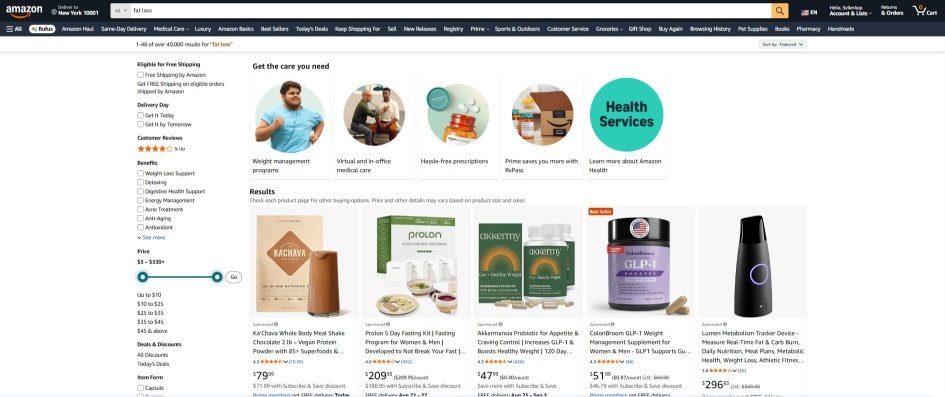
To stay one step ahead of your game, you can add result-based keywords. Say, you’re selling herbal tea and you want to show up as a solution for ‘Fat loss’, you can also add that as your backend keywords Amazon. It will not only increase your reach to lukewarm leads but also abide by the Amazon backend search terms guidelines.
You see so many products showing up for the term ‘fat loss’. It can be a fasting kit, probiotic supplement, protein powder or even a tracking device!
How to Add Amazon Backend Keywords to your Amazon Listings?
Adding Amazon backend keywords to your Amazon listing is easy.
- Head over to your Amazon Seller Central portal.
- From Menu (at the top left corner), hover the cursor over “Inventory” and choose “Manage Inventory.”
- Find the product listing you want to update, then click “Edit.”
- Go to the “Keywords” tab.
- Under the “Search Terms” section, enter your chosen backend keywords that you may find from the Search term reports.
- Click “Save and Finish” to apply the changes and finalize.
How Do I Know if a Backend Keyword is Indexed?
Here’s a full breakdown of all the possible ways to check if a backend keyword is indexed on Amazon, from quick manual checks to an advanced automated Amazon backend keywords tool:
1. Manual Amazon Search Test (using Keyword + ASIN)
Go to Amazon’s search bar. Type in your keyword + ASIN
For example: ‘Dumbbell Set with Rack’ and B0F7XS4N4H
If your product listing appears in the SERPs, that keyword Amazon backend keyword is indexed. If not, it’s not indexed.
It’s a free, quick check for individual keywords. But it is slow and not suited for bulk keyword checking.
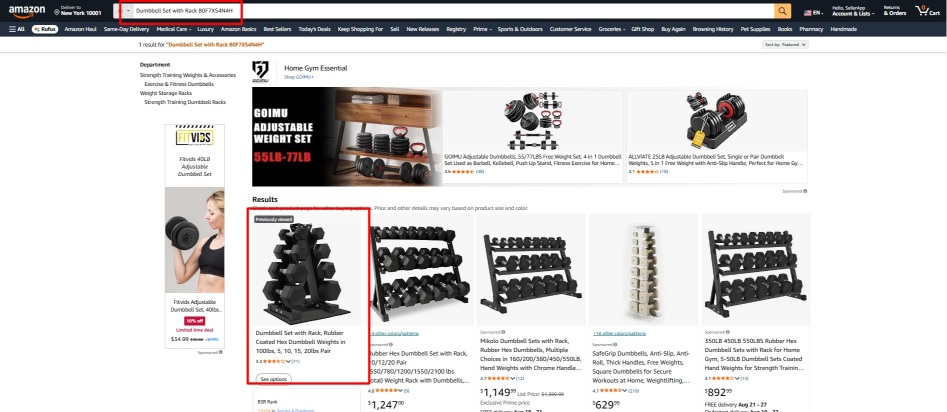
As we can see for this particular keyword+ ASIN, (Dumbbell Set with Rack’ and B0F7XS4N4H), the first result shows the particular product, which means it’s indexed.
2. Manual Search with Exact Phrase
Instead of adding keyword + ASIN, search the exact keyword phrase alone on the Amazon search bar. Then you can manually look through the results to see if your listing shows up. However, it is less precise. Your listing might be buried in results even if indexed, so it is time-consuming, and so we don’t recommend this.
On the contrary, it can be useful for checking your keywords’ search competition as well, if that’s something you aim for.
3. Backend Keyword Rotation & Re-check
Sometimes, a keyword might not be indexed because another keyword in the same backend search term field is breaking Amazon’s rules (for example, if it’s over the 250-byte limit or contains prohibited words).
When that happens, Amazon can ignore the entire field, meaning none of your backend keywords get indexed.
So if you’re unsure which keyword is not aligning with the Amazon backend search terms guidelines, you:
- Remove a suspicious keyword (or swap it with another) from the backend search terms.
- Wait 24–48 hours (because Amazon needs time to reprocess indexing)
If your backend keywords include ‘eco-friendly bottle, BPA-free insulated tumbler, coffee mug with lid’
- Amazon isn’t indexing any of them.
- You suspect “with” is a stop word and may be causing byte count issues.
- You remove “with lid” and save changes.
- After 1–2 days, you check again, if your other keywords now index, you’ve found the culprit.
This method works like debugging code. You strip away possible problem words until you find the one preventing indexing. Although this is a way to identify which specific keywords are causing indexing issues, it may is slower due to Amazon’s indexing update cycle.
But why waste time when you have free tools that can show you which Amazon backend keywords are indexed in just a click?
4. Browser Extension Index Checkers such as SellerApp
SellerApp Index Checker Chrome extension can also be of great help if you’re optimizing your products for the desired Amazon backend keywords.
How it works:
Install the SellerApp Index Checker Chrome extension and open it from the extension bar at the top.
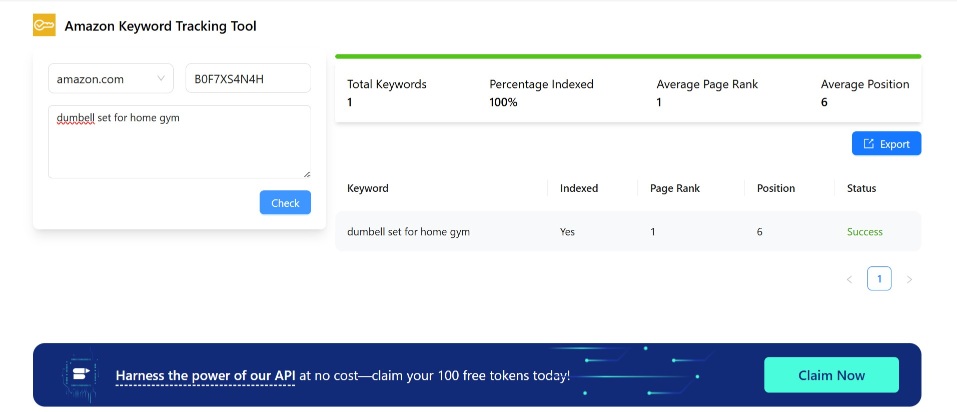
Enter an ASIN and a list of keywords (or even one) and hit ‘Check’. The tool checks each one of keyword automatically and shows if it’s indexed.
It’s a super convenient tool for fast or bulk checks. Cons? There is none because the SellerApp Index Checker Chrome extension is absolutely free for use.
How to Find the Right Amazon Backend Keywords for Your Listing
When you think about optimizing an Amazon listing, your mind probably jumps to the title, bullet points, and product description. But seasoned sellers know that backend keywords in Amazon fields are where you can quietly outmaneuver your competition.
These Amazon backend search terms act like invisible hooks in Amazon’s A9 algorithm, capturing search traffic from terms you didn’t use on the front end but that are still highly relevant to your product.
So let’s see how advanced sellers uncover these hidden gems and maximize every byte of their Amazon backend keywords limit.
1. Mining the Search Term Report
The Search Term Report (STR) in Amazon Seller Central is more than just a record of clicks and impressions. Amazon PPC experts use it to understand the customer search behavior. If backend keyword optimization is your goal, this is your first stop.
- Segment Amazon search terms by Match Type: If you’re running Sponsored Products or Sponsored Brands, filter out the report by match types. Broad match campaigns often reveal “hidden winner” terms in STR, the ones you didn’t target directly, but are perfect for backend addition.
- Zero-Click Impressions: Look for queries with high impressions but low CTR in the Amazon search terms list. These are often relevant to your product but are missing from your visible copy. Add them to your backend search terms, Amazon fields to test their performance quietly. You can eventually test by including what works and excluding what doesn’t.
- Long-Tail Variations of Amazon Backend Search Terms: Collect and apply long-tail variations like “stainless steel insulated coffee mug” and “metal insulated coffee cup”. Keep one visible to the audience and send the rest of them to the backend.
- Seasonal Data Mining to find trending Amazon Backend Search Terms: Review reports from high-traffic seasons such as Prime Day, Q4, etc., to identify spikes in keyword trends. Gradually start adding them to backend fields ahead of peak shopping periods.
- Semantic Variation Mapping: These reports can uncover semantically related terms that the A9 algorithm still connects to your product. For example, if you rank for “wireless earbuds,” but not “Bluetooth earphones,” the backend is where you add the alternate terms or synonyms.
- Misspellings & Locale Variations to target different Geos: From “color” to “colour” or “organiser” to “organizer,” make sure you’re not losing out on customers. These variations go into backend keywords to capture global traffic without cluttering your listing.
2. Using Amazon Keyword Tools for Gap Analysis
A reliable Amazon backend keywords tool, such as SellerApp’s Keyword Research tool, can help you find high-value terms you’re missing.
Here you’ll find the:
Competitor Missed Terms that are suitable as Amazon backend keywords
Focus on and identify terms your competitors rank for that you don’t. If they’re relevant but fail to align with your brand voice in the listing (front end), place them in the backend.
Let us explain.
Front end listing copy may include “Organic Dog Shampoo – Gentle, Hypoallergenic, Plant-Based Formula for Sensitive Skin”
Backend keywords may contain “cheap dog shampoo, flea shampoo for dogs,” etc. which may be missed by competitors as it may not lok presentable for the front end description.
This way, you capture search volume you’d otherwise miss, without breaking tone or trust on the customer-facing side.
Search Volume vs. Relevance Scoring
One of the most common mistakes sellers make is chasing the highest search volume possible and overlooking the relevant yet low volume keywords. High-volume terms are competitive and may already be covered in your front-end copy.
Backend fields are best used when you target medium-volume or low-competition terms. This is where even a small ranking boost can push you into the top 10 search results!
3. Reverse ASIN Lookup
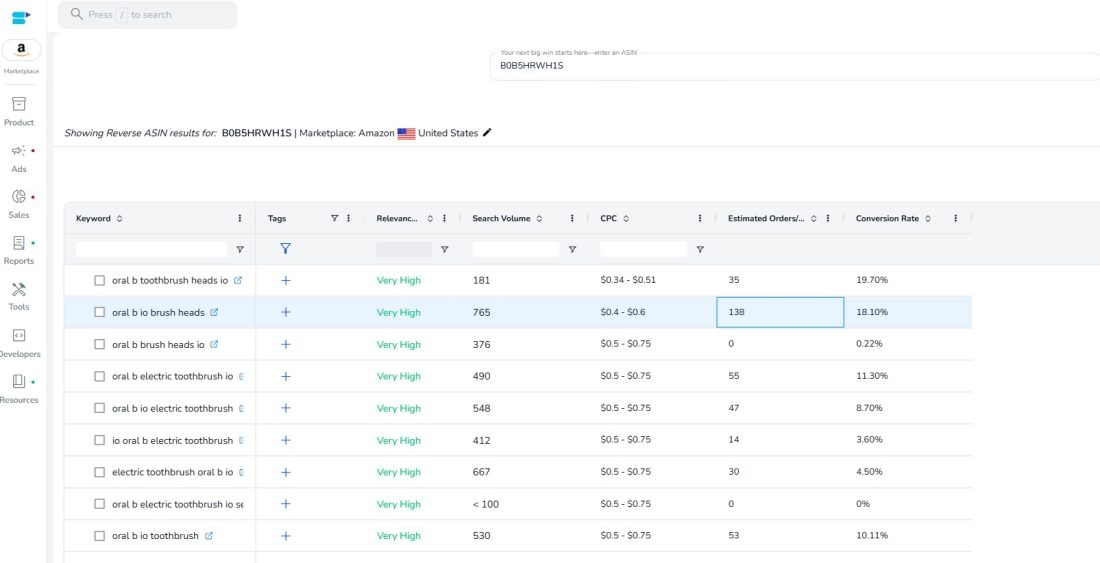
Running a reverse ASIN lookup on top competitors reveals every keyword they’re indexed for, including ones you’ve never considered. This is a game-changer for backend keyword strategy. Let us explain how SellerApp’s Reverse ASIN tool can help.
You simply take your competitor’s product ASIN, paste it into the tool, and in seconds, it’s like you’ve pulled back the curtain on their keyword strategy. You see every single search term they’re showing up and converting for. Most importantly, you get a granular look-up on the search volume of these terms, relevance, CPC, conversion rate, and estimated orders.
From there, you can spot the high-value keywords they’re ranking for that you’re missing and, without disrupting your existing listing, add them to the back end.
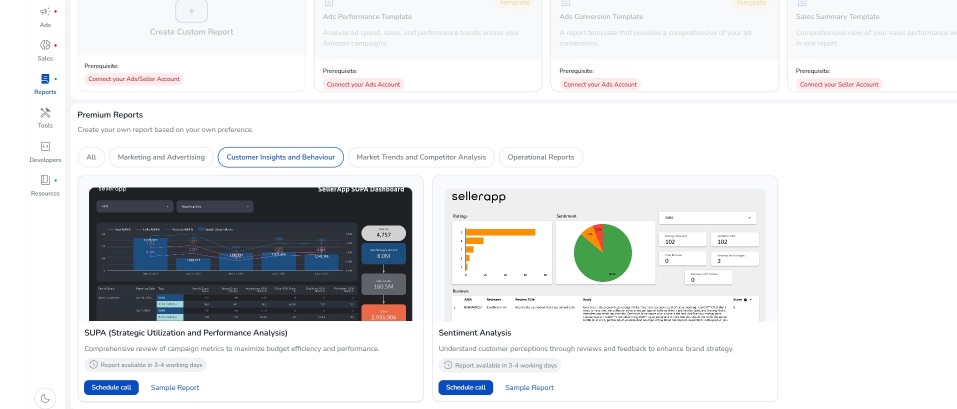
4. SellerApp’s SUPA Reports for Backend Keyword Insights
If you’ve been selling on Amazon for a while, you already recognize that data is everywhere, but finding actionable insights takes time. This is where SellerApp’s SUPA Reports come in. This reporting solution turns dense keyword performance metrics into a priority list that you must target in your Amazon backend search terms.
You get more in-depth, relevant insights that propel you into making better, more effective decisions, all backed by your business data.
How to Integrate SellerApp’s SUPA Reports into Your Backend Keyword Strategy?
- Pull the latest SUPA Report to get an updated list of high-potential, underutilized keywords based on your actual sales and ad data.
- Validate SUPA’s suggestions by comparing them with your Amazon Search Term Report to ensure these terms drive clicks or impressions.
- Add these vetted keywords to your Amazon backend keywords fields, avoiding duplication, respecting the 249-byte limit, and following Amazon backend search terms guidelines.
- Track listing impressions and organic rank changes for those keywords post-update.
And ultimately, use SUPA reports regularly to refresh backend terms based on evolving market trends and new competitor data.
Amazon Backend Keywords Do’s & Don’ts
Used correctly, Amazon backend search terms can amplify your reach, rank you for long-tail searches, and unlock discoverability that your front-end content can’t carry alone.
So, let’s break down how to add backend keywords to Amazon listings the smart way, with a few rules you’ll wish you followed sooner.
The Do’s: How to Optimize Amazon Backend Keywords for Maximum Visibility
1. Use All 250 Bytes Strategically
Amazon gives you 250 bytes, not characters, in the Search Terms field. Every byte you leave blank is a missed ranking opportunity. We’ve already mentioned, 1 byte = 1 character. Special characters (like é or ü) take up to 2+ bytes, so use a byte counter before saving your backend search terms.
If you go even one byte over, Amazon will ignore that word and what comes beyond that, which may affect your keyword intent.
Imagine your Amazon backend search terms field has a 249-byte limit, and you add the following keywords ‘stainless steel insulated coffee mug travel tumbler reusable eco friendly BPA free’. Fair enough for a long tail keyword.
Let’s say this string is exactly 249 bytes. Now, if you accidentally add one more word, like “stainless steel insulated coffee mug travel tumbler reusable eco friendly BPA free dishwasher safe”, the extra phrase “dishwasher safe” pushes the total size beyond 249 bytes by several bytes.
So in this case, “dishwasher safe” won’t be indexed at all, which means you lose visibility on that important keyword phrase, potentially impacting how your product appears in relevant searches.
2. Prioritize High-Oppportunity Keywords
Your backend is where you plug in keywords that:
- Didn’t fit into your title or bullet points
- Have search demand but low competition
- Include alternate spellings, slang, or foreign language terms
- Are relevant to seasonal events or buyer intent
Selling a desk organizer? Use backend keywords like study table, tidy setup, and dorm essentials.
3. Include Backend-Only Variants
Not everything deserves front-row status in your title or bullets. But your backend is a safe home for: Misspellings (organiser, organizor), frequently used terms (dorm hack, teacher gift) etc.
These expand your reach without cluttering your listing.
4. Appeal to Logical Search Order
Yes, Amazon indexes individual words. But word order still matters for phrase match relevance.
Here’s a comparison. ‘Wireless charger iPhone fast’ is preferred over ‘fast iPhone wireless charger’
The first matches how users actually search and understand their lingo.
5. Utilize Abbreviations and Alternate Names
Think like a shopper. They might search for “TV” instead of “television,” or “laptop stand” instead of “notebook riser.” Your backend search terms on Amazon are the perfect place to include:
- Product nicknames
- Acronyms
- Marketplace-specific terms (e.g., “car boot organizer” in the UK)
6. Use All Lowercase
Amazon treats keywords as case-insensitive. Typing in lowercase keeps things clean and byte-efficient.
For example, ‘usb hub macbook adapter’ is preferred. Don’t waste time with: USB Hub MacBook Adapter
7. Separate Keywords with a Single Space
Use one space between each keyword and nothing else.
8. Add Misspellings (With Caution)
Amazon autocorrects many typos, but not all. If keyword data shows traffic for specific misspellings, use them in your backend.
Smart example: coffeemaker, cofee maker, coffie maker
Only add them if they have volume. Otherwise, skip.
9. Localize for Global Markets
Selling on multiple Amazon marketplaces? Adjust spelling, colloquial terms, and phrasing for each country.
For US Geo, use ‘color’, ‘trash can’. For UK use ‘colour’, ‘bin’.
Localized backend keywords. This leads to a targeted reach, hence better sales.
10. Monitor & Maintain Keyword Performance
Backend optimization is never one-and-done. Use Amazon backend keywords tool mentioned to constantly track what’s working, and trim what’s not.
The Don’ts: What to Avoid in Backend Keywords Amazon Listings
1. Don’t Reuse Keywords from Back-End
Amazon is already indexing the Amazon backend keywords. Repeating it in your front-end just wastes space. Instead, focus on new, relevant keywords.
2. Don’t Keyword Stuff
Avoid repeating keyword variations like, ‘fast charger’, ‘quick charger’, ‘rapid charger’ unless backed by search term reports. Amazon sees them as redundant. One term per intent is enough. A smarter take would be ‘fast charger android wall portable’.
3. Don’t Use Competitor Brand Names
Tempting? Yes. Smart? No. Unless you’re a reseller of that brand, Amazon can suppress your listing or penalize your account if you use competitor-branded keywords as your Amazon backend keywords. Stick to generic, category-focused terms. Not trademarks.
4. Don’t Use Misleading or Irrelevant Keywords
Your backend isn’t a black hole. Adding irrelevant high-volume terms like “charger” for a water heater-like product violates Amazon’s guidelines, which may lead to account warnings or suppression.
5. Don’t Worry About Case Sensitivity
Typing “Wireless Charger” vs “wireless charger” won’t change how Amazon sees your product. Save yourself the effort and just go all lowercase.
Final Thoughts
Optimizing your products with Amazon backend keywords isn’t just about stuffing words into a hidden field, when done intentionally, it’s about sending clear, targeted relevance signals to Amazon’s search algorithm.
To make no mistakes, use SellerApp’s duplicate keyword remover tool. Also, do try our index checker tool to make sure your keyword research efforts are working in your favour.
Whether you’re figuring out how to add generic keywords to Amazon listing, using an Amazon backend keywords tool, or simply tightening your keyword strategy, precision matters. Follow the Amazon backend keywords best practices shared here, but keep testing continuously to refine your approach.