

Your Amazon ad spend just crossed $50,000 a month, and Seller Central still can’t tell you whether that spend is profitable. You look at ACoS, and it looks…fine. Revenue is climbing. But nobody in your team can answer a basic question your CFO just asked: What’s the actual margin on this, after fees, after COGS, after the ad spend that Amazon’s dashboard refuses to connect to anything else? That’s what happens when a brand managing multiple SKUs across marketplaces, or an agency running a portfolio of client accounts, outgrows a free tool that was never built for that scale.
Seller Central wasn’t designed to give a $2M/month brand the visibility it needs to protect its margins. It was designed to manage the platform relationship, and it does that job well. It just isn’t the same job. This article maps exactly where Amazon’s free tools earn their keep, where they quietly cost you money, and what third-party platforms like SellerApp actually add.
Quick Guide
What Amazon Seller Central Actually Gives You
Seller Central is a genuinely capable platform for the problems it was built to solve, and mischaracterizing it doesn’t help sellers make smarter decisions.
Order and inventory management
Seller Central lets you manage product listings, the full catalog, inventory levels, order fulfillment, pricing, and advertising from a single dashboard. Amazon FBA takes packing and shipping entirely off your plate. For a brand running a narrow catalog on a single marketplace with minimal ad spend, this is workable. The moment you’re managing multiple SKUs across US, UK, and EU storefronts or running a portfolio of client accounts as an agency, the single dashboard becomes the bottleneck rather than the convenience.
Business reports and the sales dashboard
The Sales Dashboard shows preliminary revenue data within hours of a sale. SKU-level Business Reports give you sessions, units, conversion rate, and Buy Box percentage by ASIN. These are the core inputs for spotting which products are gaining traction and which are fading, without paying for a third-party tool. These are workable for a single-marketplace operation with a handful of SKUs. They stop being sufficient the moment you’re managing performance across multiple brands, multiple marketplaces, or a client portfolio where one dashboard per account isn’t a viable workflow.
Brand Analytics
Available to Amazon Brand Registry members. Gives you search frequency rank data, market basket analysis (what customers bought alongside your product), and repeat purchase behavior by time window. Genuinely useful for understanding category dynamics and customer loyalty trends. The limitation is the cadence; Brand Analytics refreshes weekly or monthly, and it shows only your own brand’s behavior, not competitors’.
Amazon’s 2025–2026 upgrades
Amazon’s Accelerate 2025 conference delivered real improvements worth acknowledging. Amazon Marketing Cloud (AMC) is now open to all sellers, no DSP contract required, which previously locked smaller brands out entirely.
In Q1 2026, Amazon extended AMC’s lookback window to 25 months and added cross-channel attribution covering Sponsored Display and DSP in the same workbench, a direct response to brands asking for unified reporting across ad types. The Custom Analytics Workbench added 100+ metrics and a no-code interface, replacing the old workflow of exporting from five separate reports and stitching them together in a spreadsheet. These are meaningful upgrades for operational analytics. But the structural gap hasn’t closed: as of 2026, Amazon’s analytics workbench still contains no advertising data, still calculates no TACoS, and still deletes granular PPC history after 60–95 days.
The improvements closed the operational visibility gap. They did not touch the PPC decision-making gap.
Verdict: Seller Central is a sound operating layer for a single brand running a lean catalog on one marketplace. It was not built to give visibility to brands managing six and seven figures in monthly ad spend, multiple marketplaces, or agencies running dozens of client accounts side by side. At that scale, the free tool’s gaps aren’t an inconvenience. They’re a blind spot your finance team is already asking about.
Where Seller Central Falls Short and What It Costs You
The gaps in Seller Central aren’t bugs. Amazon built Seller Central to manage the platform relationship between Amazon and its sellers, not to maximize individual seller profitability.
What looks like missing features are, in many cases, design choices that serve Amazon’s interests better than yours.
Gap 1: The data cliff: 60–95 days and then it’s gone
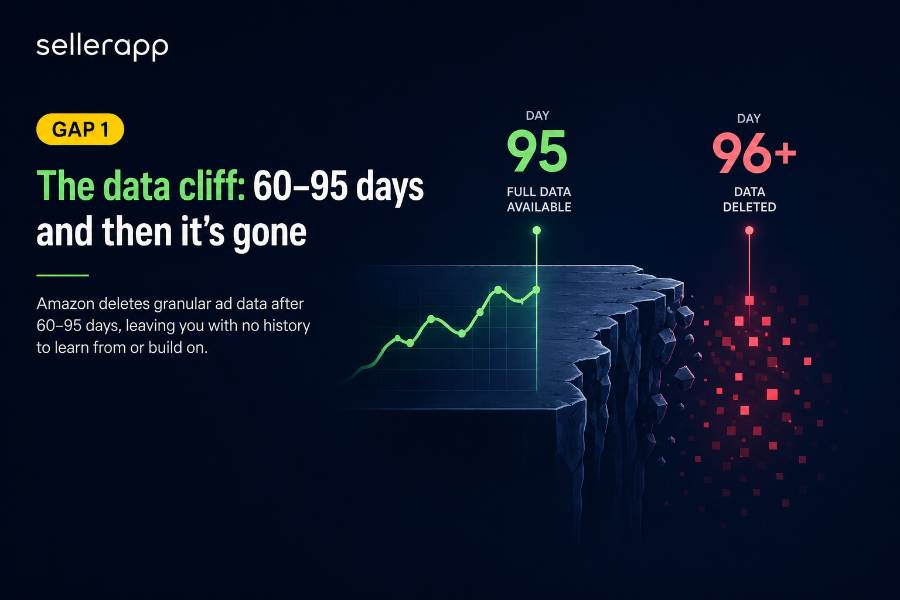
Amazon’s advertising console retains detailed daily data for 60–95 days depending on campaign type, up to 95 days for Sponsored Products via API and 60 days for Sponsored Brands and Sponsored Display. After that, granular campaign data is permanently deleted from Amazon’s interface.The practical consequence: if you ran a successful Q4 2025 campaign structure, that keyword-level, day-level data no longer exists in Seller Central. You’re rebuilding from scratch every year instead of iterating on what worked.
In Q1 2026, SellerApp’s platform crossed $1.8 billion in managed ad spend across 11,000+ brands, a dataset built almost entirely on this kind of retained, longitudinal campaign history that Amazon’s own console discards after 60 to 95 days. Third-party PPC tools download advertising data daily, storing it in their own databases to provide historical analysis well beyond Amazon’s retention periods. SellerApp connects via the Advertising API and pulls campaign data daily, storing every keyword, bid, and performance data point indefinitely. When Q4 rolls around again, you’re looking at exactly what worked last year, down to the keyword and match type, instead of starting over.
Gap 2: The TACoS blind spot: managing half your business
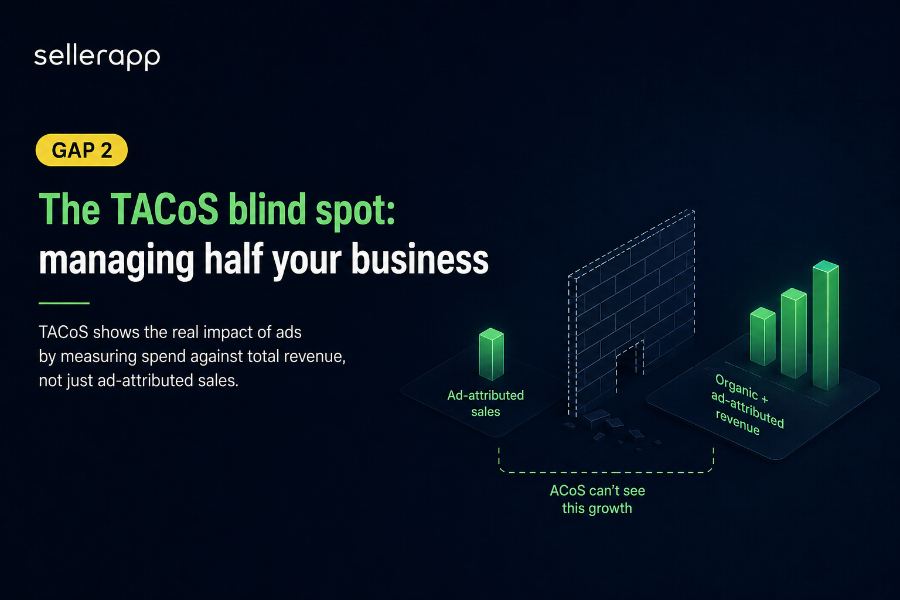
TACoS, Total Advertising Cost of Sale, measures ad spend as a percentage of all revenue: ad-attributed and organic combined. It is not an official Amazon metric. You won’t find it labeled anywhere in Seller Central or the Amazon Ads console. It’s an industry-created KPI that sellers, agencies, and PPC tools have adopted because it fills a gap that ACoS can’t. Because it only assesses the direct correlation between ad spend and the sales that Amazon attributes to that advertisement, ACoS has a basic blind spot. It ignores everything else your ads do.
A product with 40% ACoS might look like a problem. If that same product has 8% TACoS, because the ads are driving organic rank that generates 5x in organic revenue alongside each ad sale, it’s one of your best performers. ACoS tells you to cut it. TACoS tells you to scale it. You log into Amazon Seller Central, see ACoS at 75%, and start cutting bids. Two weeks later, total sales are down, and organic rank has slipped on two core keywords. You saved $400 in ad spend and lost $3,000 in total revenue. That’s one of the most common and costly mistakes Amazon sellers make, and it almost always comes down to relying on ACoS as the only measure of ad performance.
Gap 3: Data latency when every hour counts
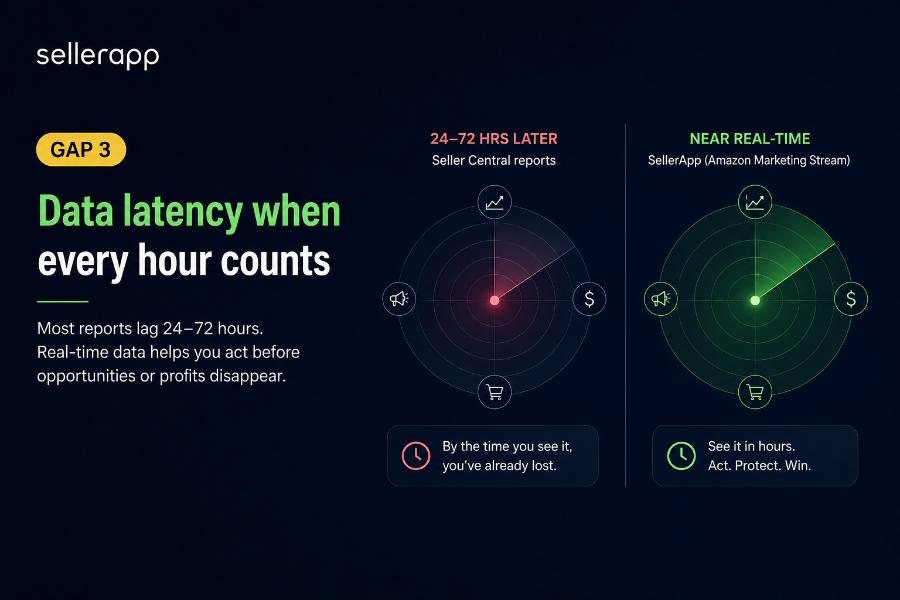
Your competitor launched a flash deal against your best seller. By the time Seller Central updates tomorrow, you’ve lost $3,000. Most reports update every 24–72 hours, with final numbers lagging 1–3 days. Third-party tools connected via the Amazon Marketing Stream pull performance data in near real-time, not the daily batch that Seller Central runs.
SellerApp connects via the Amazon Marketing Stream, which means performance data updates in near real-time, not Amazon’s daily batch cycle. When something changes in your account, you see it in hours, not the next morning. For sellers managing time-sensitive promotions, competitive responses, or high-velocity launches, that lag difference is the difference between catching a problem and discovering it after the damage is done.
Gap 4: No bulk PPC management
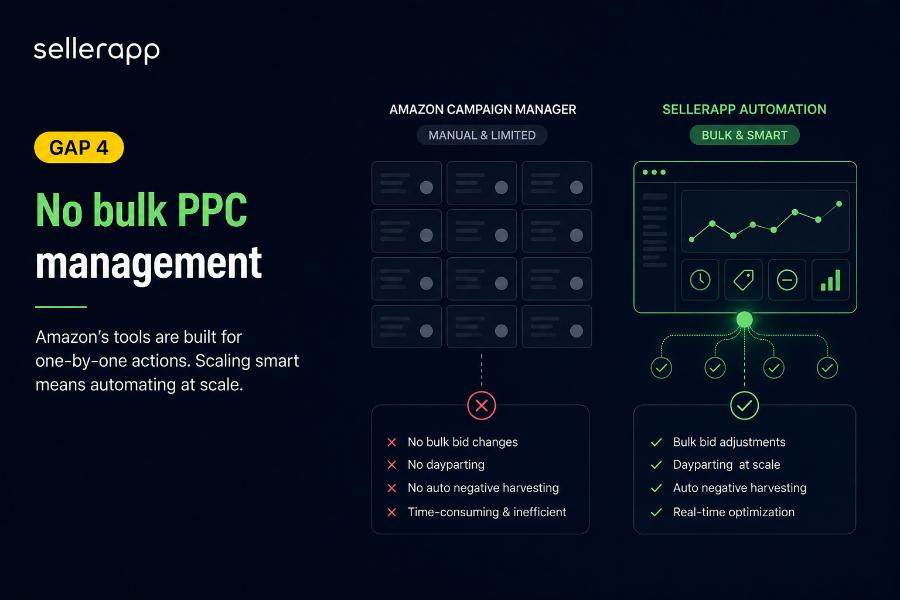
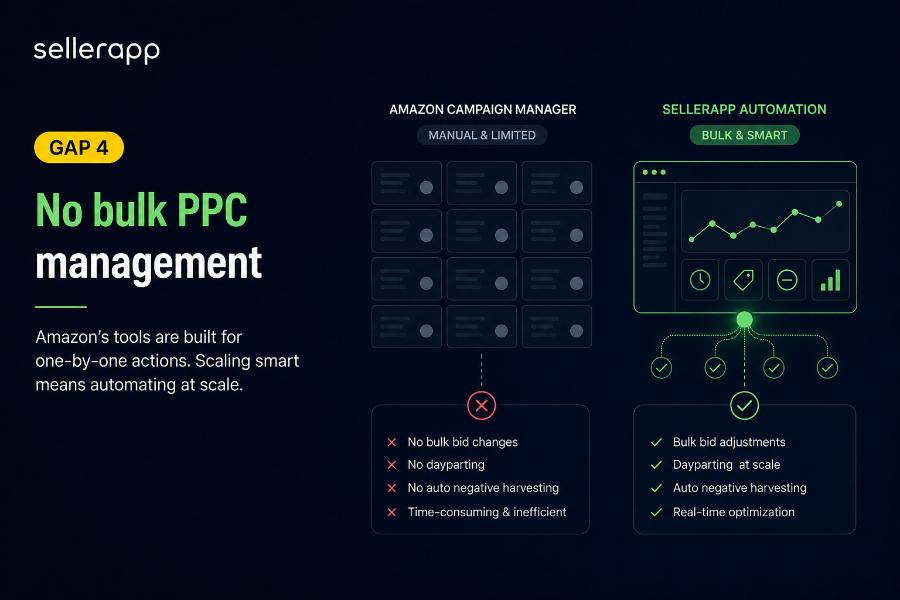
Amazon’s Campaign Manager is built for manual, one-campaign-at-a-time management. It cannot execute bulk bid changes across hundreds of campaigns simultaneously. It has no dayparting. It has no automated negative keyword harvesting based on live conversion data. Managing 10+ campaigns with 500+ keywords manually through Seller Central isn’t just inefficient; at any meaningful ad spend level, it’s mathematically impossible to optimize.
Without proper tracking and automation, sellers operate with limited visibility into which advertising strategies are yielding positive results, hindering optimization efforts and potentially leading to wasted resources. Third-party automation software adjusts bids based on real-time performance thresholds, harvests profitable search terms into exact-match campaigns automatically, and surfaces wasted spend before it compounds. None of that happens natively.
Gap 5: The P&L is structurally incomplete
Seller Central shows revenue and some Amazon fees. It does not calculate true profit. COGS, PPC costs at the ASIN level, inbound FBA shipping, promotional discounts, and return processing costs are all absent from any native profit view. If you’re using Seller Central reports or a basic analytics tool, you’re probably missing 8–15 fee types that Amazon charges but doesn’t surface clearly. Amazon launched a native profit analytics dashboard in 2025, which closed some of this gap, but it still doesn’t ingest COGS or connect ad spend to product-level profit without external calculation.
Gap 6: Brand Analytics sees your brand, not your market
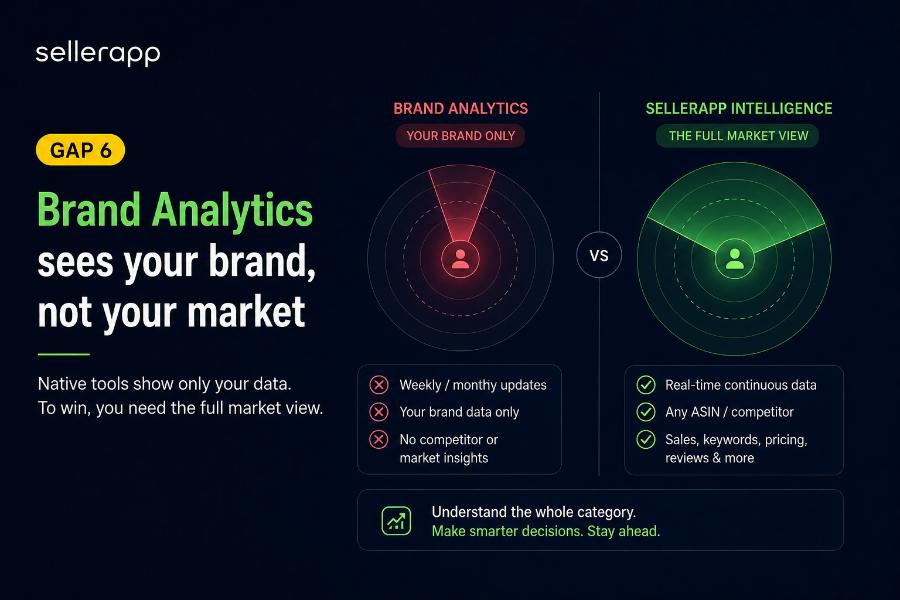
Brand Analytics updates weekly or monthly and covers only your own brand’s search and purchase behavior. ACoS only accounts for sales attributed to ads; it ignores the halo effect of how ads lift your organic visibility, branded searches, and long-term conversion rates. For competitive intelligence, what your competitors rank for, where their sales velocity is trending, and what they changed in the last 30 days, Brand Analytics gives you nothing. Third-party tools index public Amazon data continuously, giving you a market view rather than a brand view.
SellerApp’s product intelligence indexes public Amazon data continuously. You can pull up any competitor ASIN and see estimated sales velocity, keyword rankings, pricing history, and review trends the kind of market-level view that Brand Analytics was never built to provide. So, instead of knowing only what your customers are doing, you start understanding what the whole category is doing. That’s a different level of decision-making.
What Third-Party Software Actually Fixes
Here is what every seller needs to understand before they evaluate the difference between Amazon’s own tools and third-party software.
Persistent data and year-over-year benchmarking
Third-party platforms that connect via the Advertising API download and store PPC performance data daily, creating an indefinite archive. The useful benefit is you can benchmark this Prime Day 2026 against Prime Day 2025 at the keyword level. You can see which campaign structures consistently outperform in Q4. You can diagnose why a product’s ACoS has drifted over six months. None of that is possible if you’re relying on Amazon to hold the data.
TACoS at the ASIN level
A proper third-party analytics platform joins advertising data to organic sales data at the product level, calculating TACoS continuously. ACoS only counts sales Amazon credits to your ads. TACoS uses total sales, including organic. When your ads drive rank, organic sales follow, and ACoS misses that completely. TACoS captures the full picture, which is why CFOs use TACoS as the headline ad metric and ACoS as a per-campaign diagnostic.
Automation that runs while you’re not looking
SellerApp’s Amazon PPC tool helps you reach specific goals without requiring manual ad optimization. It offers preset automation templates, including Target Harvester, Down Bid, Optimizer, and ACoS Reducer, which you select based on your objectives. Once you activate a template, SellerApp’s algorithms handle KPI delivery with minimal user input. This is the compounding advantage that separates sellers managing by feel from sellers managing by system. Every optimization that didn’t happen overnight in Seller Central is margin left on the table.
True ASIN-level profit
Third-party analytics platforms ingest COGS from custom input, pull FBA fees directly from Amazon’s fee reports, add PPC spend at the ASIN level, and net out refunds and return processing. The result is the number you actually need: net margin by product, not revenue dressed as profit.
Seller Central vs. SellerApp: Full Feature Comparison
| Capability | Amazon Seller Central | SellerApp |
| PPC bid management | Manual only; no bulk editing | AI + rule-based automation, bulk across all campaigns |
| Bid adjustment frequency | Requires manual login each time | Real-time via Amazon Marketing Stream |
| Dayparting (hourly ad scheduling) | Not available natively | ✓ Built-in scheduling by hour and day |
| TACoS visibility | ACoS only, organic impact invisible | ✓ TACoS + ACoS at SKU level, side by side |
| Historical PPC data | 60–95 days then permanently deleted | ✓ Stored indefinitely, year-over-year analysis ready |
| Data refresh rate | 24–72 hour lag on most reports | ✓ Near real-time (Marketing Stream integration) |
| True P&L per ASIN | Revenue only; COGS and PPC not unified | ✓ COGS + FBA fees + ad spend in one profit view |
| Reverse ASIN / keyword intel | Not available | ✓ Full reverse ASIN + competitor keyword data |
| Competitor ASIN intelligence | Not available | ✓ Sales estimates, keyword share, ranking trends |
| Negative keyword harvesting | Manual search term export and review | ✓ Automated finder runs continuously |
| Automation templates | None | ✓ Target Harvester, ACoS Reducer, Down Bid Optimizer |
| Multi-marketplace dashboard | Per-marketplace login only | ✓ Unified: US, UK, DE, CA, and 15+ more |
| Agency multi-account management | Not supported | ✓ Full agency platform for 10–100 accounts |
| Managed PPC service | Software only | ✓ Certified managed service option available |
| Amazon Ads partner status | N/A | ✓ Official Amazon Ads verified partner |
What Third-Party Software Actually Fixes
Here is what every seller needs to understand before they evaluate the difference between Amazon’s own tools and third-party software.
Persistent data and year-over-year benchmarking
Third-party platforms that connect via the Advertising API download and store PPC performance data daily, creating an indefinite archive. The useful benefit is you can benchmark this Prime Day 2026 against Prime Day 2025 at the keyword level. You can see which campaign structures consistently outperform in Q4. You can diagnose why a product’s ACoS has drifted over six months. None of that is possible if you’re relying on Amazon to hold the data.
TACoS at the ASIN level
A proper third-party analytics platform joins advertising data to organic sales data at the product level, calculating TACoS continuously. ACoS only counts sales Amazon credits to your ads. TACoS uses total sales, including organic. When your ads drive rank, organic sales follow, and ACoS misses that completely. TACoS captures the full picture, which is why CFOs use TACoS as the headline ad metric and ACoS as a per-campaign diagnostic.
Automation that runs while you’re not looking
SellerApp’s Amazon PPC tool helps you reach specific goals without requiring manual ad optimization. It offers preset automation templates, including Target Harvester, Down Bid, Optimizer, and ACoS Reducer, which you select based on your objectives. Once you activate a template, SellerApp’s algorithms handle KPI delivery with minimal user input. This is the compounding advantage that separates sellers managing by feel from sellers managing by system. Every optimization that didn’t happen overnight in Seller Central is margin left on the table.
True ASIN-level profit
Third-party analytics platforms ingest COGS from custom input, pull FBA fees directly from Amazon’s fee reports, add PPC spend at the ASIN level, and net out refunds and return processing. The result is the number you actually need: net margin by product, not revenue dressed as profit.
SellerApp: The All-in-One Platform Built for This Transition
Brands and agencies that outgrow Seller Central typically end up managing four or five separate subscriptions across accounts and marketplaces: one for PPC, one for Amazon keyword research, one for competitor intelligence, one for P&L, and another for the agency dashboard. At scale, that’s not just a cost problem. It’s a data fragmentation problem; nobody on the team has a single source of truth across every brand or marketplace. SellerApp removes that fragmentation.
What SellerApp covers in one platform:
- AI + rule-based PPC automation: Intelligently optimize bids, manage keywords, and enhance campaign performance based on real-time data and advanced algorithms. Maximize profitability with predefined automation rules or customize your own to align with specific business goals.
- TACoS tracking at the ASIN level: Joins ad spend to organic sales continuously. See which products’ ads are building rank and which are just buying revenue at margin cost.
- historical data storage: SellerApp downloads and stores your advertising data every day, permanently. SellerApp keeps all your data forever. You can easily dive into past trends, compare year-on-year performance, and find high-performing products anytime you want.
- Reverse ASIN and keyword intelligence: See which keywords your competitors rank for organically. Build campaign targeting from real market data instead of guesswork and auto campaigns.
- True ASIN-level P&L: COGS, Amazon FBA fees, PPC spend, and refunds unified into a single profit view per product.
- Multi-marketplace dashboard: US, UK, DE, CA, and 15+ additional marketplaces in a single login. No tab-switching between separate Seller Central regions.
- Agency platform: Built for teams managing 10–100 client accounts with centralized dashboards and white-label reporting.
- Managed PPC service: SellerApp also offers Amazon PPC managed services. If you’re looking to accelerate brand growth, their certified experts can drive campaign success faster and more effectively. You don’t switch vendors as you grow; DIY and managed live in the same platform.
SellerApp vs. the alternatives
Helium 10 and SellerApp shine as all-in-one platforms combining PPC with research and optimization. But both platforms differ. Helium 10 is built research-first with PPC added on top. SellerApp is built PPC-first, with research and listing tools as complements.
For brands whose primary growth lever is advertising efficiency, which describes most brands past the $500K/year mark, that difference is significant.
SellerApp is also an official Amazon Ads verified partner. API access is direct and Amazon-sanctioned. As Amazon tightened its Business Solutions Agreement in early 2026, restricting how third-party tools can access seller data, being on the verified partner list became an account safety consideration, not just a credibility signal.
When Successful Sellers Add SellerApp after Seller Central
Every serious Amazon seller uses Seller Central, and it’s the operating layer you can’t avoid. The question is when to add third-party tools on top.
| Your Situation | Stay with Seller Central. | Add SellerApp |
| Monthly revenue | Under $30K/month | $30K+/month |
| Monthly PPC spend | Under $1,000 | $3,000+ |
| Active campaigns | 1–5 campaigns | 10+ campaigns |
| Keywords managed | Under 100 | 500+ keywords |
| Marketplaces | Single marketplace | US, UK, DE, CA, or more |
| Historical data needed | The last 60–90 days are sufficient | Year-over-year seasonal benchmarking |
| P&L tracking | Revenue reporting is sufficient | Need true ASIN-level profit |
| Team structure | Solo seller, single brand | Agency or multi-brand team |
Final thoughts
This was never a versus debate. Seller Central and third-party software aren’t competing for the same job. Seller Central is the operating system; you can’t sell on Amazon without it. The question is always what you layer on top of it, and when that layer stops being optional.
The brands scaling past $1M in annual revenue aren’t the ones who found the perfect software. They’re the ones who stopped managing by feel, built repeatable systems around their data, and recognized, at the right moment, that their free tool had become the most expensive thing in their stack.
If your ad spend is past $3,000/month and you’re still managing campaigns manually through Seller Central, that’s the moment. The gap between what Amazon’s tools show you and what you actually need to make profitable decisions is costing you real money every day you wait.
Stop optimizing campaigns manually. See how SellerApp’s PPC automation reduces wasted spend in the first 30 days; book your free demo today.
FAQs
For sellers under $30K/month with minimal ad spend, yes. Seller Central handles order management, basic reports, and campaign setup adequately. But once PPC spend crosses $3,000/month, the 60–95 day data limit, absent TACoS visibility, and manual-only bid management start costing more than any third-party subscription. That’s when the free tool becomes the expensive one.
SellerApp adds real-time PPC automation, TACoS tracking at the ASIN level, unlimited historical data storage beyond Amazon’s 60–95 day limit, reverse ASIN keyword research, competitor intelligence, true ASIN-level profit and loss, and a unified multi-marketplace dashboard, all under one subscription instead of managing four or five separate tools.
SellerApp offers a free plan for basic analytics, with paid tiers scaling by ad spend and account size. For current pricing, visit sellerapp.com/pricing. At $3,000+/month in ad spend, bid automation and keyword waste reduction typically cover the subscription cost many times over. A managed service option is also available for brands that prefer hands-off execution.
Yes, SellerApp is an official Amazon Ads-verified partner, meaning API access is direct and Amazon-sanctioned, not scraped or reverse-engineered. This matters for data accuracy, account safety, and long-term reliability as Amazon continues tightening its data access policies for third-party tools.
TACoS (Total Advertising Cost of Sale) measures ad spend as a percentage of all revenue, both ad-attributed and organic combined. Seller Central only surfaces ACoS, which covers ad-attributed sales only. ACoS can make campaigns look profitable while they’re quietly eroding organic rank. TACoS is the metric that shows the full picture, and because it’s not an official Amazon metric, it doesn’t appear in any native Seller Central report.
Amazon’s advertising console retains detailed daily data for 60–95 days depending on campaign type. After that, granular data is permanently deleted from Amazon’s interface. Third-party tools like SellerApp download and store that data daily, giving you indefinite history for year-over-year benchmarking and seasonal campaign planning.
Yes. SellerApp has a dedicated agency platform for teams managing 10–100 client accounts, with centralized dashboards, white-label reporting, and a managed service option for brands that want certified execution alongside the software. Clients don’t need to switch vendors as they scale.
SellerApp is the strongest all-in-one alternative for sellers who prioritize PPC automation alongside research. Helium 10 is built research-first with PPC added on. SellerApp is built PPC-first; AI bid automation, keyword harvesting, campaign auditing, and marketing stream-grade data refresh rates are core features, not add-ons.
Yes, and most serious sellers do. Seller Central remains your operational hub for listings, orders, FBA shipments, and account health. Third-party tools like SellerApp layer on top via Amazon’s API for PPC automation, advanced analytics, and keyword research. One is the operating system; the other is the engine running on top of it.
No. Brand Analytics shows your own brand’s search and purchase behavior, updated weekly or monthly. It has no competitor sales data, no real-time view, no TACoS calculation, and no automation. It provides useful context on customer behavior but doesn’t replace tools that give actionable, timely data for live PPC and pricing decisions.