

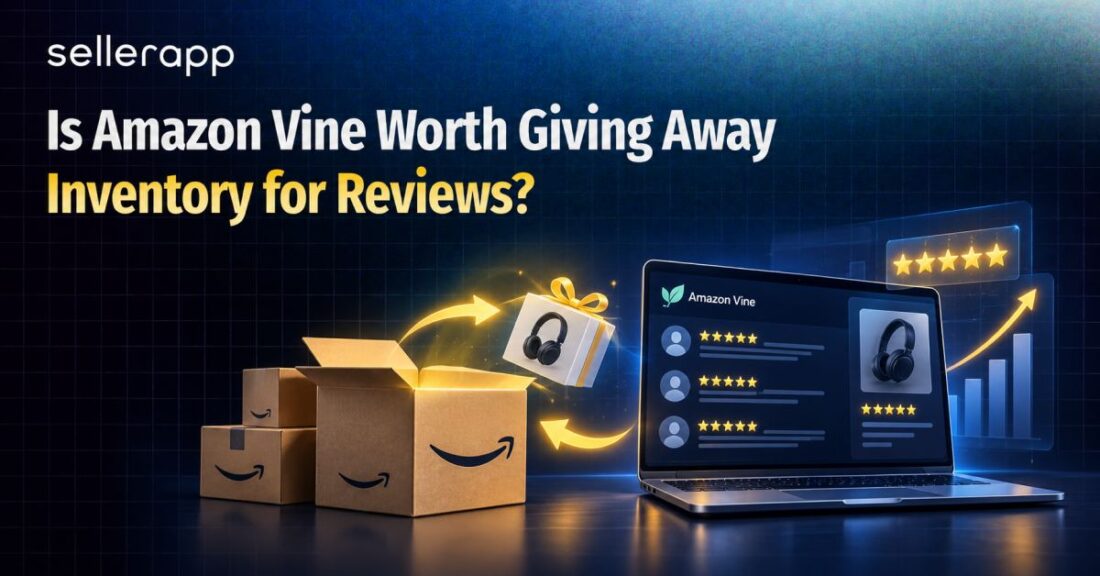
The Amazon Vine program is Amazon’s review program that connects eligible sellers with trusted reviewers, known as Vine Voices, who receive products free of charge and share honest feedback on Amazon. It helps sellers build early social proof for new or low-review products.
But Vine’s value goes beyond collecting reviews. Nithin Mentreddy, Director of Customer Success at SellerApp, sees it as part of a product’s retail readiness. When an ASIN builds credible reviews and ratings, shoppers have more confidence in the listing, which can help paid traffic convert more effectively. The result isn’t just more social proof. It’s a stronger foundation for PPC to turn visibility into sales. So, is giving away inventory worth it? That depends on your product, margins, review gap, and growth potential. This guide covers eligibility, enrollment, costs, how the program works, common mistakes, and when Vine actually makes sense.
Quick Guide:
What Is the Amazon Vine Program and How Does It Work?
The Amazon Vine program helps sellers build early product reviews by giving selected Amazon reviewers, known as Vine Voices, free units to try. In return, Vine Voices share their honest opinions about the product on Amazon. The process starts with checking whether your ASIN qualifies. Amazon currently requires a Professional selling account, an eligible FBA offer, a product listing with an image and description, and fewer than 30 reviews on the product detail page. Branded products also need to be associated with a brand enrolled in Amazon Brand Registry. Adult products, digital products, and bundles are among the products excluded from Vine. Once an eligible ASIN is enrolled, Vine Voices can claim available units, receive them through Amazon fulfillment, and decide whether to publish a review. Sellers can’t choose the reviewers, request positive reviews, or control what they write. For new products, this can solve a common launch problem. You may have a strong product, a well-optimized listing, and validated demand, but shoppers still see an ASIN with little or no review history. Say a cookware brand launches a $35 ceramic saucepan. The product is already at FBA, and demand has been validated, but established competitors have hundreds of reviews. The product may be competitive, yet shoppers have less evidence that they can trust it. That’s where the Vine program Amazon offers can help. It doesn’t create demand for a product that nobody wants. It gives a promising ASIN a chance to build the social proof it needs to compete.
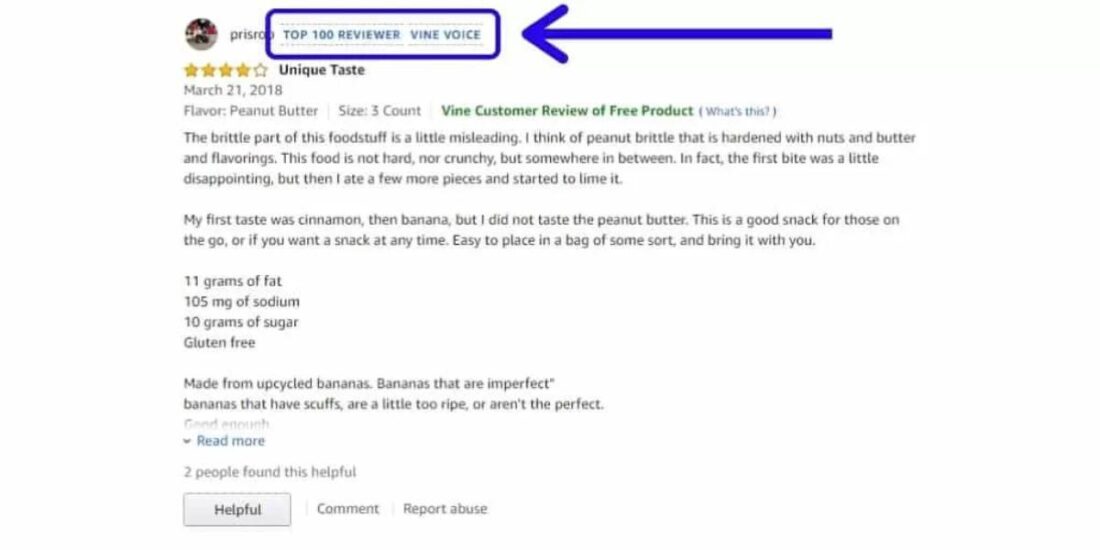
Who Are Vine Voices?
Vine Voices are reviewers Amazon invites based on the quality of their reviews. They get access to products enrolled in Vine, choose the ones they want to try, and share their honest feedback. For sellers, that’s useful because Vine Voices can surface things you might miss internally. A reviewer could love the saucepan’s heat distribution but flag the handle, packaging, or lid. If the same issue keeps appearing, you’ve got a product problem worth fixing before you put more money behind the ASIN. Want to become a Vine Voice? There isn’t an application you can submit. Amazon invites reviewers based on factors such as the quality, helpfulness, and consistency of their reviews. So while the Amazon Vine reviewer program can help build review volume, the bigger value for sellers is getting genuine feedback from people who have actually used the product.
The Vine Review Timeline From Enrollment to Posted Review
Start with an eligible product: You need a qualifying ASIN, an appropriate seller account, and FBA inventory.
Enroll the ASIN: Add the eligible product to Vine through Seller Central.
Vine Voices claim units: Eligible reviewers can choose available units, receive them through Amazon fulfillment, and decide whether to review them.
Enroll up to 30 units: Amazon currently allows sellers to enroll up to 30 units per parent product.
Launching a new product: You can enroll before launch if the product has a customer-ready FBA listing and a future launch date. Amazon recommends having inventory available at least three weeks before launch.
No review, no enrollment charge: Amazon says sellers aren’t charged if an enrolled product receives no Vine review within 90 days.
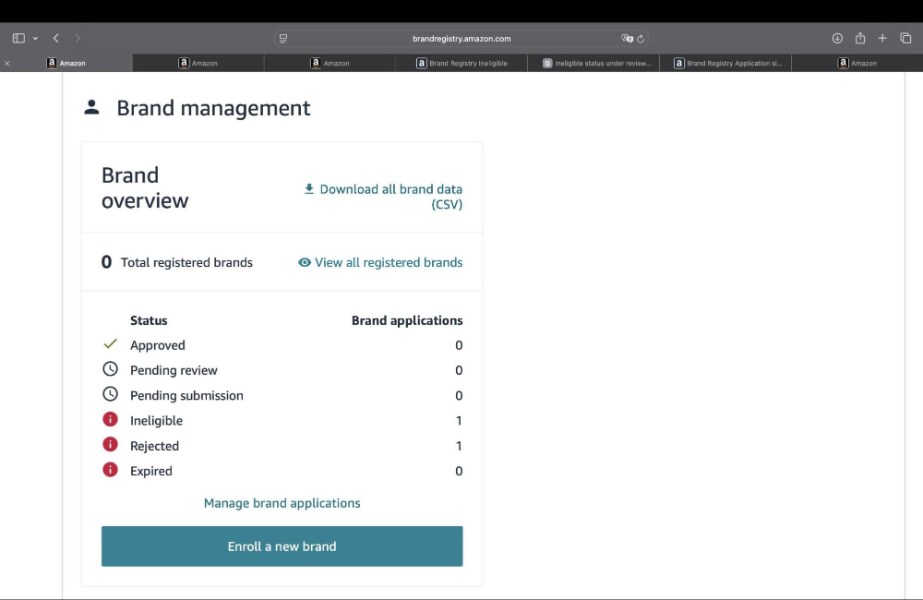
Brand Registry Requirements
For branded products, Brand Registry is an important part of eligibility. Sellers need the appropriate relationship with the enrolled brand before they can use Vine for its products. For example, a private label seller cannot simply create a new listing and assume the ASIN can immediately be enrolled. The seller account, brand permissions, listing, and fulfillment setup all need to be in place.
Why FBM Products Don’t Qualify
Vine requires FBA because Amazon handles fulfillment for Vine Voices. This keeps the reviewer relationship within Amazon’s fulfillment system and means sellers don’t receive reviewer contact information. So if you’re an FBM-only seller, you cannot simply enroll the existing offer. Moving the product to Amazon FBA becomes part of the launch economics.
How to Join the Amazon Vine Program Without Wasting Inventory
The Amazon Vine program is easy to access when your ASIN is eligible. The harder part is deciding whether that ASIN is actually worth putting inventory into Vine.
Step 1: Check Your ASIN Eligibility
If your ASIN meets the requirements covered above, you’re clear to enroll. If you skipped that section, check it before moving forward.
Step 2: Evaluate the Product Opportunity
Don’t enroll simply because an ASIN qualifies. Weigh these factors first.
- Search demand
- Competitive positioning
- Listing quality
- Profit margins
- Available inventory
A $30 kitchen organizer with strong demand may be a better Vine candidate than a $12 phone accessory with thin margins, even if both are eligible.
Step 3: Choose How Many Units to Enroll
Decide how much inventory you can reasonably allocate to Vine based on the product’s margins, demand, and launch goals. You don’t necessarily need to use the maximum number of units.
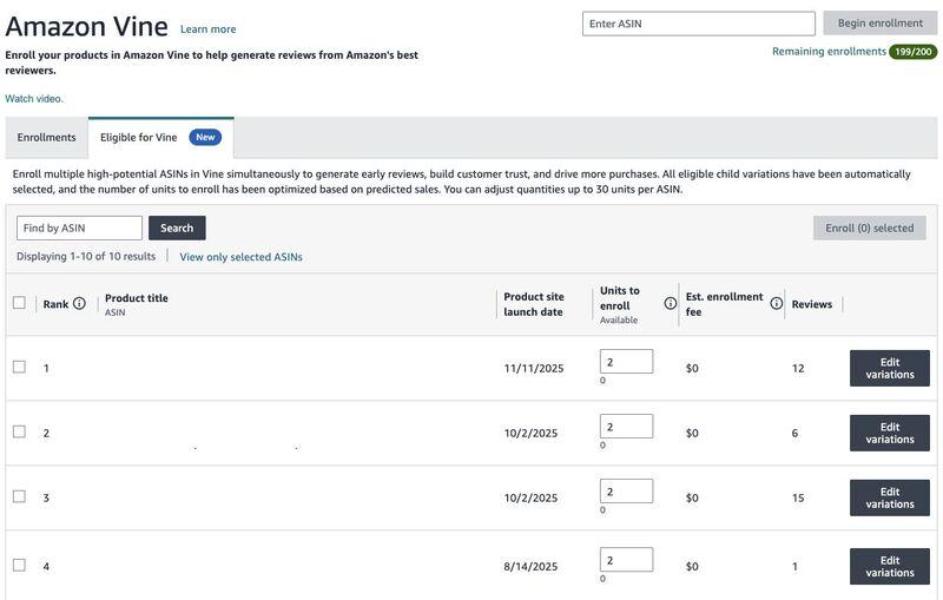
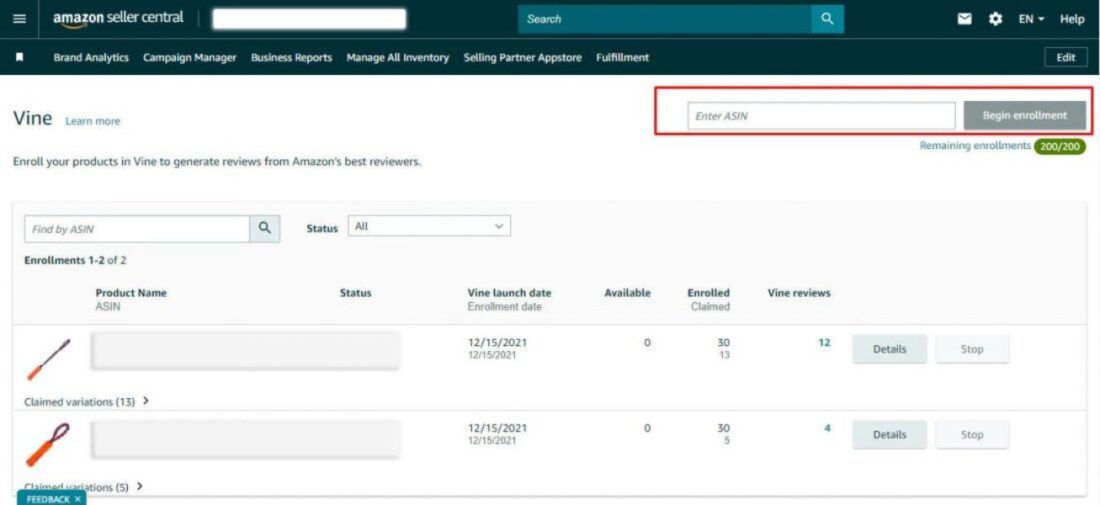
Step 4: Enroll the Product in Seller Central
Once you’ve identified a strong candidate, access Vine through Amazon Seller Central, select the eligible ASIN, choose the number of units to enroll, and submit the product.
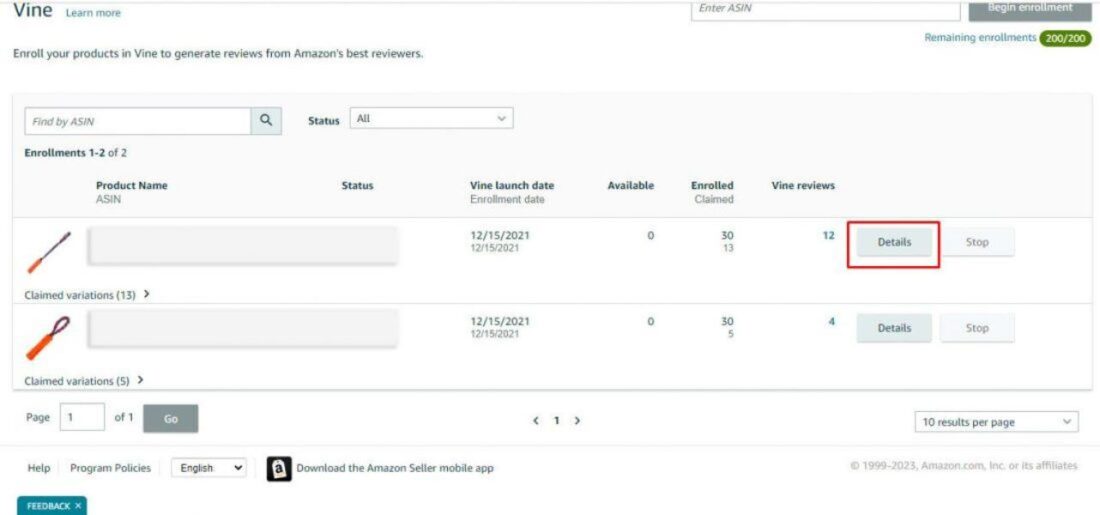
Step 5: Track the Results
After enrollment, monitor how many units are claimed and how reviews develop. More importantly, watch what happens to traffic, conversion, organic visibility, PPC performance, and profitability once the product starts building social proof.
How Much Does the Amazon Vine Program Cost in 2026?
For US sellers, current Vine enrollment fees are based on the number of units enrolled per parent product
| Units enrolled | Enrollment fee |
| Up to 2 | $0 |
| 3 to 10 | $75 |
| 11 to 30 | $200 |
Amazon states that there is no additional enrollment fee for child products under the same parent.
The Real Cost of Vine
Suppose a cookware brand enrolls 30 units of a $30 saucepan.
| Cost | Example |
| Vine enrollment | $200 |
| COGS for 30 units | $240 |
| Inbound and FBA-related costs | $90 |
| Total investment | $530 |
The seller hasn’t really “spent $200 on Vine.” The $200 is simply the program fee. The actual investment also includes inventory and fulfillment costs. Now assume 22 reviews are published. $530 ÷ 22 = $24.09 per review. That gives the seller a more realistic cost benchmark. But even cost per review isn’t the final KPI. The better question is whether those reviews help the ASIN generate more profitable sales
Amazon Vine Pros and Cons Nobody Tells You Upfront
Vine can give a new product the review history it needs to compete, but that doesn’t automatically make it a smart investment. The upside is early customer feedback and social proof. The downside is giving away inventory without knowing exactly what reviewers will say or how much those reviews will influence sales.
The Pros of Using Vine
- Build early social proof for new products with little or no review history.
- Get authentic product feedback from reviewers who actually use the product.
- Support launch momentum by giving shoppers more information when they first discover an ASIN.
- Spot product issues early and use reviewer feedback to improve the product or listing.
- Complement your wider review strategy rather than relying entirely on organic reviews.
The Cons You Need to Consider
- Reviews are completely outside your control. A Vine Voice can praise the product or point out its flaws.
- The real cost goes beyond the enrollment fee. You also give away inventory and absorb associated fulfillment costs.
- Vine cannot create demand. A product with weak positioning or poor market fit will still struggle.
- Not every enrolled unit results in a review, so sellers shouldn’t assume a one-to-one return.
- FBA is required, which adds another consideration for sellers who primarily use FBM.
Common Mistakes Sellers Make With Vine
The biggest mistake is using Vine before validating demand. If shoppers don’t want the product, more reviews won’t fix the problem. Another mistake is automatically enrolling the maximum number of units. Thirty units may make sense for a high-margin product with strong demand, but could be unnecessary for a product with uncertain sales potential. Sellers should also avoid sending an unfinished listing into the program. Weak images, unclear positioning, poor pricing, or confusing copy can undermine conversion even after reviews arrive. Most importantly, don’t measure success only by review count. Look at what happens to traffic, conversion, organic visibility, PPC efficiency, and profitability as your review base develops.
When the Vine Program Amazon Offers Is Worth It and When You’re Burning Inventory
The strongest use case for the Vine program Amazon offers is a genuine cold-start problem. A new brand launching an insulated lunchbox, for example, may have strong demand signals and a competitive product but no review history. Early reviews can help close that credibility gap. An established ASIN with hundreds of organic reviews has a different problem. Giving away more units may create less incremental value because the product has already cleared its initial social-proof hurdle. Also, Incentivized reviews that align with organic reviews strengthen the effect, while inconsistency between the two weakens it.
So before enrolling, run three checks.
- Does this product have validated demand?
- Is the listing ready to convert?
- Can the margin absorb the inventory cost?
If the answer is yes, Vine can be a sensible part of a launch strategy. If not, fix the fundamentals first.
Forever New International, a family-owned laundry detergent business in Sioux Falls, South Dakota, used Amazon Vine as part of its Amazon expansion. The company grew from a single product to 40–50 offerings and now generates around 70% of its revenue through Amazon, with more than 5,000 reviews across its products. Amazon specifically lists Vine, FBA, and Seller Central forecasting among the tools the business used as it scaled. The lesson isn’t simply that brands should use Vine. It is that customer feedback becomes more valuable when it feeds into the broader growth strategy. That means looking at what reviewers repeatedly praise, what they criticize, and whether those insights should influence the product, listing, positioning, or marketing.
How SellerApp Helps You Maximize Vine’s Impact
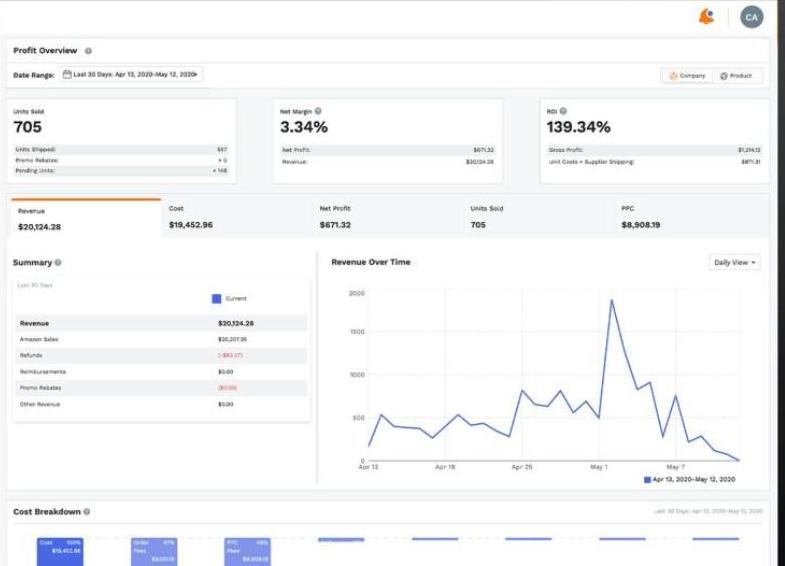
The Amazon Vine seller strategy shouldn’t end when the reviews start coming in. The real question is whether those reviews are helping an ASIN gain visibility, convert more shoppers, and become more profitable. That’s where SellerApp comes in. Before enrollment, SellerApp’s Product Intelligence helps you assess an ASIN using historical pricing, sales estimates, revenue trends, and listing quality. Competitor Intelligence adds category trends, share of shelf, new product tracking, and Buy Box monitoring. Combine that with keyword research and the Profit Dashboard, and you can judge the opportunity using actual marketplace data instead of assumptions.
Once the product is live, SellerApp’s Review Request Tool helps you keep generating review opportunities beyond your initial Vine enrollment. Then, measure what actually changed. Are rankings improving? Is organic visibility growing? Is PPC becoming more efficient? Is the ASIN converting better? And most importantly, is it making more money? SellerApp’s Listing Quality Index and Business Monitoring help you stay on top of those changes, with alerts for ranking shifts, review changes, and important performance movements. Don’t judge Vine by the review count alone. Track the ASIN for 60 to 90 days and measure whether the additional social proof is translating into actual growth.
Final Takeaway: Should You Enroll?
The Amazon Vine program can be a smart launch lever when you’re solving a genuine review gap on a product that already has demand. But Vine shouldn’t be treated as a shortcut for weak positioning, poor listings, or a product that hasn’t been validated. Before committing inventory, use SellerApp’s Product Intelligence to track an ASIN’s pricing, sales estimates, revenue trends, and listing quality. Add Competitor Intelligence to understand category trends, share of shelf, pricing, and competitive movement, then use the Profit Dashboard to see whether the product can actually support the investment. Once reviews start coming in, SellerApp’s Business Monitoring helps you track changes across revenue, advertising, visibility, rankings, reviews, and competitor activity. That lets you measure whether Vine is doing more than increasing the review count. Vine can help you build social proof. SellerApp helps you decide whether that social proof is translating into profitable growth. Ready to see what your ASIN’s numbers are really telling you? Explore SellerApp and make your next product decision with data behind it
FAQ
If you’re wondering how the Amazon Vine program how it works in practice, the process is pretty straightforward. You log in to Seller Central, open Vine under Advertising, choose an eligible FBA ASIN, select how many units you want to offer, and enroll it. Vine Voices can then claim the products and decide whether to review them. You can track claimed units and published reviews from the Vine dashboard. The important part of how the Amazon Vine program how it works is that you don’t get to choose who reviews your product or what they say. That’s the whole point of the vine program amazon offers. You’re providing the product in exchange for an honest review, not paying for a positive rating.
There isn’t a separate Amazon Vine program login for sellers. Your Amazon Vine program login is your regular Seller Central account. Once you’re signed in, go to Advertising → Vine to access the dashboard and eligible products. If you can’t find the Amazon Vine program login or Vine dashboard, check whether you’re using a Professional selling account and whether your brand or generic products meet the eligibility requirements. The Amazon Vine program login doesn’t give you access to Vine by itself; your account and products still need to qualify.
The biggest thing to understand about the Amazon Vine reviewer program is that reviewers aren’t there to give you five stars. Vine Voices receive products free of charge and are expected to provide honest, unbiased opinions. That’s why the Amazon Vine reviewer program can be useful beyond simply collecting reviews. A reviewer might point out a problem with your packaging, instructions, sizing, or product quality that you hadn’t noticed. If you’re treating the Amazon Vine reviewer program as customer feedback rather than a guaranteed rating generator, you’re approaching it the right way. And yes, sellers discussing the Amazon Vine reviewer program often worry about negative reviews. That’s a legitimate concern. Recent seller discussions include cases where a single negative Vine review appeared to hurt conversion significantly, which is a good reminder that Vine comes with real review risk.
For an Amazon seller, Vine makes the most sense when the product is genuinely competitive but lacks the review history to prove it. That’s where Vine program Amazon seller strategies can help, particularly for new ASINs. The Vine program Amazon seller equation isn’t just the enrollment fee. You also give away inventory and absorb fulfillment costs, so compare the potential value of early reviews with your margins. For an Amazon seller, the other question is whether the listing is ready before enrollment. The Vine program Amazon seller strategy works much better when your images, copy, pricing, and product itself are already strong.
Yes. One useful part of how the Amazon Vine program how it works is that eligible new products can be enrolled before launch once you have a customer-ready FBA listing and a future launch date. Amazon recommends having inventory available in its fulfillment network at least three weeks before launch. If you’re an Amazon seller, that means you can build review momentum before customers start arriving. But how the Amazon Vine program works doesn’t mean you should automatically enroll every new ASIN. The Vine program Amazon seller decision should still come down to demand, margins, listing quality, and how much inventory you’re comfortable giving away. And if you’re still figuring out how the Amazon Vine program how it works, remember the simplest version: eligible product → FBA → enroll → Vine Voices claim units → reviews come in → measure whether those reviews actually help sales.