


Onboarding a new Amazon client involves more than collecting account credentials and scheduling a kickoff call. Agencies need the right permissions, reliable access to advertising and seller data, a clear understanding of the client’s business, and a structured plan for the first audit. When these steps are handled poorly, onboarding becomes a source of friction before the agency has even delivered value.
A well-designed onboarding process helps agencies establish trust, reduce security risks, and identify growth opportunities early. Instead of requesting unnecessary administrator access or waiting days for reports, teams can follow a repeatable workflow that takes clients from authorization to their first actionable audit.
This guide explains how to onboard a new Amazon client, request the right permissions, connect account data securely, and complete a meaningful baseline audit through a structured seven-day workflow.
Quick Guide
Why Does Client Onboarding Break Down for Amazon Agencies?
Amazon agencies often work across multiple systems, including Seller Central, Amazon Ads, inventory reports, Amazon product listings, and third-party analytics platforms. Each system may have different authorization requirements, and the person responsible for granting access may not understand the technical details.
Without a defined process, onboarding turns into a series of emails, access requests, and follow-ups. The agency waits for data, the client becomes frustrated, and the first deliverable gets delayed.
What Clients Worry About (Payments, Suspensions, Account Linking)
Clients are often cautious about granting access because their Amazon accounts represent significant revenue, operational history, and customer relationships.
Their concerns usually fall into three categories.
- Payments and financial information: Clients do not want an external agency accessing bank details, tax information, or other sensitive business records without a clear reason.
- Account suspensions and policy violations: They worry that an inexperienced team could change listings, pricing, account settings, or campaigns in ways that create operational problems.
- Account linking and data sharing: They may worry that connecting a third-party tool gives it control over their account, exposes data to other businesses, or creates permanent authorization.
Agencies should address these concerns before sending an access request. Explain what the team needs to access, which changes it may make, and what remains under the client’s control. For third-party integrations, clarify what data is shared and how the client can review or revoke authorization.
What Access Do You Need Before Day One?
Before requesting access, confirm the services covered by the contract and identify the people responsible for approving access. Your requirements will differ depending on whether you manage advertising, optimize listings, oversee the entire marketplace operation, or provide analytics alone.
Primary Account Owner vs. Secondary Users
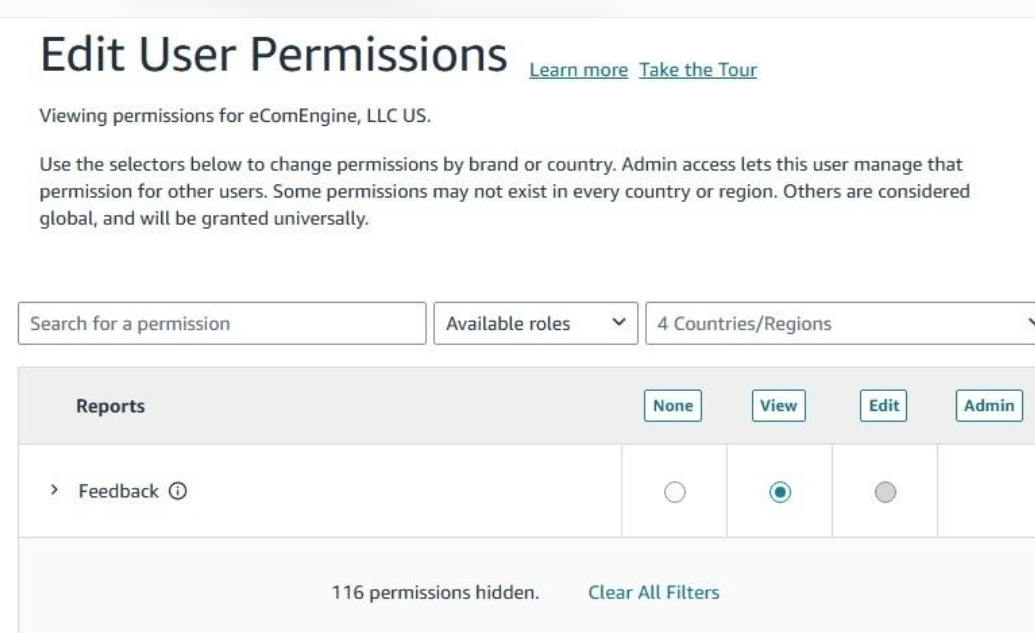
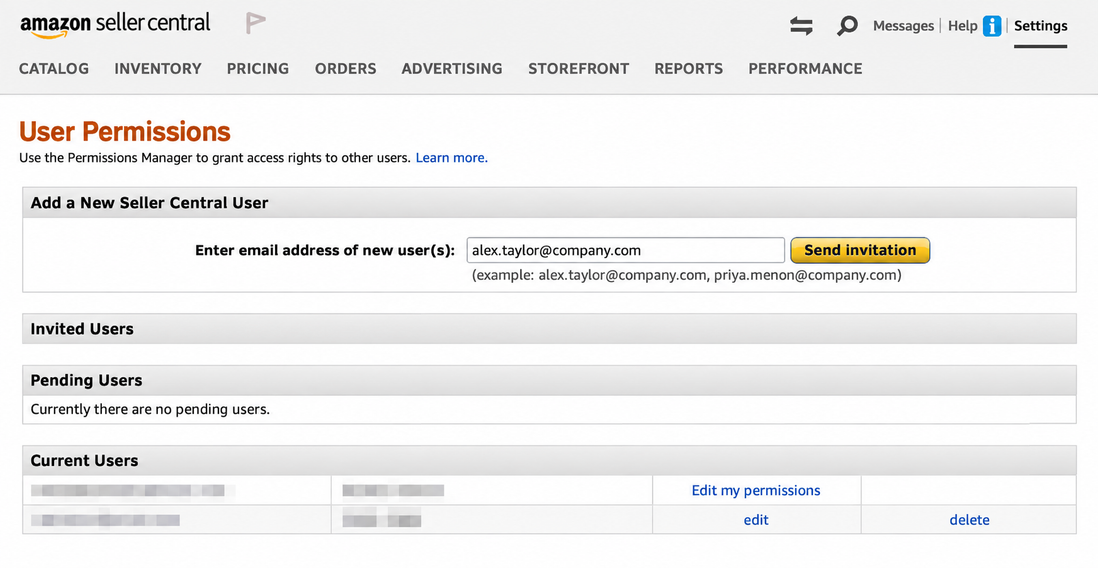
The primary account owner or authorized business administrator should retain control of account ownership, security settings, and user permissions. Agencies should generally work through their own named user accounts or approved authorization mechanisms rather than sharing the owner’s credentials.
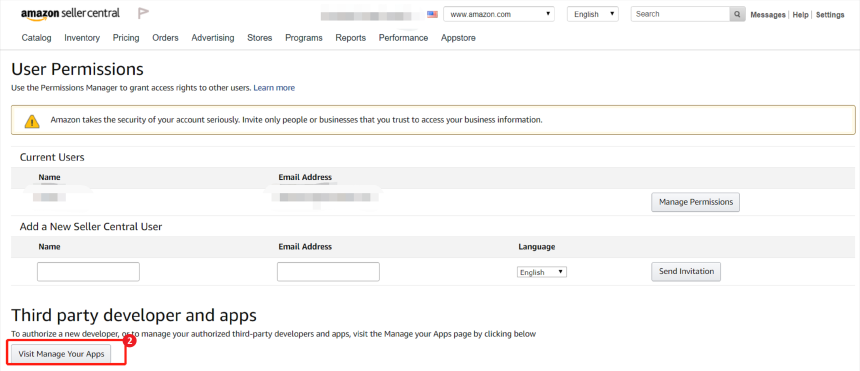
In Seller Central, the account owner adds secondary users under Settings > User Permissions, sends each person an invitation to their own email address, and assigns permissions function by function, such as View or View & Edit for inventory, reports, or advertising. Menu names can differ slightly by marketplace.
Advertising access is granted separately. A client hiring an agency to manage Sponsored Products campaigns invites the agency’s users from the Amazon Ads console, or links its advertising account to the agency’s manager account. The agency never needs the client’s personal login to do this work.
How Amazon’s Solution Provider Portal Changes Agency Access
Amazon’s Solution Provider Portal (SPP) is where approved service providers list their services, receive requests from sellers, and manage those engagements. For agencies, its main value is a documented, official relationship with clients instead of informal credential sharing.
Joining SPP does not grant access to any client account. Each client still approves access through Seller Central user permissions, Amazon Ads user management, or an authorized integration. Treat these as three separate mechanisms in your onboarding process, because each one is granted and revoked in a different place.
Permissions by Service (PPC, Listings, Full Management)
Access should reflect the work the agency has agreed to perform.
| Service | Typical access requirements |
| PPC management | Amazon Ads account access with campaign management and reporting permissions; billing visibility only if the agency manages budgets |
| Listings optimization | Product listing information, catalog and listing-editing permissions where needed, and relevant sales or business reports |
| Inventory management | Inventory reports, fulfillment information, and operational permissions required for the agreed workflow |
| Full marketplace management | A broader combination of advertising, listings, inventory, reporting, and operational permissions based on the contract |
| Analytics and auditing | Read-only reporting access wherever sufficient, plus the authorized data connections required by the analytics platform |
Follow the principle of least privilege. Give each user only the permissions needed to perform their assigned responsibilities. Document the reason for any broader access and review it when project requirements change.
Permissions to Never Ask For
Agencies should never request a client’s password, one-time password, or personal authentication code as a routine onboarding requirement. They should not ask clients to disable security protections or share credentials through email, chat, or spreadsheets.
Avoid requesting access to payment instruments, banking information, tax settings, or account-ownership controls unless a specific, legitimate responsibility requires an approved workflow. Even then, use the narrowest available authorization and explain the business need.
How Should Agencies Assign Account Access Across Different Teams?
Amazon agencies often have multiple specialists working on the same client account. Without clearly defined responsibilities, teams may request overlapping permissions or access information they do not need. A role-based access structure helps agencies maintain accountability while reducing unnecessary permissions.
For example:
- PPC specialists: Require campaign management permissions, targeting access, budget monitoring, and advertising performance reports.
- SEO and listing specialists: Need access to keyword research, listing performance data, and authorized catalog editing functions.
- Account managers: Primarily need client communication, reporting, and performance review access.
- Data analysts: Typically require read-only access to advertising, sales, and marketplace reports wherever possible.
Agencies should assign permissions according to each employee’s responsibilities rather than providing identical access to the entire team. Review these permissions whenever project responsibilities change, and remove access when employees no longer work on a particular client account.
Onboarding Access Checklist
Before beginning the audit, verify that the following steps are complete.
- Confirm the client’s legal business and authorized account owner.
- Document the services covered by the contract.
- Identify the Seller Central, Amazon Ads, and reporting access required.
- Request only the permissions necessary for those services.
- Complete authorization through the appropriate official workflow.
- Verify that each authorized user can access the required functions.
- Confirm that advertising, sales, and inventory data are available where applicable.
- Record outstanding permissions, blockers, and the person responsible for resolving them.
- Agree on the audit timeline and first reporting milestone.
How Do You Connect Client Data Without Sharing Logins?
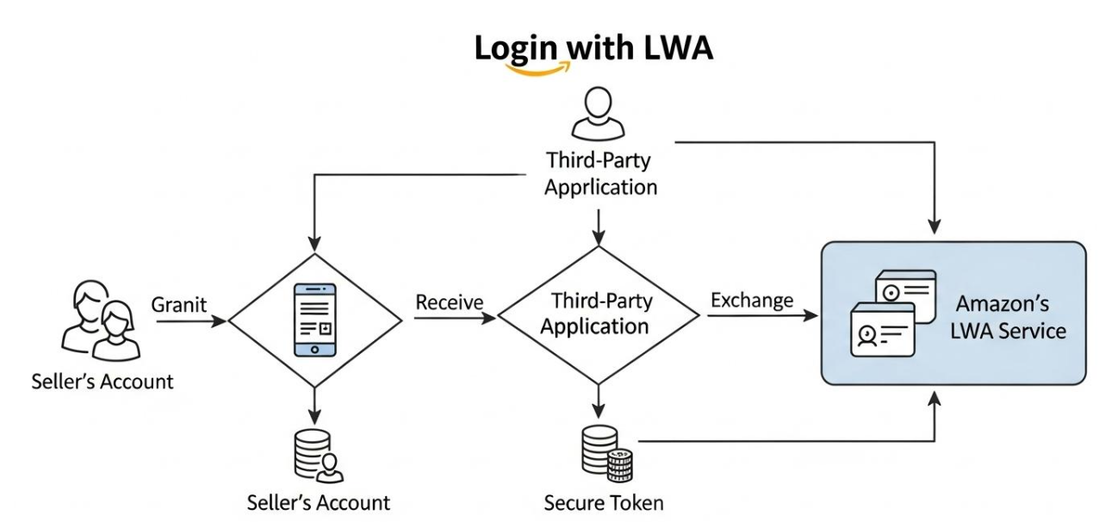
Once the required permissions are approved, connect the data sources needed for the engagement. Official integrations allow agencies to retrieve authorized advertising, sales, listing, and inventory data without asking clients to share their personal login credentials.
How Official Authorization Works (Selling Partner API and Amazon Ads)
The Selling Partner API (SP-API) supports authorized access to seller and vendor data, depending on the application’s approved roles and the seller’s authorization. Amazon Ads provides separate authorization mechanisms for eligible applications that need advertising account data.
These integrations are not interchangeable. SP-API supports eligible selling-partner workflows, while Amazon Ads authorization supports advertising-related data and operations. An agency may need one or both, depending on its services and the platform it uses.
During onboarding, identify the data required for the first audit. Advertising analysis may require campaign performance and search-term reports, while a broader marketplace audit may also need sales, inventory, and listing information.
Use the official authorization process supported by the relevant application. Confirm that the client has approved the correct account and that the integration has the required permissions. If data is missing, investigate authorization scopes, account selection, and report availability before requesting broader access.
What the Client Approves and How They Revoke It
Clients should understand what they are authorizing before approving an integration. This includes the application or service provider, the account being connected, the data or functions requested, and the intended use of that information.
Explain that the client can revoke access at any time, and that each type of access is removed in its own place. Agency users are removed under User Permissions in Seller Central, connected apps under Manage Your Apps, and advertising users or integrations in the Amazon Ads console.
Agencies should document the appropriate removal procedure for every connection they establish. They should also explain that revoking access can interrupt reporting, automation, or campaign management, so the client understands the operational consequences.
What Should Your First 7 Days Look Like?
A structured Amazon client onboarding process can follow a seven-day workflow, beginning with scope confirmation and access coordination. The timeline depends on how quickly the client approves the required permissions and makes account data available. The goal is not to change everything immediately, but to understand the account before recommending significant changes.
Days 1-2: Confirm Access and Connect Data
Start by verifying access to the accounts and reports required by the engagement. Test the permissions rather than assuming an invitation or authorization approval guarantees everything will work. Send access requests before Day 1 where possible, because the timeline depends on the client accepting them promptly.
Connect the approved data sources to the agency’s reporting or analytics platform. Check whether the correct marketplace, advertising account, and seller account are selected.
Validate the data for completeness and consistency. Confirm that reporting periods align, currency settings are correct, and key metrics are available. Investigate missing reports or discrepancies before concluding.
Confirm the client’s business context and engagement priorities. Document priority products, target markets, seasonal patterns, profitability constraints, advertising goals, and known operational challenges.
Use this information to guide the audit and distinguish genuine performance issues from decisions that reflect the client’s business strategy.
Days 3-5: Audit Ads, Listings, and Inventory
Once the data is validated, begin the account audit. Focus on findings that affect performance, profitability, and operational stability.
Day 3: Audit advertising performance. Review campaign structure, targeting, budgets, search-term performance, placement adjustments, and spend allocation. Identify campaigns with substantial spend but weak conversion performance, irrelevant search terms, or limited budget coverage.
Day 4: Review listings and conversion opportunities. Examine product titles, images, bullet points, pricing, ratings, and available listing-quality indicators. Look for inconsistencies between advertising keywords and product detail pages, as well as content gaps that could affect relevance or conversion.
Day 5: Examine inventory and operational constraints. Review available inventory, stockout risks, fulfillment considerations, and relevant sales trends. Advertising recommendations should account for product availability; increasing spend on an item that cannot remain in stock may undermine the plan.
Prioritize findings by potential business impact, confidence in the evidence, and implementation effort. Separate urgent issues from longer-term opportunities so the client can see what needs attention first.
Days 6-7: Deliver the Baseline Report and Plan
Use Day 6 to consolidate the findings into a baseline report. Include the reporting period, the metrics reviewed, important limitations, and the principal performance gaps.
For advertising, relevant metrics may include spend, sales attributed to ads, advertising cost of sales (ACoS), return on ad spend (ROAS), clicks, and conversions. For a broader view of advertising efficiency, include total advertising cost of sales (TACoS), which compares advertising spend with total sales. For broader marketplace management, include relevant sales, conversion, listing, and inventory indicators.
Avoid presenting metrics without context. A high ACoS is not automatically a failure if the campaign supports a deliberate launch or customer-acquisition strategy. Similarly, strong ROAS does not necessarily mean a campaign is profitable after product costs and other expenses.
On Day 7, walk the client through the baseline and propose a prioritized action plan. Identify immediate fixes, experiments to run, data gaps to resolve, and targets to monitor over the next 30 days.
What Should an Amazon Agency’s First Audit Report Include?
The first audit should give clients a clear understanding of their account’s current performance and the opportunities that deserve immediate attention. Rather than presenting raw metrics without context, agencies should organize their findings into a report that connects performance issues with actionable recommendations.
A comprehensive first audit report should include:
1. Account overview: Current sales, advertising spend, and relevant marketplace performance indicators.
2. Advertising performance: Campaign structure, search-term effectiveness, ACoS, ROAS, and budget allocation.
3. Listing performance: Product content quality, keyword relevance, and potential conversion-related issues.
4. Inventory considerations: Stock availability, fulfillment constraints, and operational factors that could affect advertising performance.
5. Priority recommendations: Immediate fixes, optimization opportunities, and experiments worth testing.
6. Performance benchmarks: Baseline metrics against which future improvements can be measured.
Each finding should be connected to a specific business outcome. Agencies should explain the issue, its potential impact, the recommended action, and the metric that will be used to measure improvement. A well-structured audit gives clients more than a snapshot of their current performance.
It establishes a measurable starting point for ongoing optimization and creates a clear direction for the next 30 days.
How Do You Manage Access Across Multiple Clients?
As an agency grows, access management becomes an operational discipline rather than a one-time onboarding task. Teams need a consistent way to separate accounts, review permissions, and remove access when engagements end.
Keeping Accounts Separated (Devices, Networks, Logins)
Maintain clear separation between client accounts, user identities, and business data. Use individual logins, approved access controls, and secure systems for storing reports and credentials.
Avoid copying one client’s information into another client’s workspace or sharing account-specific exports through unrestricted folders. Apply access restrictions to internal documents and analytics dashboards based on each employee’s responsibilities.
Clients often worry that an agency working on many accounts from one office could get their account linked to others.
The safest answer is to access each account only through the user invitations or integrations the client has granted, with every team member signing in as their own named user with two-step verification. That is the access method Amazon provides for agencies, and it keeps every action traceable to a person.
Workarounds such as VPNs or a dedicated device per client are not a substitute for proper authorization.
How Can Agencies Build a Centralized Client Access Register?
Managing access becomes increasingly complicated as an Amazon agency takes on more clients and expands its internal team. A centralized client access register helps agencies maintain visibility into authorized users, connected accounts, and third-party integrations without relying on scattered emails or individual spreadsheets.
A useful access register should capture the following information
| Field | Information to record |
| Client name | Business or brand name |
| Account type | Seller Central, Vendor Central, or Amazon Ads |
| Authorized users | Team members with access |
| Permission level | Assigned access and responsibilities |
| Integrations | Connected applications and data sources |
| Approval status | Pending, approved, or revoked |
| Last review | Date of the most recent access review |
Update the register whenever a new team member joins a project, a client’s service agreement changes, or an integration is disconnected. Agencies should also periodically verify that existing permissions remain necessary.
This creates a clear audit trail and turns periodic access reviews into a quick check rather than a search through old emails.
Offboarding Clients Cleanly
Offboarding should be as structured as onboarding. When an engagement ends, confirm the termination date, identify the access controlled by the agency, and coordinate any required changes with the client.
Remove agency users and team members who no longer need access. Revoke application authorizations where appropriate, disconnect integrations that are no longer required, and disable internal access to client-specific dashboards and documents when permitted by the contract and retention requirements.
Transfer agreed deliverables, document outstanding work, and confirm who will manage campaigns and reporting after the handover. Preserve records only where required by contractual, legal, or operational obligations.
Finally, mark the client’s entries in the access register as revoked and record the completion date.
How Does SellerApp Speed Up Agency Onboarding?
SellerApp shortens the path from authorization to first audit by bringing advertising and marketplace data into one workspace. Instead of downloading and merging separate reports, agencies can connect a client’s account through supported authorization and start the audit with data already organized.
This is how it fits into the first week
Days 1-2: Connect the client’s advertising and seller data, then confirm that the correct marketplace and accounts are selected.
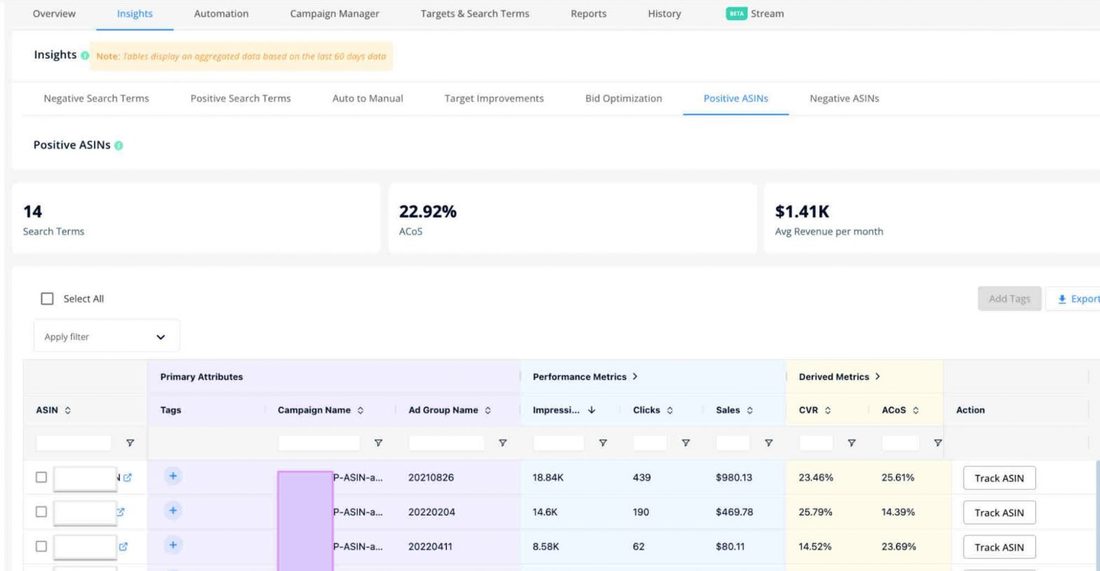
Day 3: Use PPC Insights to surface negative and positive search terms, bid optimization opportunities, and auto-to-manual targeting candidates, without sorting search-term reports by hand.
Days 4–5: Review ASIN-level metrics such as clicks, sales, conversion rate, and ACoS to find products where ad performance and conversion don’t line up.
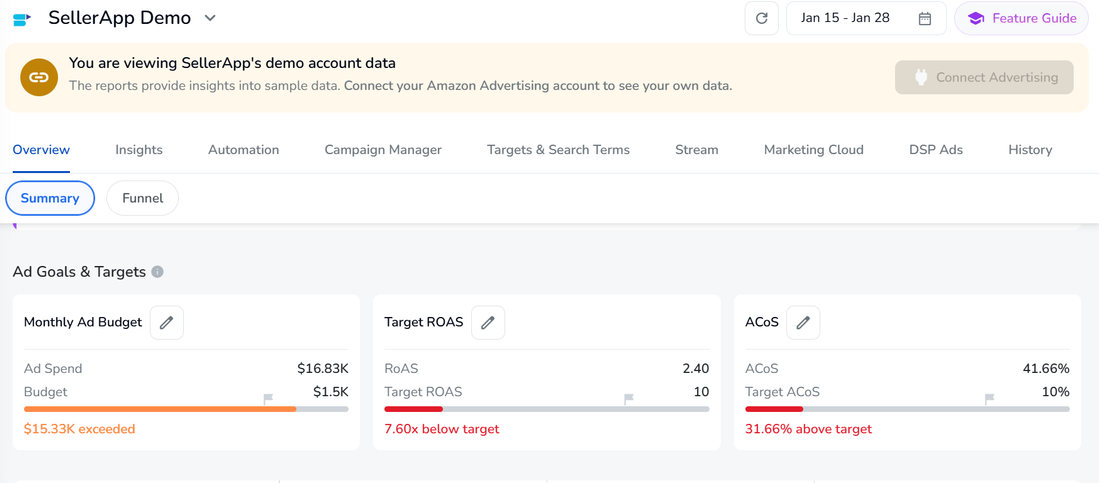
Days 6–7: Use SellerApp’s reporting tools to consolidate baseline metrics, including advertising spend, ad-attributed sales, ACoS, ROAS, TACoS, clicks, and conversions. Prepare a client-ready report highlighting key performance gaps and opportunities for the walkthrough.
Final Thoughts: Faster Onboarding Wins Clients and Keeps Them
Successful Amazon client onboarding requires more than collecting account access. Agencies need a clear understanding of the client’s goals, the right permissions, reliable data connections, and a structured audit process. A repeatable workflow helps teams reduce administrative delays, protect client accounts, and identify performance opportunities early.
By the end of the first seven days, the client should have a clear view of current account performance, the most important opportunities, and the agency’s recommended next steps.
Ready to streamline your Amazon agency workflows? Explore SellerApp to simplify marketplace analysis, gain actionable performance insights, and manage your clients’ growth with greater efficiency.
Frequently Asked Questions
A structured Amazon client onboarding process can be completed within seven days. This includes securing account access, connecting data sources, auditing advertising campaigns and listings, and preparing an initial performance report. Using an analytics platform like SellerApp can help agencies streamline data collection and accelerate the first audit.
An Amazon agency should request permissions based on the services covered by the contract. PPC management typically requires Amazon Ads account access and campaign reporting permissions, while listing optimization may require catalog editing access. Agencies should use individual logins and official authorization workflows instead of requesting client passwords or OTPs.
Yes. Agencies can use centralized Amazon analytics and account management platforms to organize performance data across multiple client accounts. SellerApp helps agencies bring marketplace intelligence and account analysis into a more organized workflow, reducing the need to manually compile reports across different accounts.
You can grant access through Seller Central’s user permissions or other supported official authorization mechanisms. Assign individual users the permissions required for their responsibilities, enable multifactor authentication where available, and avoid sharing your primary account credentials. You should also periodically review and revoke unnecessary permissions.
The first audit should cover Amazon PPC performance, campaign structure, search-term performance, listing quality, inventory availability, and relevant sales metrics. Agencies should also review ACoS, ROAS, advertising spend, and conversion performance to identify immediate optimization opportunities and establish a baseline for future reporting.
Agencies can reduce onboarding time by standardizing access checklists, using secure data integrations, assigning role-based permissions, and automating performance reporting wherever possible. A centralized analytics workflow such as SellerApp can help teams organize account intelligence, identify performance gaps, and prepare client audits more efficiently.
The right Amazon analytics tool should support reliable data analysis, advertising performance monitoring, marketplace intelligence, and efficient reporting across client accounts. SellerApp offers marketplace intelligence and account analysis capabilities that help agencies evaluate performance and identify growth opportunities. Explore SellerApp to see how it can support your agency’s Amazon account management and auditing workflows.