

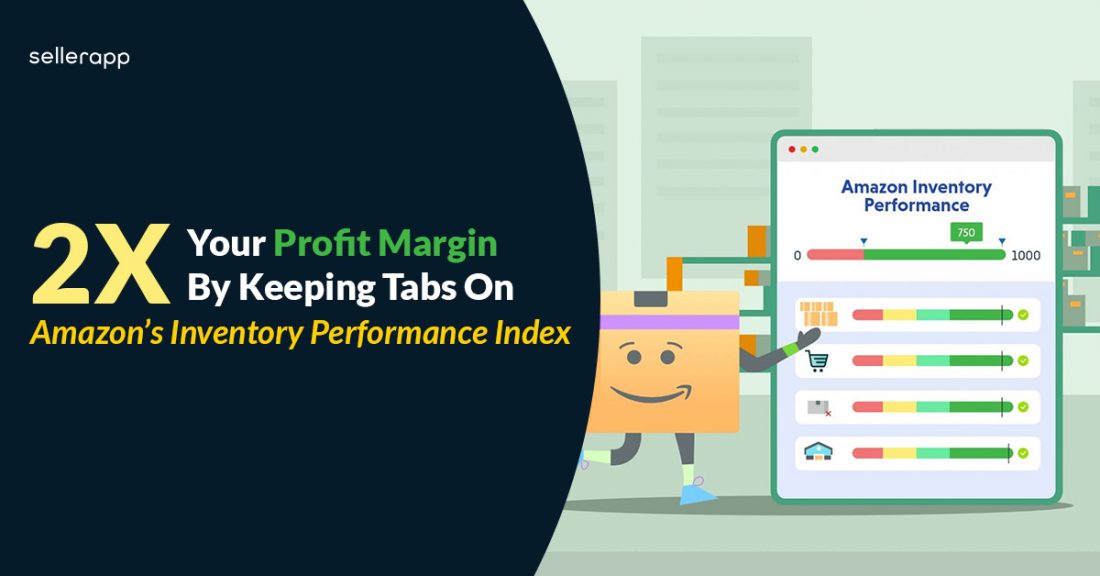
Inventory Management is one of the most crucial factors behind an FBA seller’s success. It can make or break their Amazon business. By learning effective inventory management techniques, one can reduce storage fees, inventory costs and improve their overall profit margin.
To help sellers measure the health of their inventory, Amazon has developed a metric known as Amazon Inventory Performance Index(IPI) – it is based on how well you can generate sales by stocking trending products and optimizing on-hand inventory at the same time.
So, before we jump right into the ideal Amazon IPI score 2026 and its threshold, let us first understand what exactly the IPI score is, how it is calculated, and what affects your IPI Score performance. So, let’s get started-
Topics to be covered:
- What is an Inventory Performance Score?
- How to check Amazon’s IPI score?
- How is Amazon IPI calculated?
- Amazon IPI threshold
- Factors affecting IPI Score
- What happens when your IPI score goes below the threshold?
- How to improve Amazon’s IPI score?
IPI was introduced in 2018 to gauge inventory levels and set stock limits to help novice Amazon sellers improve their business trajectory by identifying the areas of improvement in inventory management.
According to Amazon, the Inventory Performance Index measures your inventory health and profits, it also takes into consideration how well you fix your product listing problems such as keeping popular products in stock and removing unavailable products from your listings.
Inventory health is determined by the number of units present your inventory has – having very low units of inventory leads to out-of-stock items and lost sales. On the other hand, having excess units of inventory leads to higher holding and storage costs.
The first step in setting a standard on Amazon sellers’ Inventory Performance is to analyze the IPI score. It ranges from 1 to 1000 – the more, the better.
Amazon’s IPI Score is beneficial to both sellers and Amazon. Effective management of inventory will reduce lost sales and inventory holding costs for sellers. This further allows Amazon to optimize its vast warehouse network as sellers stock the inventories with the right products in the right quantities.
How to check Amazon IPI Score?
You can view your current score in your Inventory Dashboard within Seller Central. Make sure you have an active Seller Central account to access your IPI Score.
Your IPI consists of its own dashboard. To view it-
Log in to Seller Central.
Click on Inventory and select Inventory Planning from the drop-down menu.
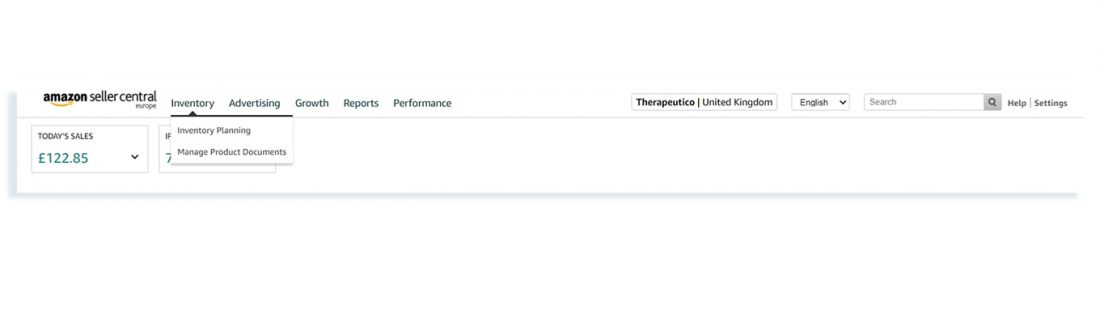
Click on the Performance tab to view your IPI score.
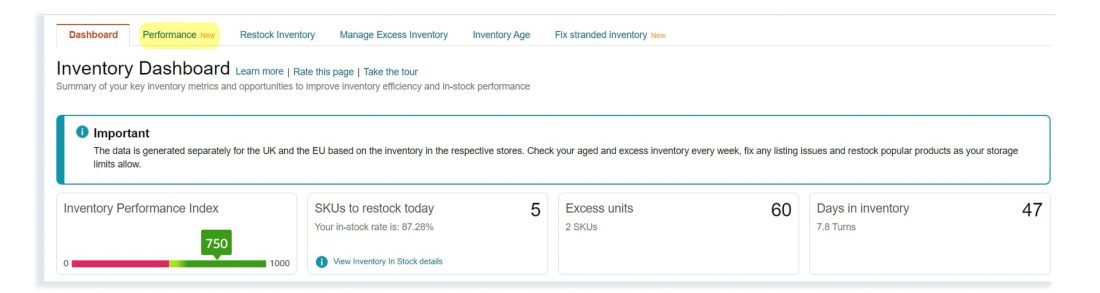
Click on EXPAND STORAGE MONITOR tab at the bottom of the page.
On the Inventory Performance Dashboard, Amazon facilitates sellers to increase their IPI score with the help of these three steps –
- Excess Inventory recommendations for optimizing holding, storage, and carrying costs.
- Restock suggestions for improving in-stock rate.
- Provide actionable insights on stranded inventory items to ensure the availability of product listings.
Your IPI score is updated weekly – every Monday, based on your latest 3-months performance stats.
How is Amazon’s IPI Calculated?
The formula for calculating IPI scores is still a secret. When Amazon was asked how they calculate the IPI score, they responded “The calculation is proprietary and will not be published, just as we do not publish the Buy Box algorithm.”
Amazon clearly mentions that “IPI points are not deducted for running out of stock”. Therefore, out-of-stock items will not negatively impact your IPI score.
Stranded inventory may impact your IPI score, but sellers can fix this problem easily. Therefore, simply put, the key factors that increase your IPI Scores are –
- Reducing excess stock at Amazon warehouse
- Improving your sell-through rate.
According to Amazon, “The best way to increase your IPI score and minimize your FBA storage fees is to reduce unproductive inventory and keep your product inventory at lean levels while ensuring you have enough on hand to minimize lost sales.”
Amazon IPI Score Threshold 2026
Amazon sets a minimum IPI score threshold that all sellers must have to avoid high storage costs. If your score drops below that threshold, Amazon will apply storage limits on your seller central account until any further improvement on your inventory levels.
Amazon’s Inventory Performance Index (IPI) minimum threshold currently sits at 400, reduced from 450 in previous years. Sellers falling below this threshold face storage limits and restrictions on new inventory shipments. In mid 2025, Amazon tightened capacity limits further, reducing storage allowances from six months of forecasted sales to five months, and reactivated ASIN-level restock limits for individual SKUs.
This means sellers may be capped on how many units of a particular product they can send to FBA, even if they have overall account capacity available. These changes emphasize Amazon’s push for sellers to maintain lean, fast-moving inventory.
Sellers with an IPI score below 400 are now subject to storage limits and restrictions on new inventory shipments. Maintaining an IPI above 400 is considered a healthy score, helping FBA sellers avoid penalties and storage restrictions. Amazon updates your IPI score weekly based on your rolling three month performance data, giving you time to improve before storage limits take effect.
However, Amazon no longer offers unlimited storage even for high-performing sellers. Since March 2023, Amazon switched to monthly FBA capacity limits measured in cubic feet, with allocations based on your IPI score, sales velocity, and inventory efficiency.
In 2025, these limits tightened further to approximately five months of inventory coverage, and Amazon reactivated ASIN-level quantity restrictions alongside account-wide caps. The higher your IPI and sell-through rate, the more capacity Amazon allocates, but the days of unlimited storage are gone.
If you score above the threshold of 400 during two consecutive score check weeks, you will have access to unlimited storage space for each storage type (footwear, apparel, aerosol, oversize, standard-size, flammable).
Factors affecting IPI Score
Even though Amazon does not declare the formula for commuting IPI score, it does tell us what are the factors that influence your IPI score and what you can do about it.
Currently, there are four factors that influence your IPI score –
- Excess inventory % provides you insights into your excess stock unit proportion.
- Stranded inventory % refers to the number of units that are not actively listed on Amazon, this further leads to excess storage costs.
- FBA sell-through rate refers to the number of units sold that are in stock.
- FBA in-stock rate indicates how well you manage your in-stock replenishable items.
| Excess Inventory % | Stranded Inventory % | Sell-through Rate | In-Stock Rate |
|---|---|---|---|
| Excess units X 100 / Total units | Inactive listing units X 100 / Total units | Units sold / Shipped over 90 days/ Total units in stock available from the past 90 days | ST1 = Stock Time for SKU 1 ST2 = Stock Time for SKU 2 SV1 = Sales Velocity for SKU 1 SV = Sales Velocity for SKU 2 [(ST1 * SV1) + (ST2 * SV2)] / (SV1 + SV2) |
Excess Inventory
One of the biggest aspects that influences your IPI score is your excess inventory. As it is already known that Amazon prefers to be the fulfillment center for sellers and not the storage space facilitator. Therefore, its first priority is to move inventory items from warehouses to customers’ doorsteps quickly.
Amazon declares an item to be “excess” or “overstock” when the proportion of FBA inventory units exceeds a 90-days supply, depending on its demand prediction.
A smart step would be to maintain an inventory of approximately 30-60 days’ worth of supply to prevent overstocking. Amazon provides sellers with actionable insights into product demand and restocks on their Inventory Dashboard.
For example, if your inventory stock is way more than what it should be, Amazon will tell you the number of excess units your inventory has and what you must do with that excess inventory.
Amazon also provides you a detailed insight on three other metrics to further understand your excess inventory condition:
- Excess Units: The number of units that incur excessive storage fees and yield no profits. It is determined by the customer demand for that product and its cost of production.
- Estimated Total Storage Cost: Total storage cost to be incurred by you over 3 years if you do not balance your inventory levels now and let it stay idle in the fulfillment center.
- Reduce Excess Inventory: This displays how many of your SKUs have excess inventory units.
Related Post: The 2026 Guide to Removing Inventory From Amazon FBA
FBA Sell-Through Rate
Your sell-through rate is based on the number of units sold and shipped over the past 90 days from your total inventory stocks available at the fulfillment center from the past 90 days.
Amazon’s inventory dashboard also helps sellers by providing actionable insights into how you can improve your sell-through rate and reduce long-term storage fees.
Click on “Improve sell-through” to land on the “FBA Inventory Age” page.
Here, you can find each of your products with a low sell-through rate, sales rank, sales over 90 days, available inventory, inventory storage duration, and approximate long-term storage costs.
You will also find proper recommendations on how to improve your low sell-through rate and reduce long-term storage costs.
Stranded Inventory
Stranded inventory refers to the number of units stored in your inventory with no active offer for that item due to listing problems. This means that customers will not be able to buy that item, causing the seller to incur higher storage fees and lost sales.
The good news is this is not a very grave issue and sellers can resolve it easily, as Amazon will provide a detailed overview of your stranded inventory units and recommendations on how to fix them.
If you have stranded inventory, you can view a Warning button that says “Fix listings” in your inventory performance dashboard.
If you select “Fix listings,” it will navigate you to the “Fix stranded inventory” page. Here, Amazon will display all the stranded inventories, indicate the number of units stranded and if they have an auto-removal date, it will show the cause of the stranded inventory, and an option to relist them.
In-Stock Inventory
Amazon monitors your performance depending on how effectively you stock popular ASINs. While this metric does not impact your IPI score negatively, it can surely bring about some improvements to your score.
Amazon takes into account the amount of time your listings have been in stock during the past 30 days, with additional importance given to products that have been purchased more over the past 60 days. If you ensure a high in-stock inventory is maintained, you can reduce your lost sales opportunities too.
What happens when your IPI score goes below the threshold?
If your Amazon IPI score drops below the minimum threshold of 450, you will be subject to inventory storage limits. You will be able to find your store and new restock limits by navigating to “Inventory performance” or “Manage FBA shipments.”
If your Inventory Performance Index falls below 400, Amazon immediately restricts your ability to send more inventory and may impose storage utilization surcharges of up to $10 per cubic foot on excess inventory. Unlike the old quarterly review system, enforcement is now sharper and more immediate.
Sellers dipping below 400 face capacity restrictions right away rather than waiting for the next quarterly review. Additionally, as of April 2025, Amazon introduced a Storage Utilization Surcharge that kicks in if you hold more than 26 weeks worth of inventory in FBA, and long-term storage fees now apply at 271 days instead of 365.
The penalties are usually severe and may incur hefty storage fees and lead to lost Amazon sales, hence, it is crucial for you to monitor your inventory performance index (IPI) frequently.
How to improve your IPI Score?
There are a few general recommendations on improving your IPI Score. They are:
Improve your sell-through rate
If you are an Amazon seller, you must maintain a 90-day sell-through rate that gives you a heads-up in the IPI graph with the “green” color mark.
You can improve your sell-through rate by running sponsored ad campaigns, enhancing your listing strategy, improving your keyword targeting, and conducting detailed product research to find the most trending products that resemble your listing category.
Reduce excess inventory
Remove items that are no longer in demand or yield you any profits. Go to the “Manage Inventory Page” in your inventory dashboard to find recommendations on how you can tackle excess inventory.
Avoid long-term storage fees
Remove any inventory within 365 days of its sitting in Amazon’s fulfillment center. If your inventory sitting duration has reached beyond 365 days, you will be subjected to hefty long-term storage fees. You can make a removal order or even allow Amazon to get rid of your inventory.
Stay on Top of Listing Issues
If you have stranded inventory or any other listing problems that hinder your sale, it’s time to get proactive with your listings. You must:
- Monitor your stranded inventory percentage
- Optimize inventory levels
- Reduce excess inventory over a 90-days supply period
- Prioritize your popular inventory items – keep them between 30-60 days supply period.
- Track your inventory dashboard frequently.
Related Post: How to Leverage Amazon Inventory Reports – Step-By-Step Guide
Conclusion
If you can optimize your inventory levels well, nobody can stop you from increasing your profit margins. If you are a new seller and cannot predict the demand properly, send in a small proportion of FBA inventory to analyze your listing’s sales velocity on Amazon.
It takes a good amount of time and experience to finally understand the right amount of inventory units essential for each of your ASINs. Pay attention to the actionable insights that Amazon provides to prevent overstocks and reduce hefty storage costs.
Additional Read :
The Amazon Wish List – Everything You Need To Know
Amazon Sponsored Products vs. Sponsored Display Ads