

Your Amazon conversion rate tells you if all those clicks on your listing are actually turning into sales. That’s a metric worth paying attention to because you’ve put the effort into getting the traffic, optimizing your listings, and showing up in SERPs.
If shoppers keep bouncing instead of buying, there’s a clear indication that something’s off, and without knowing why, you’re stuck watching potential revenue walk out the door.
This guide will walk you through what a strong Amazon conversion rate looks like, how to calculate it, what those numbers really mean (especially Amazon conversion rate by category and how PPC ad campaigns help), and most importantly, how to actually improve it.
Because traffic means nothing if it doesn’t lead to sales. So, keep reading to know how to improve the conversion rate on Amazon.
Amazon conversion rate tells you how often people buy after viewing your product. The higher the rate, the better your product is at getting people to hit “Buy Now”.
It not only indicates how appealing your listing is to them but also how it directly impacts where you land on Amazon’s search results.
While attention spans are limited and product options are endless, this metric becomes a weighing scale of your marketing efficiency, be it via PPC ads or organic marketing.
The conversion rate shows how much your target audience likes what you offer, thus signaling Amazon’s A9 and A10 algorithms that you must be seen by more buyers.
So, it considers you more relevant to the search queries, ultimately placing you higher in the Amazon SERPs, anticipating quick conversion.
Most shoppers come to Amazon with high buying intent. Even when browsing, they’re typically deciding between what to choose. By signing up for the Amazon FBA program, you’ll have a Prime badge slapped on your product listings, which can positively influence a buyer who’s on the fence.
But before you start popping the champagne over a high conversion rate, keep this in mind: percentages don’t always tell the full story. One sale from one visitor? That gives you a 100% conversion rate, so, always look at volume alongside percentages.
Look at the number of conversions and the amount of traffic together to get the full picture. This we will explain in our following segments.
Amazon conversion rate reflects the true health of your product listing.
If 100 people click on your product organically and end up on your product page, and 10 out of those 100 people complete a purchase, that’s a 10% Amazon conversion rate for the product.
To calculate it, you just divide the number of orders by the number of visits to your listing and multiply by 100.
Here’s the formula simplified:
Conversion Rate= (Orders ÷ Sessions) × 100
Similarly, your Amazon PPC conversion rate follows the same formula: (Number of orders from ads ÷ number of ad clicks) × 100.
Once you have the Amazon conversion rate formula, monitoring it becomes easy. Simply go to Seller Central and click on ‘Menu’ followed by ‘Reports’, you’ll get Detail Page Sales and Traffic, and you’ll see “sessions” and “order item” columns.
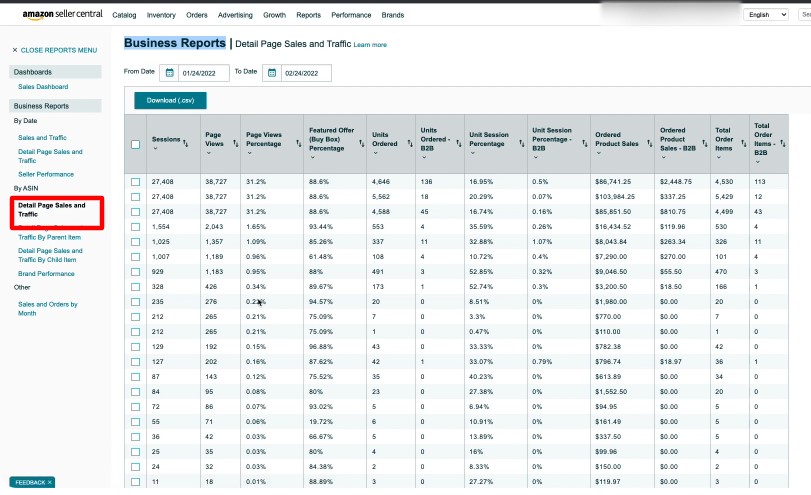
Use the numbers to plug into the formula and track your performance. Easy peasy!
Evidently, high conversion rates usually mean your listing is successfully optimized, and your images, title, reviews, and price are convincing enough for shoppers to buy.
Amazon conversion rate is an incredibly useful indicator, but when taken at face value, without looking at the full context, it can be incredibly misleading.
If all your traffic is coming from a branded search like “GlowRx Vitamin C Serum,” of course, people are converting. Now, contrast that with broader searches like “best face serum”, lower conversion, but way more opportunity for discovery. That’s why looking at Amazon conversion rate in isolation can be misleading.
The number’s only meaningful when you understand the story behind it.
Let’s break down what really drives this metric and how you should interpret it to make better business decisions.
A 12% conversion rate over 50 sessions tells you very little. You will keep on wondering what is a good conversion rate on Amazon for your product if you don’t have a timeframe long enough to hit the accuracy.
It’s easy to get excited or discouraged when you see a sudden spike or drop. Maybe your listing just hit 10% and you’re ready to celebrate. But before you react, ask yourself this:
How many people actually visited your listing? Let’s say 1 person out of 10 buys. That’s a 10% conversion rate. But what if the next 10 visitors don’t convert? Now your rate is cut in half. Did something go wrong? Probably not. It’s just too soon to tell.
When you zoom out and look at hundreds or better, thousands of sessions, that’s when the real story starts to take shape. The ups and downs start to smooth out, and you begin to see what’s consistently working (or not working) in your listing.
So, when dabbling with Amazon conversion rate, don’t focus on daily fluctuations. Check your Amazon conversion rate over weekly or monthly intervals. Incorporate strategy changes based on patterns noticed over a longer period.
Even if your product is excellent, competition has a direct impact on your Amazon conversion rate. When shoppers have more options, they’re more likely to fiddle around comparing, second-guessing, or they may ultimately leave without buying.
The presence of strong competitors doesn’t mean your product is failing and you’re going to be cursed with a poor conversion rate. It just means your listing has to work harder. Use this opportunity to come up with better images, stronger copy, enhanced brand content, and social proof (like reviews and ratings) can all help tip the scale in your favor.
If you’re discounting mindlessly to get sales or overspending on ads just to maintain that Amazon conversion rate, your profitability will greatly suffer, affecting overall ROI.
Conversion rate is only reliable if it contributes to sustainable growth. A 9% conversion rate with solid margins is far better than a 15% rate that drains your budget.
Not all products are created equal, and neither are their Amazon conversion rate by category. That’s why it’s crucial to look at your numbers in context of your category.
So if you ask, ‘Is a 7% conversion rate good?’, it will completely depend on what category the product belongs to, CPC, and market size, so you can’t really judge a certain percentage across several categories. A 7% conversion rate might be underwhelming in one niche but phenomenal in another.
While the average Amazon conversion rate of a collagen boosting night cream (from Personal Care category) may stand at 13–18%, the same for a collagen supplement powder (from Health & supplement) category may be at 5%.
Some categories naturally attract high-intent shoppers, where people who know exactly what they want and are ready to hit “Buy Now.” Others invite more browsing, research, and comparison before the sale ever happens. So, if you understand the context behind your numbers, you’ll make smarter Amazon conversion rate optimization choices.
When someone types in “organic turmeric capsules,” they know exactly what they’re looking for. Maybe they’re dealing with joint inflammation or are concerned with boosting immunity, but either way, they’re on a mission. They probably already have a product type or brand in mind, and they’re ready to hit “Add to Cart.”
That kind of search is what we call high-intent search. Health & Personal Care products often show strong conversion rates because shoppers in this category are looking to solve a real problem, fast.
Now compare that to someone browsing “boho curtains for bedroom.”
They’re most likely exploring styles, checking sizes, scrolling through reviews, maybe even saving a few options to come back to later, all of it without any urgency in purchasing. That’s called a low-intent browsing session, and categories like Home & Decor or Fashion tend to see lower, more fluctuating conversion rates as a result.
So when you’re analyzing your Amazon conversion rate, always ask:
Am I selling a necessity or a nice-to-have? A grab-and-go item or a decision-heavy purchase?
That answer alone will help you set more realistic expectations and make smarter, more strategic optimization choices.
So, benchmark yourself against your own category and even better, against your own product’s past performance. This brings us to understanding what a good Amazon conversion rate is.
Broadly speaking, a 13–15% conversion rate is considered excellent for Amazon listings in general. At that level, your product page is likely firing on all cylinders, your pricing is competitive, reviews are working in your favor, your content is clear, and your branding resonates. It means you’re attracting the right traffic.
Note: If your click-through rate (CTR) is high but conversions are low, that’s a red flag.
We’ve already talked about how the Amazon conversion rate by category can swing dramatically. So when someone asks, “What is a good conversion rate on Amazon?”, the only honest answer is one that performs above the average for your category and one that leads to profitable growth.
A 12% conversion rate in Home & Kitchen might be strong, while the same figure in Grocery or Health could suggest room for growth. Some categories naturally attract high-intent shoppers who are ready to click “Buy Now.” Others require more consideration, more comparisons, and more time.
That’s why every Amazon conversion rate optimization strategy should begin with category-specific benchmarks. It’s the only way to make informed, data-driven improvements.
For a quick Amazon conversion rate benchmark breakdown, refer to this:
| Conversion Rate | Inference |
|---|---|
| Below 8% | Poor. Something’s off. Maybe weak images, unclear copy, or misaligned PPC traffic. |
| 8–12% | Average. Performing decently, but likely some low-hanging fruit for improvement. |
| 13–15% | Strong. Well-optimized listing, aligned audience, good pricing. |
| 16%+ | Excellent. But don’t stop here. If you’re not driving enough traffic, your potential might still be capped. |
Here’s a word of caution if you’re planning for Amazon conversion rate optimization.
Even a high conversion rate can be misleading if it’s not paired with volume. If you’re converting 20% of visitors but only getting 50 clicks a week, you may not be maximizing your reach. This is where Amazon advertising conversion rate and ad strategy come into play.
A good conversion rate for Amazon can also mean Amazon PPC conversion!
So, a good Amazon advertising conversion rate typically falls between 8–12%, but again, it varies based on product, category, keyword targeting, and how aligned your ad is with shopper intent.
However, a high ad spend won’t save a weak listing. Which is why Amazon conversion rate optimization should always be discussed prior to investing more dollars into ad campaigns.
A low Amazon PPC conversion rate (say, 3–5%) often means you’re paying for traffic that isn’t relevant or ready to buy. This could be due to broad targeting, poor keyword alignment, or weak creatives. On the other hand, a very high PPC conversion rate (15%+) might signal you’ve dialed into a profitable niche, but also that you may be leaving reach on the table by not scaling spend.
The sweet spot? Balance. Your ads should bring in enough new visitors to grow, even if your conversion rate dips slightly. Especially, because higher volume with sustainable efficiency leads to higher total profit.
We’ve already established that Amazon conversion rate by category plays a huge role. Before we get into how to improve Amazon conversion rate, let’s take a look at what can hinder conversion in the first place.
If you’re getting a healthy number of clicks but not seeing sales, it’s not a conversion issue; it’s a relevance issue.
Here’s what usually causes it:
This directly impacts your Amazon advertising conversion rate. If you’re running Sponsored Products without tightening your targeting, you’re paying for traffic that was never going to convert.
What to do next?
If your title, images, and bullets don’t build confidence in the first 5 seconds, you’ve already lost the scroller. Too many listings explain the product, but they don’t sell it. They lead with specifics, not benefits. Never assume the shopper will perceive from the features, instead, show them why it matters.
What to do next?
Front-load value in your title. Use images that visually answer “Why this one?” before a shopper even reads a word. Add A+ Content that tells the product story like a brand, not a brochure.
If you’re sitting at 3.9 stars with 20 reviews and your competitors have 4.4 with 1,000+, it’s not even a contest. The biggest red flags that kill conversions are sparse reviews, recent 1- or 2-star feedback with no response (showing you don’t respond to complaints or incorporate user feedback), and missing images from real buyers.
In categories where purchase anxiety is high, health, beauty, electronics etc. social proof isn’t optional.
What to do next?
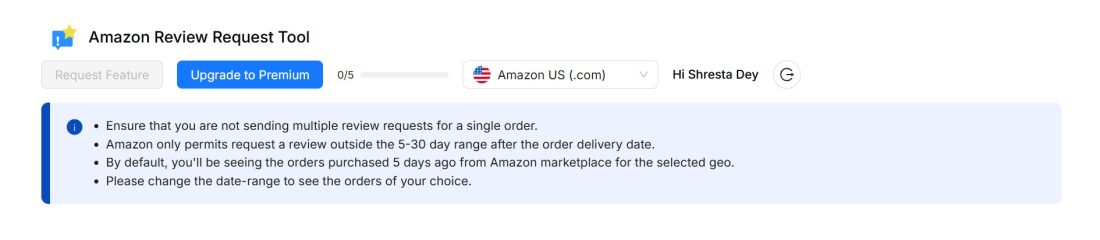
Use SellerApp’s Review Request extension tool.
If your listing looks like a $15 product and you’re asking $24.99, there’s friction, which eventually kills momentum. If you’re asking more, show why they need to pay more for it. If your listing doesn’t visually justify your price in the first scroll, they’re already back-clicking to the next cheapest thing.
What to do next?
Use your secondary images to build price justification. Compare your materials, packaging, durability, all of it visually. Test how people respond to your price fluctuations. Run discounts, strikethroughs, and coupons.
Let’s say your listing is converting at 22%. But if you’re only getting 30 sessions a week, you’re not seeing a revenue boost. In this case, your Amazon PPC conversion rate may actually drop slightly when you scale, and that’s okay. The goal is to hit sustainable margins.
What to do next?
Start scaling ad spend gradually. Layer in new long-tail keywords. Expand to complementary keywords or cross-niche variations. Be okay with a slightly lower Amazon conversion rate if it means growing total sales and market share.
You’ve got great content. Your pricing’s solid. Traffic looks healthy. But your Buy Box is missing. Shipping takes a week, so inventory isn’t steady. The “Only 1 left in stock” shows up constantly. This silent friction turns warm shoppers into cold exits.
What to do next?
Operational alignment is part of Amazon conversion optimization which we often overlook.
Let’s talk about how to improve conversion rate on Amazon and how to optimize for growth that lasts, not spikes that fade.
A truly optimized listing that boosts your Amazon Conversion Rate meets three conversion criteria:
Here’s how to build a listing that checks all the boxes.
Contextualize your product via lifestyle images. Think of lifestyle imagery as the bridge between product and purpose.
It helps the shopper instantly visualize:
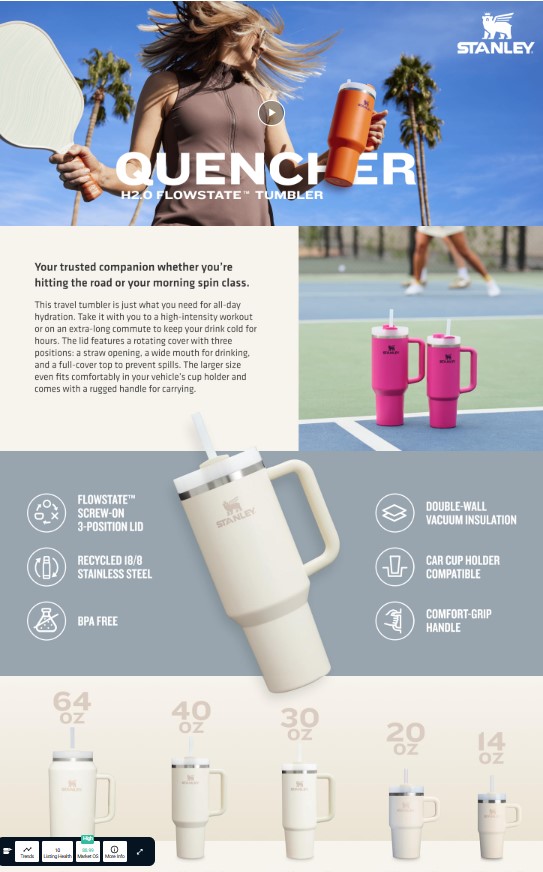
Add infographics to break down complex features of the product and answer pre-purchase questions visually. Like how to assemble a product or how to clean it.
Include at least one demo video for better understanding of usage. This not only increases Amazon conversion rate but lowers return rate. Videos can increase conversion rates by up to 80% on mobile, especially for electronics, beauty, and tools.
Let the strongest differentiator be in the title. Format bullets for easy skimming with outcome-based phrasing and objection-handling baked into the copy. How?
Focus on outcomes. For a bullet point describing a tattoo practice sheet, instead of “Made with high-grade silicone” you can write “Feels like real skin – high-grade silicone mimics the texture and resistance of human skin to improve tattoo precision.”
Instead of “Includes app integration.” within bullets, you can write “Connects in seconds, syncs instantly with Apple Health and Google Fit—no extra setup or tech knowledge needed.”
Use A+ modules to highlight:
Use-case scenarios.
Value stack comparisons.
Trust-building proof (certifications, accolades, guarantees etc.)
A+ content increases average order value by allowing upsell opportunities and cross-ASIN awareness. A+ lets you display comparison tables across your product range (e.g., different pack sizes, flavors, or premium versions). Other than communicating about your entire product range, here you get an option to upsell or even cross sell, if you correctly present it.
By analyzing reviews, you’ll discover real-life terms, unexpected use cases, and emotional triggers that your team might overlook. Review-inspired copy connects more naturally with buyer intent. It also boosts keyword relevance, and increases conversion rate.
Respond to negative reviews publicly to show accountability and presence.
Strong listings are the foundation of all Amazon conversion rate optimisation.
Pricing on Amazon is psychological. So, if you underprice, you lose credibility. If you overprice, you in a way fuel bounce rate.
Here’s how to fine-tune it:
Let’s say you sell a premium yoga mat priced at $59, while competitors are offering basic ones for $25–$30. Buyers may perceive your product as expensive unless they can visually understand why it costs more. In the product listing, mention Your mat: “6mm eco-certified TPE | Sweat-proof | Anti-tear core” so that it visually contrasts quality, anchoring your price in durability and comfort.
What is a good conversion rate on Amazon at $24.99 may not hold at $28.99, especially in categories with known anchors (think pet supplements, phone chargers, or grooming kits).
Promotions shouldn’t train shoppers to wait for discounts, they should nudge already-interested buyers over the line. So, use these responsibly, or let a seasoned Amazon PPC agency such as SellerApp assist you.
You can use:
Make sure you monitor your Amazon advertising conversion rate before, during, and after promotions. This reveals whether you’re converting more, or just cheaper.
Let’s say two listings are identical, but one delivers in 2 days and the other in 5. Which one gets the sale?
FBA isn’t just about convenience. It signals legitimacy. It removes one more worry from the shopper’s mind.
This becomes especially critical when:
If you’re running FBM, transitioning even 1–2 hero SKUs to FBA could move your conversion needle significantly.
Grouping product variations color, size, pack count increases perceived selection without splitting traffic. You get higher review aggregation, more social proof, and better time-on-page.
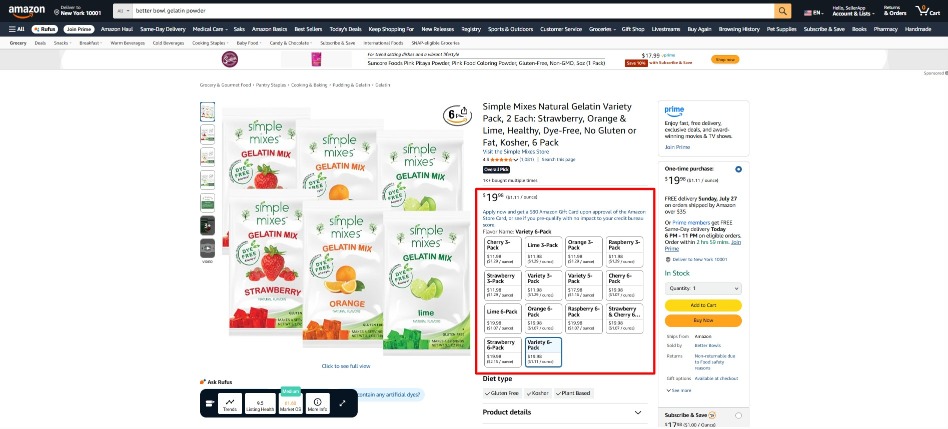
With cross-choice optimization, you can present all variations of a product in your Amazon A+ Content.
So, when a shopper lands on the A4 Single Sheet page, but sees they can upgrade to a 3-pack for better value, they do so with one click.
For ad campaigns, it supports higher Amazon PPC conversion rate because the destination listing feels like a curated experience.
So you’ve optimized your listing to death. Your images are chef’s kiss, your bullets are tighter than a drum, and your A+ Content could win awards. But your Amazon conversion rate is still stuck at 11% and you’re wondering what gives.
Here’s what gives. You’re only fishing in Amazon’s pond. And everybody else is fishing there too with the same bait.
The smartest sellers I know? They’re bringing their own fish to the pond. They’re running Instagram ads, TikTok campaigns, even old school email marketing, and funneling that traffic straight to their Amazon listings. And those external visitors convert at rates that’ll make you spit out your coffee. We’re talking 20% to 30% instead of the usual 10% to 12%.
Why the massive difference? Because these people aren’t cold traffic anymore. They’ve already been warmed up, pre-sold, sweet talked into believing your product is the answer to their prayers before they ever click that Amazon link.
Think about it this way. Someone clicking your Sponsored Product ad on Amazon is still in research mode, comparing options across multiple tabs. But someone who watched your Instagram Reel, clicked through to a custom landing page where they learned about your product’s unique benefits, and then landed on your Amazon listing? They’re already sold. They’re just there to complete the purchase.
This approach to amazon conversion optimization creates what we call “high intent traffic” and it’s one of the most underutilized strategies for improving your Amazon PPC conversion rate and overall sales.
External traffic typically converts 2 to 3 times higher than cold Amazon traffic. When you calculate your conversion rate formula Amazon style (orders divided by sessions), those external visitors dramatically improve your numbers. And here’s the bonus. Amazon rewards you for bringing them new customers by improving your organic rankings. It’s a compounding effect.
The challenge is tracking this correctly. When you drive Facebook or Instagram traffic to Amazon, you need Amazon Attribution to properly measure the conversion rate of Amazon ads versus your social campaigns. Without this data, you’re flying blind on which external channels actually move the needle.
Picture this. Someone sees your Facebook ad for a premium yoga mat. Cute ad, but they’re skeptical because everyone and their mother sells yoga mats on Amazon. They click anyway because the ad promised something about “joint relief.”
Now, most sellers would send that click straight to their Amazon listing where it competes with 47 other yoga mats, all screaming for attention. That visitor browses for 30 seconds, maybe adds to cart, probably doesn’t buy, definitely doesn’t remember you tomorrow.
But what if that click went to a simple landing page first? Not some overwrought sales letter that feels like a used car pitch. Just a clean page that tells your brand story, shows real people using the mat, and addresses the “is this actually different or just more expensive?” question that everyone’s thinking.
Then, after they’ve spent 45 seconds learning why your mat is worth the premium price, they click through to Amazon already convinced. They’re not shopping anymore. They’re just completing the purchase.
The conversion rate formula shifts dramatically in your favor when half your traffic is pre-qualified buyers instead of tire kickers. I’ve seen this push conversion rates from 12% to 25% on the same exact listing. Same images, same price, same everything. The only difference was warming people up before sending them to Amazon’s battlefield. Of course, this will never be a
SellerApp’s analytics can track which external sources actually convert versus which ones just drain your budget on window shoppers. Because not all traffic is created equal, and throwing money at Facebook ads without knowing your Amazon advertising conversion rate by source is like fishing blindfolded.
Let’s talk about user generated content for a second. You know those videos where someone’s genuinely obsessed with a product and won’t shut up about it? Yeah, those. They’re conversion gold.
Get your customers to post videos using your product. Repost them on your brand’s Instagram or TikTok. Run ads to those posts. Then watch what happens when someone sees three different people raving about your yoga mat before they ever land on your Amazon listing.
Your Amazon conversion rate from that traffic? Through the roof. I’ve tracked campaigns where Instagram traffic converted at 35% to 40% compared to 10% from regular Amazon PPC. Why? Because social proof beats product descriptions every single time.
When someone sees three or four real people raving about your product before they ever click to Amazon, your Amazon advertising conversion rate from that traffic source will blow your mind. We’ve seen conversion rates hit 30% to 40% from well-nurtured Instagram audiences, compared to 10% to 12% from standard Amazon PPC.
The kicker is calculating your real cost per acquisition across all channels. Sometimes paying $0.50 per click on Facebook and getting a 25% conversion rate is more profitable than paying $1.20 per click on Amazon PPC with a 12% conversion rate. Run the numbers both ways, because what is a good conversion rate on Amazon depends entirely on what you’re paying to get that traffic.
Alright, truth bomb time. Most sellers think about Amazon conversion rate like it’s a one night stand. Someone visits your listing, they either buy or they don’t, done deal, onto the next victim.
But that’s leaving stupid money on the table.
Amazon’s own data (the stuff they don’t advertise) shows repeat customers convert at over 50%. Read that again. A first-time visitor to your listing converts at maybe 12%. Someone who already bought from you and didn’t hate the experience? They’re converting at 50% plus when they come back.
This is the game within the game that separates sellers who plateau at mid six figures from the ones who blow past seven. Your real Amazon conversion rate isn’t just about first-time buyers. It’s about creating customers who convert again and again.
The second someone completes a purchase, you’ve got this golden window to turn them from a one-time buyer into someone who keeps coming back. But here’s what most sellers do with that window. Absolutely nothing. Or worse, they blast the customer with desperate “PLEASE LEAVE US A REVIEW WE’LL LITERALLY CRY IF YOU DON’T” emails.
Here’s what actually works for improving your long term Amazon conversion rate average.
Package inserts that don’t suck. I’m not talking about those sad little cards begging for five stars. I mean stuff that adds genuine value. “Here’s how to get the most out of your purchase” or “Did you know this product also works amazing for X?” You’re building trust, not begging for approval.
Follow up email sequences using Amazon’s messaging system or your own email list if you’re collecting it properly that provide value first. If you sell skincare, send a “how’s your skin looking after 30 days?” check-in. If you sell kitchen gadgets, send recipe ideas. You’re staying top of mind without being pushy about it.
Strategic review requests at exactly the right moment. Not two days after delivery, which is Amazon’s default. But at the moment of peak satisfaction. For some products that’s 7 days, for others it’s 30. Test this, because a well-timed review request can boost your review rate by 40%, and more reviews directly impact your Amazon conversion rate optimization efforts.
When you calculate conversion rate on Amazon in your SellerApp dashboard, you’re seeing total conversions divided by total sessions. Looks great at 13%, right?
But here’s what most sellers miss. If 30% of your monthly conversions come from repeat customers (which is realistic for consumables and strong brands), those customers are inflating your average conversion rate.
That’s actually a good thing, but only if you’re tracking it correctly. You need to know your new customer conversion rate versus repeat customer conversion rate separately. Why? Because the strategies to improve each are completely different.
New customer conversion rate is improved through listing optimization, better images, stronger copy, competitive pricing. All the stuff we’ve covered. Repeat customer conversion rate is improved through customer experience, product quality, brand building, and post-purchase engagement.
SellerApp’s customer analytics lets you segment these cohorts so you can see exactly where your conversion improvements are coming from. Are you acquiring more new customers, or are you getting better at bringing existing customers back? Both matter, but the strategies and budgets required are totally different. Understanding this distinction is critical when evaluating what is a good conversion rate on Amazon for your specific business model.
Even if you’re not selling Subscribe & Save products, you can create subscription-style behavior. Send customers a “restock reminder” email before they run out. Offer a small discount for their second purchase. Make it ridiculously easy to reorder.
Amazon’s “Alexa, reorder my yoga mat cleaner” functionality is powerful but underutilized. Include instructions in your package insert for how customers can set up voice reordering. Sounds silly until you realize that voice reorder conversion rates are near 100% because there’s zero friction.
This is where understanding your Amazon conversion rate by category becomes crucial. Consumables and replenishables naturally lend themselves to repeat purchases, but even durable goods can benefit from cross-selling complementary products that keep customers in your ecosystem.
Lightning Deals can spike your conversion rate into the 20% to 40% range during the promotion. Sounds amazing, right? But if you’re running them just to chase a sales bump without a real plan, you’re setting yourself up to crash hard afterward.
Let’s talk about when these promotional tools actually make sense and when they’re just expensive band-aids on a broken strategy.
Running a Lightning Deal to “boost sales” is like eating cake for breakfast because you’re hungry. Sure, it solves the immediate problem, but you’re gonna regret it later.
Here’s when Lightning Deals are actually smart moves that improve your long-term Amazon conversion rate optimization strategy.
You’re launching a new product and need velocity fast to climb the rankings. A Lightning Deal can generate enough orders in six hours to convince Amazon’s algorithm your product is hot, which improves your organic ranking for weeks.
The temporary margin hit is the cost of admission to better visibility. This is especially effective when you’re trying to establish what is a good Amazon conversion rate benchmark for a new ASIN.
You’ve got excess inventory and the next shipment’s coming whether you’re ready or not. Better to take a margin hit on a Lightning Deal than drown in long-term storage fees. Plus, the BSR boost from all those conversions helps your organic game even after the deal ends.
You need reviews and you need them yesterday. Lightning Deals attract bargain hunters, sure, but they also attract actual humans who might love your product and leave glowing reviews.
Just make sure your product quality exceeds expectations even at the discount price.
What you absolutely want to avoid is running Lightning Deals like you’re hosting a going-out-of-business sale.
Do it too often and you train Amazon’s algorithm and customers to expect discounts. Suddenly your regular Amazon PPC conversion rate tanks because everyone’s waiting for the next deal. Your conversion rate Amazon sellers worked hard to build just evaporates.
Prime badges make conversion rates go brrr. We’ve known this since forever. But Prime Exclusive Discounts are a different beast entirely.
When you offer a discount that’s only for Prime members, you’re doing two things at once. First, you’re targeting Amazon’s highest intent audience. Prime members convert at rates that would make most ecommerce sites weep with joy. They’re pre-qualified buyers with free two-day shipping baked in. Your conversion rate formula Amazon style looks gorgeous when you’re mostly selling to Prime members.
Second, you’re getting Amazon’s seal of approval. Products with Prime Exclusive Discounts get special placement in search results and category pages. Amazon’s basically vouching for you. This halo effect boosts conversions even after the promotion ends because customers remember seeing you in those premium placements.
The discount doesn’t even need to be massive. A 10% Prime Exclusive often performs nearly as well as a 20% discount in terms of average conversion rate Amazon benchmarks because the psychological trigger is exclusivity, not just savings. People like feeling special. It’s why country clubs exist.
Deal of the Day is Amazon’s billboard. It’s the first thing millions of shoppers see when they open the app or visit the homepage. Your conversion during DOTD can hit 30% to 50% if you’re in the right category.
But most sellers run DOTD whenever Amazon offers it. Wrong move. You want to time it strategically around seasonality, product launches, or competitive gaps.
Selling grilling accessories? Running DOTD in March leading into spring is infinitely more valuable than November. The conversion might be similar, but the long-term ranking boost and customer acquisition matters more because you’re catching the beginning of your peak season, not the end. Understanding Amazon conversion rate by category means knowing when your category naturally converts better.
Use SellerApp’s seasonal analytics to see exactly when search volume spikes for your category, then grab DOTD placements 2 to 4 weeks before that spike. This gives you momentum heading into your busiest period. You want to ride the wave, not chase it.
Optimizing Amazon Questions & Answers for Conversions (The Leak You’re Ignoring)
When’s the last time you actually looked at your Questions & Answers section? If you’re like most sellers, maybe once a month when you remember it exists?
Meanwhile, it’s quietly murdering your Amazon conversion rate.
Amazon’s internal data shows listings with well-maintained Q&A sections convert higher than those without. The reason’s painfully obvious once you think about it.
Customer lands on your listing. Looks good. Price is reasonable. Images are solid. But they’ve got this one nagging question burning in their brain. “Is this dishwasher safe?”
They scroll to Q&A hoping someone already asked. They find either nothing, or a question from three months ago with no answer, or worse, an answer from another confused customer that’s completely wrong.
Now they’ve got three choices. Ask the question themselves and wait a day or two for your response. Search through your listing again hoping they missed the answer buried in bullet point seven. Or just buy from your competitor who already answered it clearly.
Guess which option they pick? They ghost you. And your conversion rate takes another hit.
But here’s the opportunity. Most of your competitors are also ignoring their Q&A. Which means if you actually manage it proactively, you’ve got an unfair advantage that directly impacts your Amazon conversion optimization efforts.
The classic mistake is waiting for customers to ask questions, then answering them a day later. By then, that customer’s already bought from someone else. The conversion’s gone. You’re just answering questions for some future theoretical buyer.
Here’s the play that actually moves your Amazon conversion rate average. Scope your top 5 competitors in your category. Read every single Q&A they have. Notice patterns? “Does this fit a 32oz bottle?” “How long does shipping take?” “Is this compatible with X?” “What’s the warranty?”
Those are the exact same questions your potential customers have. They’re just not asking yet because they already bounced to a competitor who had the answer ready.
So before customers even ask, you post those questions yourself or have someone on your team do it and answer them immediately with detailed, helpful responses. Two things happen when you do this.
One, when customers land on your listing with that specific question burning in their brain, boom, there’s the answer waiting for them. Friction removed. Objection handled. Conversion saved.
Two, you control the narrative. When you write both the question and the answer, you can phrase them in a way that highlights your product’s strengths and throws a little shade at competitors. “Yes, this yoga mat is dishwasher safe, unlike foam mats that degrade and smell funky after washing.” See that? You answered the question and threw an elbow at the competition. That’s playing chess while they’re playing checkers.
One of the biggest conversion assassins is when your product costs more than competitors. Customers immediately think “why should I pay more for this?” and if your listing doesn’t answer that question within about 8 seconds, they’re gone. Your Amazon PPC conversion rate suffers because you’re paying for clicks that bounce.
Q&A is perfect for addressing this head-on instead of hoping customers figure it out themselves. Post a question like “Why is this more expensive than similar products?” then give a detailed, transparent answer about your superior materials, longer warranty, better customer service, made in USA if that’s the case, whatever your actual differentiator is.
This accomplishes two critical things. You address the elephant in the room before customers bounce. And you reframe the higher price as justified value instead of a red flag. Suddenly what looked like a negative becomes a selling point because you’re the only one confident enough to talk about it openly.
SellerApp’s competitor tracking can alert you when competitors drop prices or launch promotions, so you can update your Q&A section to address new objections before they become conversion killers. Because what is a good conversion rate on Amazon becomes a moving target when your competitive landscape shifts.
Over 60% of Amazon’s traffic now comes from mobile devices. Let that sink in for a second. More than half of the people looking at your listing are doing it on a phone.
Yet most sellers still optimize listings on their desktop, upload images that look fire on a 27-inch monitor, and write bullet points that are way too long for a 6-inch screen.
Then they’re shocked their Amazon conversion rate average is underperforming benchmarks. It’s not a mystery. You’re optimizing for the wrong screen.
Mobile-First or Die Trying
Do this right now. Pull out your phone. Go to your listing. Scroll through it like an actual customer would while waiting in line at Starbucks or pretending to listen to their kid’s story about school.
Does it still slap? Or does it look like a cluttered mess that makes you want to tap away and find something easier to understand?
The mobile shopping experience is fundamentally different from desktop. Desktop shoppers can process complex information, read long descriptions, zoom into image details easily. Mobile shoppers are scrolling with their thumb between meetings or while half-watching TV. You’ve got about 8 seconds to hook them or they’re gone. Your conversion rate formula Amazon calculations need to account for this reality.
Your main image needs to be instantly clear even on a small screen. Text overlay should be large and minimal. If someone can’t tell what your product is from the thumbnail, you’ve already lost them.
Your title needs to front-load the good stuff because only the first 60 to 80 characters show before the cutoff on mobile. Everything else is hidden behind a “more” button that most people never tap.
Bullet points need to be scannable at a glance. Start each one with a clear benefit statement in caps or bold if possible. “30 DAY MONEY BACK GUARANTEE” destroys “We offer a comprehensive return policy allowing customers to return products within 30 days for a full refund with no questions asked” every single time on mobile. The first one is digestible. The second one is a wall of text nobody’s reading on their phone.
Your A+ Content needs serious mobile optimization. Larger text, fewer words per module, images that tell the story without requiring someone to read paragraphs. Think of it like Instagram stories more than a brochure. Quick hits of value, not dense information dumps.
Video on product listings increases conversions by 30% to 80% depending on the category. But here’s the thing nobody tells you about those impressive statistics. They’re driven almost entirely by mobile users.
Desktop shoppers might watch your video if they’re really interested. Mobile shoppers definitely watch it because video’s way easier to consume on a small screen than scrolling through six images and reading text.
But the video has to be mobile-optimized or it’s useless. Captions are mandatory because most people watch with sound off while sitting next to someone or in a public place. Get to the actual point in the first 3 to 5 seconds because mobile attention spans make goldfish look focused. Show the product being used, not just a list of features scrolling across the screen.
Kitchen gadget? Show someone actually making a meal in 15 seconds, not a slow pan across the product sitting on a counter. Phone case? Show a drop test, watch it bounce, prove it works. Supplements? Show a real person incorporating it into their morning routine, not stock footage of someone smiling at a salad.
SellerApp’s analytics can show you what percentage of your traffic comes from mobile versus desktop, and more importantly, how those Amazon conversion rates compare. If your mobile conversion is significantly lower than desktop and it probably is for most sellers, mobile optimization should be your next priority. Because improving mobile conversion is often the fastest path to improving your overall average Amazon conversion rate.
You’re running Amazon PPC at $500 per day. Facebook ads at $300 per day. Sending weekly emails to your list with product features and occasional promotions.
Your Amazon conversion rate looks healthy at 13%, sales are growing month over month, and life is good.
But here’s the million dollar question that nobody asks until they’re bleeding money. Which channel is actually driving those conversions?
Your Amazon conversion rate formula only tells you that 13 out of every 100 sessions convert. It doesn’t tell you if those sessions came from your PPC campaigns, your Facebook ads, your email blasts, or just organic search from people who’ve never heard of your brand.
Most sellers attribute everything to Amazon by default. They look at their PPC spend and calculate ROAS return on ad spend based purely on Amazon-attributed sales. But what if 30% of your Amazon conversions actually came from Facebook ads and people just completed the purchase on Amazon because that’s where they feel safe entering their credit card?
Without proper cross-channel attribution, you’re flying completely blind. You might be massively underspending on your best performing channel and burning money on the one that’s barely moving the needle. You’re asking “what is a good conversion rate on Amazon” without knowing which channels are actually generating those conversions.
Amazon Attribution yes, it exists, and yes, most sellers ignore it like expired milk in the fridge tracks exactly this. When someone clicks your Facebook ad and then purchases on Amazon within 14 days, Amazon Attribution ties that sale back to your Facebook campaign. Same with Google Ads, influencer links, email campaigns, all of it.
Now you can finally see your real Amazon advertising conversion rate by source. And here’s what usually happens when sellers first set this up properly. They discover their Amazon PPC conversion is lower than they thought, but their Facebook or email conversion rate is way higher. Suddenly the whole budget allocation strategy needs to change.
Once you actually know which channels drive conversions instead of just assuming, you can build something intelligent instead of throwing spaghetti at the wall.
Maybe you discover that Instagram generates tons of engagement, thousands of likes and comments, but converts poorly when you track it back to Amazon sales. That tells you people like your content but aren’t sold yet on actually buying. You need a better bridge between your social presence and your Amazon listing. Remember that landing page strategy we talked about earlier? This is exactly when it matters.
Or maybe you find out that your email list converts at 25% to 30% when you send product announcements to Amazon. That’s insane compared to your 10% to 12% from cold Amazon PPC traffic. That tells you to invest way more resources into building and nurturing your email list, because those are your most valuable customers with the highest Amazon conversion rates.
SellerApp integrates with multiple data sources to give you this unified view without needing to manually stitch together reports from five different platforms while losing your mind in spreadsheets. One dashboard showing exactly where your traffic comes from and what it actually converts at. No more guessing whether your Facebook spend is working or just making Zuckerberg richer.
This gets even more interesting when you layer in keyword-level conversion data. Because here’s a secret that separates amateur PPC management from professional-level strategy. Not all keywords convert the same, even within the same campaign.
Some keywords have incredibly high search volume but terrible conversion rates because they’re too broad and attract browsers instead of buyers. Other keywords have lower search volume but convert like absolute gangbusters because the search intent is laser-focused on buying, not researching.
For example, “yoga mat” as a keyword might get 100,000 searches per month but convert at only 8% because people searching that generic term are just starting their research journey.
They’re browsing, comparing, not ready to commit. “Extra thick yoga mat for bad knees” might only get 2,000 monthly searches but convert at 18% because that person knows exactly what they need and is ready to buy right now.
Your Amazon PPC strategy should heavily weight toward high-converting keywords even if the traffic volume is lower. Would you rather get 10,000 clicks at 8% conversion that’s 800 sales or 2,000 clicks at 18% conversion that’s 360 sales?
Well, it depends on your margins and your cost per click, but often those lower volume, higher intent keywords are significantly more profitable when you actually do the math.
SellerApp’s keyword analytics shows you not just search volume and CPC which every tool shows, but actual conversion rates by keyword based on real performance data. This lets you build campaigns that prioritize profitable conversions over vanity metrics like impressions or clicks. Because at the end of the day, what is a good conversion rate on Amazon depends entirely on whether those conversions are actually profitable after you factor in all your costs.
Your Amazon conversion rate doesn’t just sit there behaving itself like a well-trained dog. It fluctuates wildly based on seasonality, holidays, trends, random TikTok videos that go viral, and about a thousand other market conditions you can’t control.
Understanding these patterns and actually optimizing around them instead of just reacting is the difference between good conversion rates and legendary ones that make your competitors wonder what you’re doing differently.
If you sell grilling accessories, your conversions in May and June are going to be 30% to 50% higher than January. Not because your listing suddenly got better overnight or because you discovered some secret optimization hack. Because buyer intent is peaking. People are thinking about summer cookouts, planning Memorial Day parties, and your product is exactly what they’re searching for.
The massive mistake most sellers make is running the same playbook year-round. Same PPC budget allocation, same promotional strategy, same inventory levels. Then they act completely shocked when their Amazon conversion rate tanks during off-season months and they’re stuck with inventory nobody wants.
Here’s the smarter approach that actually accounts for how conversion rates work in the real world. Identify your category’s peak seasons using SellerApp’s trend analytics that show you historical search volume patterns and conversion data. Then plan your entire year around those peaks instead of just hoping for the best.
Two months before your peak season hits, ramp up inventory significantly and go aggressive on listing optimization. You want fresh stock, updated images based on what worked last year, new reviews coming in, and fully optimized content ready before the wave of traffic arrives. Your goal is to enter peak season firing on all cylinders, not scrambling to catch up.
During peak season, crank your PPC budgets to maximum because this is when it actually makes sense to spend. Your Amazon PPC conversion rate will naturally spike because buyer intent across your entire category is maxed out. This is when you fight aggressively for visibility and market share, because the customers are already looking to buy. You’re not convincing them they need the product, you’re just making sure they buy it from you instead of your competitor.
After peak season ends, pull back significantly on PPC spend but double down hard on post-purchase engagement and review generation. Those customers who bought during your peak season are your absolute best bet for positive reviews and repeat purchases. Nurture them during the slower off-season months so they convert again next peak instead of forgetting you exist.
During true off-season when traffic is slow, test everything you’ve been wanting to try. New image styles, different keyword strategies, experimental A+ Content layouts. The stakes are lower when traffic is naturally down, so it’s the perfect time for learning what actually works before your next peak season hits and every mistake costs you real money.
Amazon’s major sale events Prime Day, Black Friday, Cyber Monday, the entire holiday season from November through December create absolutely massive conversion rate surges. But only if you’re actually prepared for them instead of just hoping to ride the wave.
Prime Day conversions can legitimately hit 25% to 40% if you’re running competitive deals and have sufficient inventory. But if you stock out halfway through the event because you didn’t forecast properly? You’ve just wasted the single biggest conversion opportunity of the entire year. And it’s even worse than that. Stockouts during high-traffic periods absolutely crater your product ranking for weeks afterward because Amazon’s algorithm flags you as unreliable and stops showing your listing to customers.
Build your entire promotional calendar around Amazon’s massive traffic events, plus your specific category’s seasonal peaks that we just talked about. Then work backward from those dates to ensure you have sufficient inventory, allocated budget, and fully optimized listings ready to capitalize. This isn’t rocket science, but somehow most sellers still wing it and wonder why their results are inconsistent.
SellerApp’s forecasting tools can predict exactly how much inventory you’ll need for major promotional events based on your historical conversion patterns combined with current trend data. This prevents both the nightmare of stocking out when demand peaks and the expensive problem of being stuck with too much inventory that sits in warehouses racking up fees.
Understanding your Amazon conversion rate by category during these promotional periods helps you set realistic expectations and budget accordingly. Some categories see 3x to 5x spikes during Prime Day. Others barely move. Know which one you’re in before you commit your budget.
From listing optimization to smarter ad targeting, boosting your Amazon conversion rate takes ongoing effort, data, and a whole lot of testing.
That’s where SellerApp comes in.
We combine real-time analytics, expert-backed strategies, and AI-powered insights to help you stop guessing and start converting. SellerApp helps you optimize for every click, every session, and every product page, for results that bring stable revenue.
At the end of the day, a strong Amazon conversion rate is also about decisions. But digging through reports, tracking every click, and figuring out what’s working (or not) can quickly become overwhelming.
SellerApp’s PPC ad experts don’t just hand you numbers; they translate them into revenue-backed insights you actually care about. No more second-guessing your campaigns or wasting hours on spreadsheets. Our team helps you optimize your Amazon advertising conversion rate and listings in plain terms, so you can focus on growth, and the journey to increasing your Amazon conversion rate becomes clearer, faster, and is built for results. Schedule a call to learn more about our PPC agency service.
Additional Read:
How To Improve Amazon Sales Rank
Amazon Pay Per Click Complete Guide