


The Amazon Wish list is a native feature that lets shoppers save products they want to buy later, organize them into separate lists, and share those lists with friends, family, or the public. It sits on every product page next to the Buy Box, accessible to any Amazon account holder.
Unlike a cart, which signals the buyer to purchase something with an immediate intent, a wishlist is like a holding space. A buyer who adds your product to their wishlist has evaluated it, decided they want it, and chosen not to buy it yet. For sellers, that difference is everything. The cart buyer is deciding how to buy, but the wishlist buyer is deciding when.
Amazon offers three list types:
- Wish List, the everyday personal list, no event attached
- Gift Registry, tied to a specific occasion like a wedding or baby shower
- Idea List, a public, curated collection built for broad sharing
Each one signals a different type of buyer intent. Understanding the difference is the starting point for using wishlists strategically as a seller.
Quick Guide:
How to Create an Amazon Wishlist (What Sellers Need to Know About the Buyer Experience)
Understanding how buyers create and manage Amazon wish list tells you a lot about their intent. A buyer who takes the time to create a named, organized list is more deliberate than one who clicks “Add to List” once and forgets about it.
On desktop:
- Hover over Account & Lists → click Create a List
- Name the list and choose the type (Wish List, Gift Registry, Idea List)
- Set privacy: Public, Private, or Shared
- Click Create List
- Add products via the “Add to List” button on any product page
On mobile:
- Menu → Lists → tap the + icon
- Name and configure the list
- Add products directly from any product page
Via Alexa: “Alexa, add [product] to my [list name]…” No screen, no friction. This is the most passive save behavior and is most common in consumable and household categories. If your product is being voice-added, it’s already someone’s default.
Sellers take note that a buyer who creates a named list (“Holiday Gifts 2026,” “Home Office Upgrade”) is actively planning a purchase. Products saved to named, organized lists have higher eventual conversion rates than products added to a default unnamed list in a moment of casual browsing because the intent level differs significantly.
How Amazon Wishlist Works and Why It Matters to Sellers
Here is a table that will tell you how exactly amazon wish list works for sellers:
| Feature | What It Does | Why Sellers Should Care |
| Save Items | The buyer adds a product to a list from the product page | Every save is a declared intent signal on your ASIN |
| Multiple Lists | Buyers organize saves by category or occasion | Public lists reveal real, unfiltered demand patterns |
| Privacy Settings | Each list is private, shared, or public. | Public lists are searchable, free research material |
| Price Drop Alerts | Amazon notifies buyers when a saved item drops in price | Your coupon or deal reaches a warm audience automatically |
| Voice Add via Alexa | The buyer adds items hands-free | Strongest in repurchase categories, signals brand stickiness |
| Gift Registry Perks | Completion discounts and direct shipping for event lists | A registry saves a higher signal of purchase intent and trust |
| Idea List Monetization | Creators earn commissions via the Influencer Program | Free placement in front of interest-matched audiences |
Every time a shopper clicks “Add to List,” Amazon records that action against your ASIN. That save persists until the buyer removes it or purchases. If you later drop the price, Amazon automatically pushes a notification to every buyer who saved that product, at zero additional cost to you. Most sellers have no idea this is happening in the background. The ones who do build their deal strategy around it.
How to Share an Amazon Wishlist and What Shared Lists Mean for Sellers
On desktop:
- Account & Lists → Your Lists → open the list
- More (three dots) → Manage List
- Set Privacy to Shared or Public → Save Changes
- Return to list → Send List to Others → copy or email the link
On mobile:
- Menu → Lists → open the list
- Tap the share icon → copy link or share via app
Public vs. Shared: The Seller Distinction That Matters
A shared list requires a direct link. It’s not searchable. A buyer shares this with specific people for a gifting occasion. The audience is small and known.
A public list is searchable by anyone on Amazon. It appears in Amazon’s list directory. This is the list type sellers can actually find and research. When a buyer makes their list public, they’re not just sharing with friends; they’re making their preferences visible to the entire platform, including you.
For example, a U.S.-based seller researching the home fitness equipment category can browse dozens of public wishlists and find the same adjustable dumbbell set appearing repeatedly, saved at $189, sitting on a 3.8-star rating with 200 reviews. That’s not a coincidence. That’s a product with real demand and a solvable problem. More on this in the research section below.
Amazon Wishlist Privacy Settings. What Sellers Can and Cannot See
Private: Only the list owner can see it. Not searchable, not accessible. Products saved to private lists are invisible to sellers and researchers. This is the default for most casual saves.
Shared: Accessible to anyone with the direct link, but not searchable on Amazon. Gift givers can view and buy from it. Sellers cannot find or research these lists without the link.
Public: Appears in Amazon’s list directory. Searchable by name, email, or list title. Anyone, including sellers doing research, can browse these lists. This is where the seller opportunity lives.
The “Don’t Spoil My Surprises” setting: When a gift-giver purchases from a shared list, the item is marked as purchased, but the list owner isn’t told which item was bought. Operationally irrelevant for sellers, but worth knowing because it affects how gift-occasion list data reads the items that may disappear from lists without the owner having purchased them directly.
The majority of wishlist saves are private. Public lists are a self-selected subset of buyers who are comfortable sharing their preferences openly. That makes public list data more deliberate and more revealing than a random sample of all saves, these buyers are curating intentionally, which means the products they’re saving reflect genuine, considered demand rather than passive scrolling behavior.
Amazon Wish list Features: A Seller’s Breakdown
Here is how an Amazon Wish list can help sellers:
Price Drop Alerts
This is the most commercially important wishlist feature for sellers, and most are not using it deliberately.
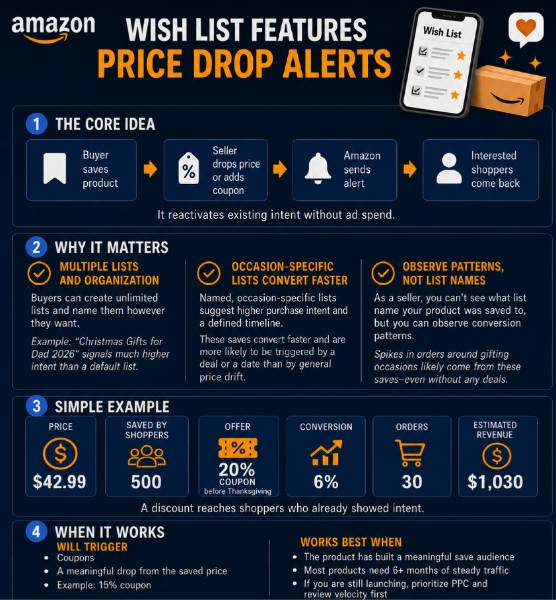
When a buyer saves your product and you later reduce the price via coupon, Lightning Deal, or standard price adjustment, Amazon automatically sends a push notification to that buyer’s phone. No ad spend. No campaign. No retargeting pixel.
A U.S. seller in the kitchen category has a $42.99 cast iron skillet. Over three months, 500 shoppers save it, most of them waiting to see if the price drops or hesitating on the purchase for other reasons.
The seller activates a 20% coupon during the week before Thanksgiving. Amazon pushes a notification to all 500 saved buyers. At a 6% conversion rate, that’s 30 orders, $1,030 in revenue, from people who already decided they wanted the product. The coupon did the same thing it would have done anyway, but the wishlist audience made it exponentially more efficient.
What actually triggers the notification is a coupon or a notable drop from the price at the time of saving. Small algorithmic price fluctuations don’t qualify. A 3% repricing adjustment won’t fire a notification. A 15% coupon will be applied.
This mechanic only pays off at scale. If your product has 40 saves, a notification reaches 40 people, which is meaningful for revenue but not meaningful for BSR movement. Products typically need 6+ months of consistent traffic to accumulate a save audience worth activating. If you’re in the launch phase, prioritize PPC and review velocity first. A wish list strategy is a mid-to-late-stage tool that compounds over time.
Multiple Lists and Organization: What It Tells You About Buyer Intent
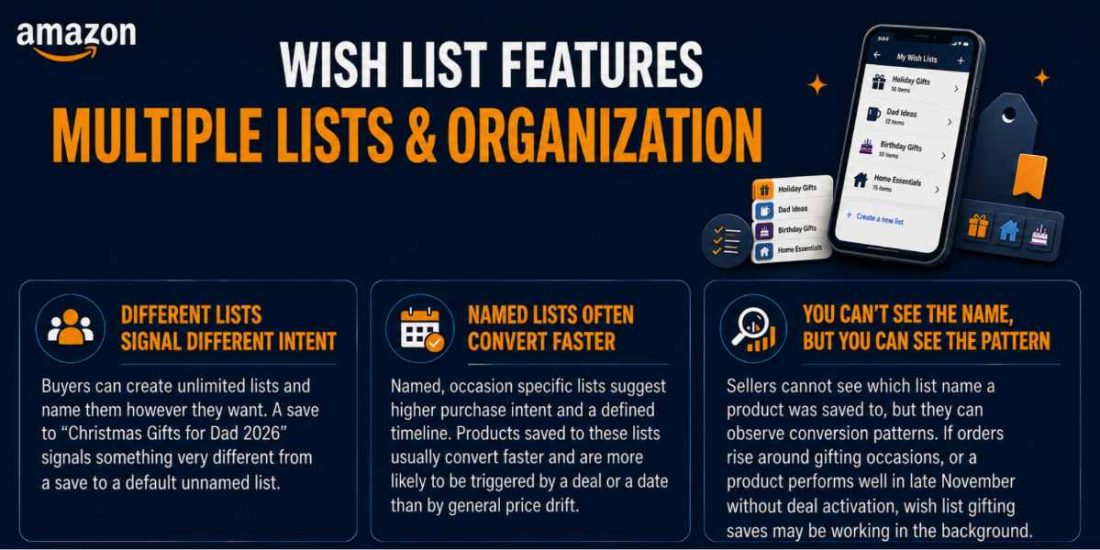
Buyers can create unlimited lists and name them however they want. A buyer who saves your product to a list called “Christmas Gifts for Dad 2026” is signaling something very different from a buyer who saves it to a default unnamed list. Named, occasion-specific lists suggest higher purchase intent and a defined timeline. Products saved to these lists convert faster and are more likely to be triggered by a deal or a date than by general price drift.
As a seller, you can’t see what list name your product was saved to, but you can observe conversion patterns. Products that spike in orders around gifting occasions are likely benefiting from occasion-specific list saves, not just organic traffic. If your product sells well in late November without any deal activation, Wishlist gifting saves are probably doing work in the background.
Voice Add
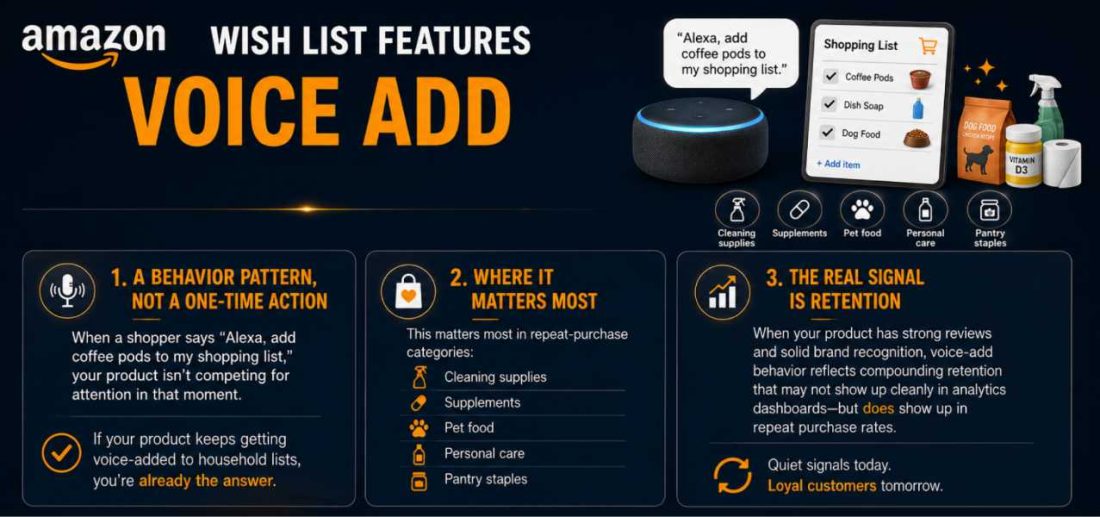
“Alexa, add coffee pods to my shopping list” is a behavior pattern, not a one-time action. If your product is the one getting voice-added to household lists, you’re not competing for attention in that moment; you’re already the answer.
This matters most in cleaning supplies, supplements, pet food, personal care, and pantry staples. If you sell in any of these categories and your product has strong reviews and solid brand recognition, voice-add behavior represents compounding retention that doesn’t show up cleanly in any analytics dashboard but does show up in repeat purchase rates.
Gift Registry Perks
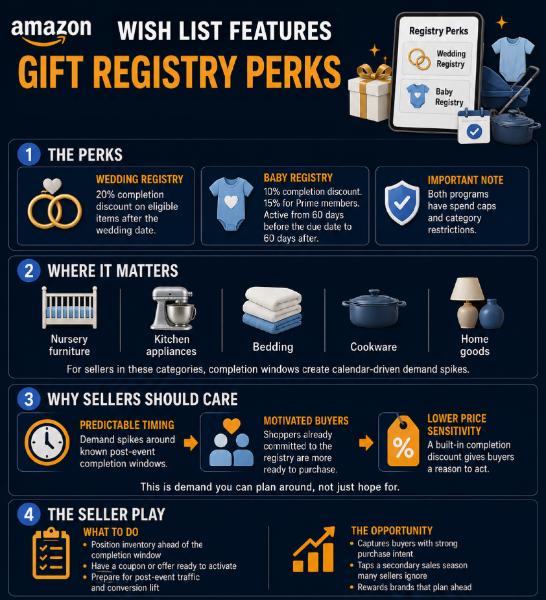
Wedding Registry: 20% completion discount on eligible items after the wedding date.
Baby Registry: 10% completion discount (15% for Prime members) starting 60 days before the due date through 60 days after.
Both have spend caps and category restrictions.
For sellers in nursery furniture, kitchen appliances, bedding, cookware, and home goods, these completion windows are predictable, calendar-driven demand spikes. A seller who has their inventory positioned and a coupon ready to activate during the post-event completion window is capturing buyers who are motivated, have a discount incentive to act, and are shopping with low price sensitivity because they’re completing a registry they already committed to.
Most sellers in these categories ignore this entirely. The ones who plan around it treat it as a secondary sales season.
Idea Lists
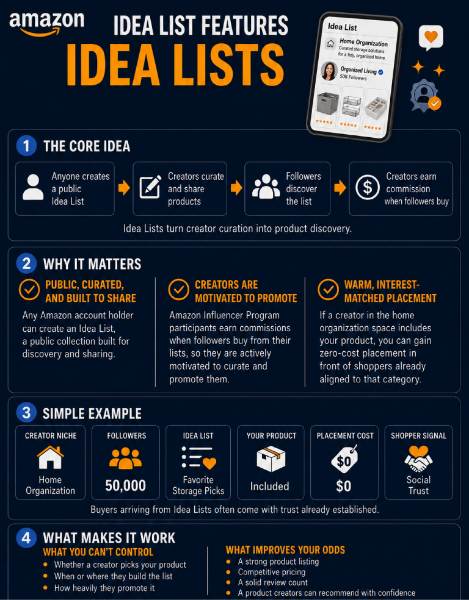
Any Amazon account holder can create an Idea List, a public, curated collection designed for broad sharing. Participants in the Amazon Influencer Program earn commissions when followers buy from their lists, which means creators are actively motivated to curate and promote them.
If a creator with 50,000 followers in the home organization space builds an idea list of their favorite storage products and includes yours, you’re getting warm, interest-matched placement at zero cost. The buyers arriving from there are coming with social trust already established.
You have no direct control over whether this happens. But a strong listing, competitive pricing, and a solid review count make your product the obvious pick. Creators building lists in your category are looking for products that won’t embarrass them. Give them one.
Amazon Wishlist as a Seller Intelligence Tool
Most sellers doing Amazon product research look at the same data: BSR, review counts, keyword volume, and Keepa price history. Public Amazon wishlists are a research layer that almost no one is using systematically. That’s the opportunity.
How to Browse Public Wishlists for Product Research
- On desktop, go to Account & Lists → Find a List or Registry
- Search a broad first name or leave the search open and filter by list type
- Open 15 to 20 public wishlists in a category relevant to your business
- Note which products appear repeatedly across independent lists
- Note which products sit at price points that suggest hesitation, not disinterest
- Record the ASIN, listed price, and current BSR for each recurring product
- Cross-reference in Keepa; a flat or declining BSR alongside repeated wishlist appearances signals consistent interest that isn’t converting
- Validate in Amazon’s Product Opportunity Explorer for search volume and review sentiment
- Use SellerApp tools to confirm margins and competitive density before committing
Run this process monthly, per category. You’re building a picture over time, not making a call from one session.
What Public Wishlist Data Actually Tells You
A product repeatedly appearing on public wishlists indicates demand exists, but something is blocking the purchase. That blocker is almost always one of three things:
Price.
The product is at a point where buyers want it but can’t justify it yet. The category has real demand; pricing is the lever. If a competitor’s product keeps appearing on wishlists at $89 and your version could come in at $64 with comparable quality, that’s your entry point.
Confidence.
The product doesn’t have enough reviews, or existing reviews raise doubts. A product wishlisted heavily but sitting on 3.6 stars and 90 reviews is a gap you can step into. Buyers want something in that category; they just don’t fully trust the available options yet.
Timing.
The buyer wants it but isn’t ready. These saves convert eventually, triggered by a price drop notification or a gifting occasion. Not actionable directly, but the price-drop mechanic handles it when you run deals.
The Saved-vs-Purchased Gap: Where Product Opportunities Hide
A product with high wishlist frequency and weak sales velocity is not a dead product. It’s a product with a solvable problem. For example, a U.S. seller in the fitness category notices a foam roller appearing across 14 separate public wishlists over two research sessions. The product has a BSR of 8,400 in Sports & Outdoors, which is decent but not dominant. It’s priced at $34.99, has 310 reviews at 4.1 stars, and the listing’s main image looks like it was shot on a phone in 2019.
The demand is there. The listing is failing. A seller who enters that subcategory with a sharper listing, better imagery, and similar pricing has a clear path, not because they found a secret, but because they looked where no one else was looking. Frequently wishlisted products that aren’t converting are pre-validated demand waiting for the right offer. The buyers already exist and have already told you what they want. You just need to give them a reason to stop saving and start buying.
Wishlist Research + Product Opportunity Explorer
Don’t run wishlist research in isolation. Pair it with Amazon’s free Product Opportunity Explorer in Seller Central.
Here is the workflow:
Find a category with heavy wishlist saves → cross-reference in POE for search volume trends and review sentiment gaps → validate margins and competitive density in SellerApp before committing inventory or ad spend. Wishlist browsing tells you what buyers are currently saving. POE tells you whether there’s sustainable search demand behind it. SellerApp tells you whether the economics work. All three together give you a research foundation that’s significantly more reliable than any single data source.
Not All Categories Generate Equal Wishlist Activity
High-consideration categories, including home furniture, electronics, fitness equipment, baby gear, kitchen appliances, and outdoor gear, generate far more wishlist saves than low-consideration impulse categories like phone cases, novelty items, or basic consumables.
In low-consideration categories, buyers either purchase immediately or don’t. The wishlist rarely comes into play. If you compete in these categories, wishlist research is a low-signal method and not worth prioritizing.
In high-consideration categories, wishlist research is one of the strongest free intelligence tools available. A buyer who saves a $300 standing desk is seriously evaluating a purchase and they’re going to make eventually. That’s the kind of intent signal worth studying.
How to Get Your Products Wishlisted More
Every save is a buyer opting into your price-drop notification audience. The more saves you accumulate, the more powerful each deal becomes, and unlike an ad campaign, the audience doesn’t disappear when your budget runs out.
Price at the Point of Hesitation
Products priced so low actually feel like impulse buys and do not get wishlisted. They get purchased immediately or ignored. Products priced where the buyer genuinely wants them but needs a moment to justify it get saved.In most categories, there’s a price band where buyers shift from reflexive buying to deliberate evaluation. A $12 item gets bought or skipped. A $58 item in the same category gets saved. Find that threshold for your category and price within it. You’re not pricing high arbitrarily; you’re pricing where considered desire accumulates.A seller in the candle category notices that products under $15 rarely appear on wishlists; they’re impulse buys. Products between $28 and $45, especially soy-based or artisan options, appear frequently. The buyer wants it, but it feels like a considered purchase at that price point. That’s the band worth competing in if your unit economics allow it.
Listing Quality Determines Whether They Save or Leave
A buyer who feels uncertain about your listing will leave your listing. The wishlist save happens when someone is genuinely interested but not quite ready to commit. Your listing has to create enough desire to hold them while the friction of the price remains.
Your main image is the biggest driver of saves from search results. If it doesn’t stop the scroll, buyers never reach the listing. Once they’re there:
- Strong reviews build desire
- A considered price creates the hesitation that produces the save
- A+ Content and secondary images deepen investment; buyers who scroll your image gallery are more likely to save than buyers who skim and bounce
Thin listings with two images and weak copy don’t create enough investment for a save. They create a bounce.
Coordinate PPC and Coupon Timing
Most sellers run PPC and coupons independently. Running them simultaneously, with a saved audience behind the product, creates a double-trigger effect. Amazon Sponsored products reach new browsers in search results. The coupon notification reaches every buyer who already saved the product. Both happen at the same time, and the combined impact on velocity and BSR is stronger than either tactic run alone. If you’re planning a coupon activation, stack it with a Sponsored Products push on your highest-converting keywords in the same window. This is especially effective during Q4 and the 48-hour post-Prime Day window, when purchase intent is highest, and your saved audience is most likely to act.
Time Your Strategy Around Wishlist-Heavy Periods
Save behavior is seasonal and predictable.
Q4 is the biggest wishlist period of the year. Buyers start building gift lists in October. By November, those lists are being shopped by gift-givers. If you’re not in your best listing shape, imagery, copy, reviews, or pricing before October 1st, you’re reacting instead of capitalizing.
Prime Day generates significant save behavior from buyers who browse the event, don’t find what they want at the right price, and save products to revisit later. The 48 to 72 hours immediately after Prime Day ends is when coupon activations convert those saves most efficiently, intent is still warm, and buyers are still in deal-seeking mode.
Valentine’s Day, Mother’s Day, and Father’s Day each generate predictable save spikes in gift-relevant categories in the two to three weeks leading up to the date. The sellers who benefit most are the ones who built their fanbase during the quieter months before.
A Save Spike After a Price Increase Is a Signal for Sellers
You raise your price. Sales slow slightly. Saves increase. The instinct is to reverse the change. That’s often wrong.
A save spike after a price increase usually means the product has moved into the considered-purchase zone. Buyers want it, but the higher price has introduced enough hesitation that they’re saving rather than buying immediately. That’s not rejection; that’s a warm audience forming.
Hold the price. Let the audience build. Then run a coupon. If saves convert well on the deal, your price floor is higher than you thought, and your original price was leaving money on the table. If saves don’t convert even with a meaningful discount, then the price is genuinely too high. Test before you conclude; don’t reverse a price move based on a week of data.
What Happens to Wishlist Saves When You Change Your Listing
This is one of the most practical questions sellers search for, and almost no article answers directly.
Wishlist saves attach to the ASIN, not the listing content.
If you update your main image, rewrite your title, change your bullet points, run A/B tests, or update your A+ Content, your existing saved audience is completely preserved. Every buyer who saved your product before the update is still in the notification pool. You can optimize aggressively without losing the audience you’ve built.
What resets your saves to zero:
Creating a new ASIN, a replacement product, a disconnected variation, or a relaunch under a different listing starts from zero. There is no way to transfer saves between ASINs. If a product has accumulated meaningful saves, that’s a real asset with real conversion value. Factor it into your decision when weighing whether to optimize the existing listing vs. starting fresh.
Saves on a child ASIN (a specific size or color) don’t automatically transfer if you restructure your variation family. If you’re planning a variation consolidation or restructure, understand that wishlist save counts on individual child ASINs will not carry over to a new structure. Keep your ASIN architecture stable if wishlist accumulation is part of your long-term strategy.
Wishlist vs. Gift Registry vs. Idea List: What Every Seller Should Know
A product on a wish list is wanted. A product on a registry is trusted. A product on an Idea List is recommended. Three different signals. Three different seller responses.
Wish List Saves: Latent Demand
Wish list saves are open-ended. No deadline, no gift-giver, no external pressure. The buyer will purchase when the price is right, when they feel confident enough, or when timing aligns. These saves accumulate slowly and convert on deal triggers. Your job is to hold the position, accumulate the audience, and activate it strategically.
Registry Saves: High-Intent, Third-Party Purchase
The registry saves the carry, a purchase deadline, and a motivated third-party buyer, the gift-giver, who is shopping with low price sensitivity and high urgency. If your product appears on baby or wedding registries, the eventual purchaser may not even be the person who saved it.
The registry completion window: Baby registries generate completion discount purchases from 60 days before to 60 days after the due date. Wedding registries trigger post-event completion purchases. These are predictable demand spikes. Sellers in nursery, kitchen, bedding, and home goods categories should plan inventory and coupon timing around these windows explicitly.
Idea List Saves: Social Proof at Scale
An Idea List placement is a peer recommendation without the ad cost. If a creator with a relevant, engaged audience includes your product, their credibility transfers to your listing. You can’t buy this placement, but you can make your product the obvious choice when a creator is building a list in your space.
Strong listings, competitive pricing, and a review count that doesn’t raise questions are the prerequisites. Creators building lists want products they can recommend without risk to their reputation. Make your listing one of those products.
Common Wishlist Mistakes Sellers Make
Assuming the listing is the problem when it’s actually the price.
Before rebuilding your listing, test a coupon. If it saves the conversion well on the deal, the listing was never the issue; the price was. You just spent time and money solving the wrong problem.
Not distinguishing between list types in research.
Registry saves have a purchase deadline and a gift giver ready to buy them. Wishlist saves are open-ended. Treating them as the same signal leads to wrong conclusions about urgency, pricing strategy, and who the actual decision-maker is.
Building only for Prime Day and Q4.
The saved audience you build in January through March is what makes your Q4 and Prime Day deal strategies work. Saves accumulate year-round. Sellers who only think about wishlists twice a year are perpetually scrambling to build an audience at the exact moment they need to be converting one.
Ignoring Idea Lists.
Most sellers in consumer categories have never thought about Idea Lists as a channel. The sellers who have and who optimize their listings specifically to be creator-friendly are getting free, warm placement that their competitors aren’t seeing at all.
Applying a wishlist strategy too early.
A product with 40 saves getting a coupon notification to 40 people is not a strategy; it’s noise. Build traffic, reviews, and organic rank first. The wishlist mechanic rewards patience and compounds over time. It’s not a shortcut for products that haven’t established themselves yet.
Misreading a save spike after a price increase.
Don’t reverse a price move based on a short-term sales dip. Let the saved audience build, then test a deal. The data from that deal is far more useful than the anxiety of a slow week.
Final Thoughts
For buyers, the Amazon Wish List is a smarter way to shop, save what you want, track the price, share it when someone asks, and let deal notifications do the work.
For sellers, it’s a system most are leaving entirely unused. A free retargeting audience that builds passively. A product research method in plain sight that almost no competitor is exploiting.
A conversion mechanic that activates at the cost of a coupon you were probably already planning to run. And demand signals, from public wishlists to registry completion windows to Idea List placements, that tell you what buyers actually want before the sales data catches up.
The one thing wishlist data can’t give you is the complete picture. It shows you what buyers are saving, not whether the category is worth entering, what the competitive margins look like, or whether the demand is sustainable long-term.
That’s where SellerApp fills the gap. Use wishlist research to identify where buyer interest is building, then validate it with SellerApp’s product research tools and keyword analysis before committing inventory or ad spend.
The sellers who treat the wishlist as a system, not a feature, are building an edge that compounds quietly in the background. That’s how the best Amazon opportunities work: visible to everyone, used by almost no one.
Frequently Asked Questions
Amazon Wishlist lets shoppers save products to a personal list directly from any product page. Lists can be set to Public, Private, or Shared. Buyers receive push notifications when saved items drop in price. For sellers, public lists are researchable, and the price-drop notification mechanic creates a free conversion channel against an already-warm audience.
On desktop: hover over Account & Lists → Create a List → name it, choose the type, set privacy, and save. On mobile: Menu → Lists → tap the + icon. Add products via the “Add to List” button on any product page. Via Alexa: say, “Alexa, add [product] to my [list name].”
Go to your list → More → Manage List → set Privacy to Shared or Public → Save Changes → Send List to Others. Copy the link or send via email. Shared lists require a direct link. Public lists are searchable on Amazon.
Private (only you), Shared (anyone with the link, not searchable), or Public (searchable by anyone on Amazon). For sellers: only public lists are accessible for research. Private and shared lists are invisible without a direct link.
Yes, Account & Lists → Find a List or Registry → Search by name or email. Only public lists appear in search results. Private and shared lists require a direct link from the list owner. Sellers can use this to browse public lists by category for product research.
Yes. Amazon sends a push notification when a saved item drops in price via coupon, Lightning Deal, or standard reduction. For sellers: this is the mechanism that makes your deal audience larger than browse-and-discover traffic alone. Buyers who saved your product are notified automatically; no additional ad spend required.
By browsing public wishlists systematically, Account & Lists → Find a List or Registry, and identifying products that appear repeatedly across independent lists.
A product with high wishlist frequency and weak sales velocity signals latent demand with a solvable problem. Cross-reference findings with Keepa, Amazon’s Product Opportunity Explorer, and SellerApp to validate before committing inventory or ad spend.
Saves attach to the ASIN, not the listing content. Updating images, copy, title, or A+ Content preserves your existing save audience entirely. Creating a new ASIN resets saves to zero; there is no way to transfer them. Keep your ASIN architecture stable if save accumulation is part of your strategy.