


Amazon Creative Assets starts becoming a life jacket the moment your ads stop feeling easy. At first, uploading creatives directly into campaigns works just fine. But once campaigns increase and formats expand, things start getting really messy.
You upload the same image twice because finding the original feels harder than starting fresh. A logo gets updated in one campaign but not another. Seasonal refreshes mean duplicating ads rather than simply swapping visuals.
Gradually, your brand starts looking slightly different depending on where shoppers see it. It is not a dramatic, life-threatening chaos. It is just friction. And friction, as you know, slows growth.
That is where Amazon Creative Assets comes in. It is a centralized creative library inside the Advertising Console where your images, videos, and logos live in one place. Instead of uploading creatives campaign by campaign, you store them once, organize them properly, and reuse them across Sponsored Ads, Stores, and A+ Content.
You manage assets, not scattered uploads. And that small shift changes how manageable scaling actually feels.
This article looks at Amazon’s Creative Assets less as a feature and more as a system, focusing on how it actually works inside the Advertising Console and how sellers, vendors, and authors use it as their accounts start to grow.
Quick Guide
- What does Amazon Creative Assets do once things scale?
- How You Upload and Organise Your Library Sets the Tone for Everything
- Using Creative Assets Across Amazon’s Ad Platform
- Types of Amazon Creative Assets Across Ad Formats
- Taking Creative Assets Further With the API and Multi-User Access
- What Separates a High-Performing Creative Asset Strategy From an Average One?
- Final Takeaway: Creative Assets is only as powerful as the strategy behind them
What does Amazon Creative Assets do once things scale?
As long as one person is managing the account, creative uploads feel pretty manageable. Files live on someone’s desktop. Updates happen manually. Things still move. Right?
Expanding campaigns really do change that.
Now there is an internal creative team building visuals. Like a performance marketer is launching campaigns, or maybe an external agency is handling Sponsored Display. A copywriter or designer is updating A+ Content. Everyone is working on the same brand, but not always from the same file.
A logo gets slightly resized in one campaign. A lifestyle image used in Sponsored Brands does not match what appears in the Store. An updated visual sits in someone’s drive while older versions continue running in live ads.
There is no space for the blame game because there is just no single source of truth here.
This is exactly where Amazon Creative Assets becomes more than a storage feature. It becomes the shared home for every approved visual. Instead of creatives living in inboxes, folders, Slack threads, and external drives, they live inside the Advertising Console itself.
When a creative team uploads an approved asset, everyone pulls from that same version. When an external agency builds new campaigns, they select from the same centralized library. When updates are needed, changes happen once and are reflected wherever the asset is reused.
The result is not just cleaner execution. It is alignment across teams, agencies, and placements. Less duplication. Fewer mismatched visuals across formats. Faster launches because no one is chasing files.
At scale, Creative Assets reduces creative clutter and turns collaboration into a structured process rather than a reactive one.
It gives growing brands what they eventually realize they need most: a single source of truth for how the brand shows up across Amazon.
How do Amazon’s creative assets solve scattered creatives and inconsistent branding?
Amazon Creative Assets helps surface messy creatives and inconsistent branding, but the benefit depends entirely on how the library is actually used. The feature brings all images, videos, and brand elements into a single library, killing the common problem of creatives living across folders, ad accounts, and inboxes. This alone makes it easier for teams to work from the same set of vetted assets.
The nuance is that Amazon’s Creative Assets does not create consistency on its own. If assets are uploaded without clear naming, tagging, or ownership, inconsistencies still creep in.
Brands that get real value from creative assets treat the library as an active system. Assets are organized intentionally and reused across campaigns rather than uploaded repeatedly.
When used this way, Amazon Creative Assets supports cleaner execution, faster updates, and a more consistent brand presence across Amazon as advertising efforts scale.
How does the feature act within the Advertising console?
Inside the Advertising Console, Amazon Creative Assets works as a shared home base rather than a campaign-level feature. Amazon’s creative assets live in a central library instead of being paired to one individual campaign.
This allows you to use, test, and update the same creative across different ads without reuploading it every time. This is where most creative bottlenecks disappear.
This setup changes how work actually moves. You can swap visuals and run tests in a flash without having to redo every ad. Everything stays on point across the board because you’re managing the ‘building blocks’ instead of the final ads. It turns a messy manual process into a well-oiled machine.
What does Amazon Creative Assets mean for sellers, vendors, and KDP authors?
What Amazon Creative Assets means in practice varies by account type, but the underlying value is the same. It shifts creative work from reactive and repetitive to structured and ready to scale.
For sellers, Amazon’s Creative Assets removes a lot of friction from managing creatives across Sponsored Brands, Sponsored Display, Stores, and A+ Content. Instead of rebuilding ads or reuploading the same visuals, sellers work from a set of approved assets and reuse them consistently. This makes it easier to test new creatives, refresh campaigns without disruption, and keep the brand cohesive as ad spend and SKU count increase.
For vendors, the value shows up in day-to-day operations. Amazon Creative Assets tags larger teams and more complex workflows by keeping brand-approved visuals in one central place. This makes it easier to stay aligned across regions, products, and internal teams, without creatives slowly drifting off-brand.
As vendor accounts scale, Amazon’s Creative Assets starts to function less like a convenience and more like a control layer. It allows teams to move faster across ad formats while still keeping a tight grip on how the brand shows up.
For KDP authors, Creative Assets provides structure in an environment where advertising often feels broken. Author images, book visuals, and brand elements can be reused across Sponsored Brands, Stores, and Posts without rebuilding campaigns each time. This allows authors to present a more consistent author brand, even when promoting multiple titles or series.
Across all three, Amazon Assets is not so much about storage but about how creative decisions are made and reused as advertising efforts mature within Amazon.
How You Upload and Organise Your Library Sets the Tone for Everything
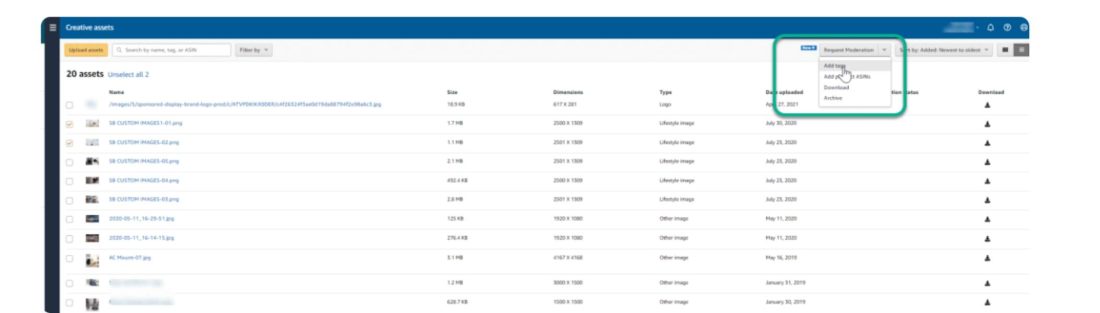
The way you upload and organize your Amazon creative assets determines how much friction you deal with later. A well-structured library makes creatives easier to find and reuse as campaigns grow. When the library is messy, teams slow down and start duplicating work.
This is where structure actually starts to matter. These elements determine how quickly assets can be found and reused as campaigns evolve.
What are the supported asset types?
Amazon Creative Assets tags a specific set of asset types that are designed to be reused across Amazon ads and brand placement. This includes images, videos, and logos that can be reused across formats like Sponsored Brands, Sponsored Display, Stores, Posts, and A+ Content.
Each asset type exists because Amazon renders creatives differently across placements. Assets built within these supported types move more easily across campaigns, while overly specific formats tend to get stuck in one place. This distinction matters when creatives are planned for reuse instead of built to solve a single campaign.
Why do file size and dimensions matter?
File size and dimension requirements determine where an asset can actually run. They control which placements an asset is eligible for.
Assets built to broader size standards move more easily across placements. They can be reused across placements without constant resizing or re-exporting. More restrictive dimensions tend to lock creatives into a single format.
When these requirements are considered during creative planning instead of at upload time, the asset library stays flexible. Get this wrong, and everything slows down later.
How Does Tagging Enable Discovery and Amplify Reuse?
Tagging is what keeps Amazon’s creative assets library usable once it grows. Using the right Amazon creative asset tags determines how quickly your team can find and reuse the right visuals across campaigns. With tagging, assets show up based on intent instead of memory.
As libraries grow, tagging becomes about consistency. When teams use the same tags for products, formats, and use cases, creatives are easier to find and reuse across campaigns. This matters most when the person launching the ad didn’t create the asset. Clear tags remove that dependency.
Tagging systems work best when they stay simple. A small, shared set of tags works better over time than overly detailed ones. When done right, tagging turns creative assets from a storage space into a system that actively supports execution as accounts grow.
How Structure and Filters Enable Faster Execution
During campaign launches, creative selection is usually where things slow down. When assets are organized by product, format, and use case, teams can move straight to launch.
Filters let teams narrow the library to assets that fit the placement or campaign goal. This reduces guesswork and helps avoid outdated or mismatched creatives.
In practice, this means launches move from browsing to selecting. Campaign builds become predictable, updates take minutes instead of rebuilds, and creative execution keeps pace with launch timelines even as the library and number of campaigns grow.
Why does submitting assets early save campaign time?
Submitting assets early moves creative work out of the critical path. When assets are uploaded, approved, and tagged before campaigns are built, setting up campaigns becomes straightforward execution instead of last-minute coordination.
This cuts down on rushed resizing, repeat uploads, and approval delays. It also surfaces missing formats or dimension gaps early, giving teams time to fix them without pushing launch dates. Over time, this habit shortens build cycles and makes launches much more predictable.
Using Creative Assets Across Amazon’s Ad Platform
Once creatives are organized and reusable, their value shows up in how easily they can be activated across Amazon’s ad formats. Instead of uploading assets format by format, teams pull from a shared library wherever Creative Assets is supported.
The sections below look at how this plays out across Sponsored Brands, Sponsored Display, Brand Stores, Amazon Posts, and A+ Content, and what changes when creatives are managed centrally rather than at the campaign level.

How to Set Up Amazon Creative Assets
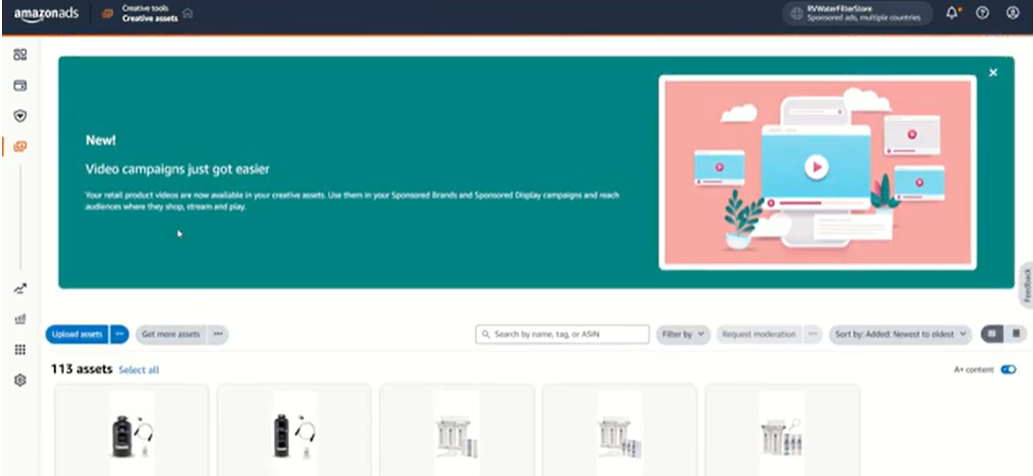
Step 1: Access Creative Assets
Log in to the Advertising Console and navigate to the Creative Assets section from the main menu. This is where all brand images, videos, and logos are stored and managed.
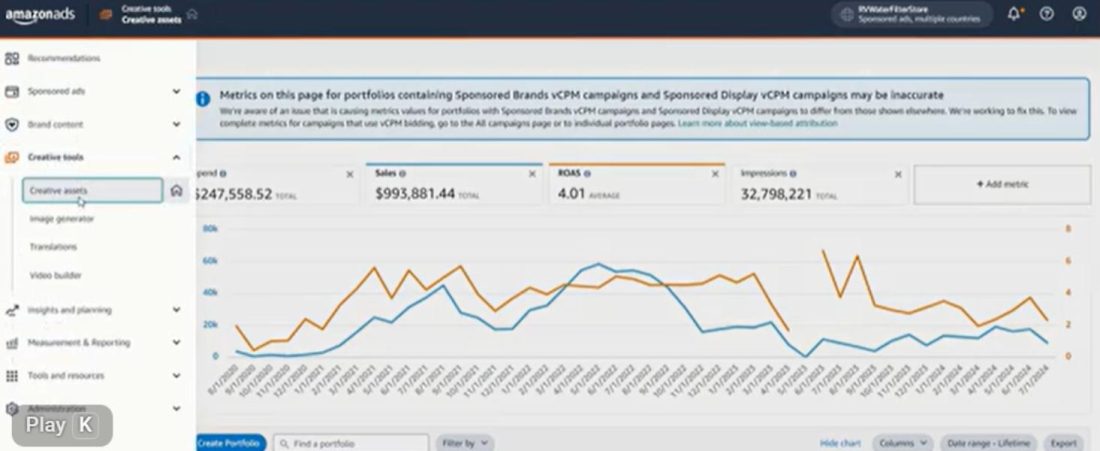
Step 2A: Upload assets intentionally
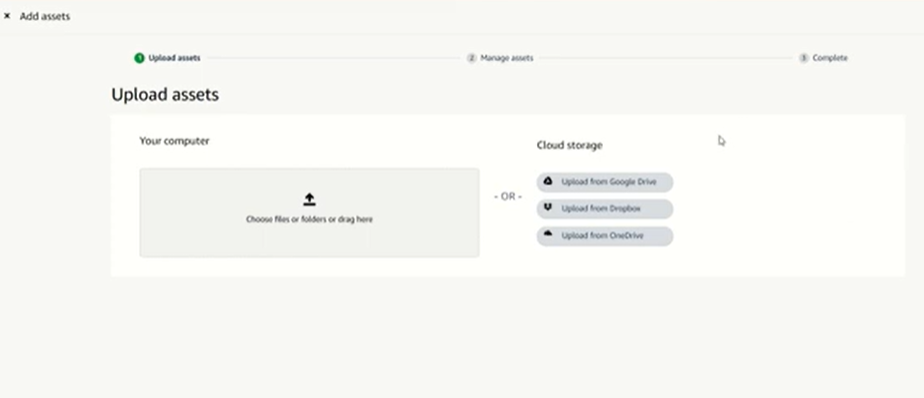
Upload images, videos, and logos that meet Amazon’s format, size, and dimension
requirements. Do not upload campaign-specific files unless necessary. Prioritize evergreen creatives that can be reused across multiple placements.
Step 2B: Use Creative Studio to generate new assets
If you do not have ready-made creatives, Amazon’s Creative Studio is accessible from the same Creative Tools menu in the Advertising Console.
It connects directly to your Creative Assets library, so anything you generate or build there is saved automatically without a separate upload step.
This is especially useful for generating lifestyle images, resizing assets for different placements, or creating video creatives from existing product images.
If your assets are already prepared, skip this step and move to naming and tagging.
Step 3: Name assets clearly
Use consistent naming that reflects what the asset is and where it is likely to be used. Clear naming reduces reliance on memory and prevents duplicate uploads later.
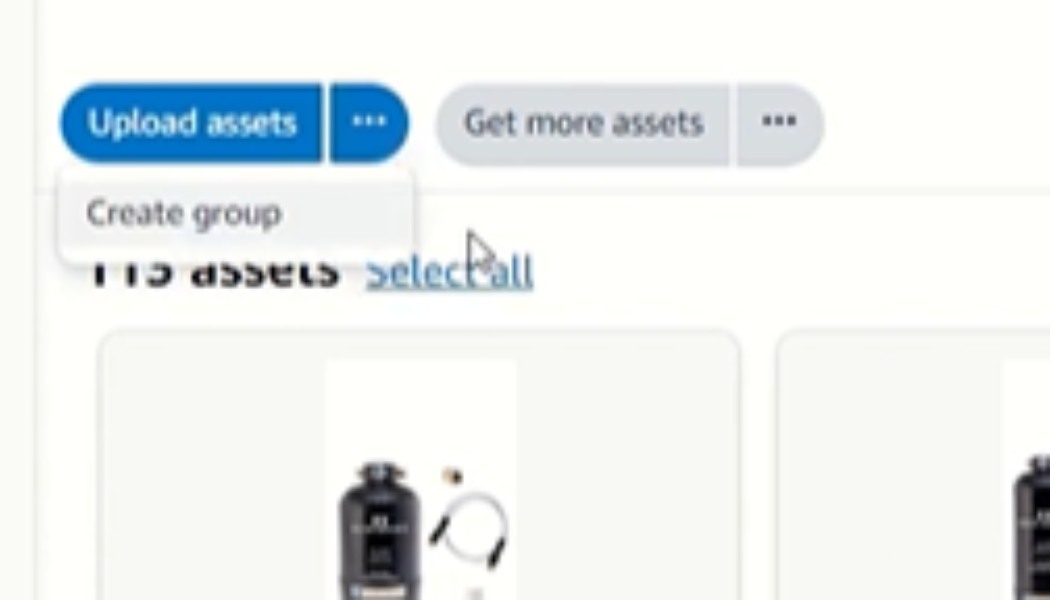
Step 4: Apply tags
Tag assets based on product, format, use case, or brand theme. Getting your Amazon creative asset tags right from the start keeps the library searchable and saves time as it grows.
Step 5: Associate assets with products
Where relevant, link assets to specific products or ASINs. This helps surface the right
creatives during campaign setup and reduces mismatches between creatives and listings.
Step 6: Review permissions and access
Ensure the right team members have access to upload, edit, or reuse assets. Controlled
Access prevents unapproved or outdated creatives from entering the library.
Step 7: Reuse assets during campaign creation
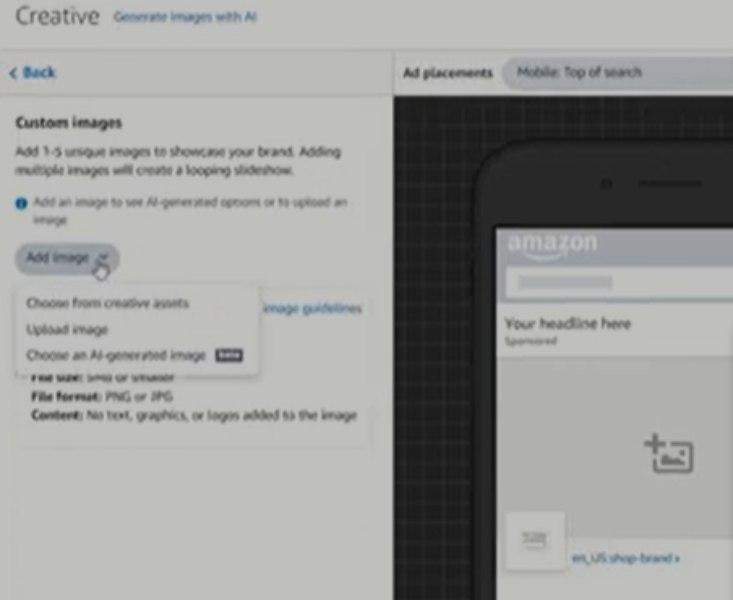
When building Sponsored Ads, Stores, Posts, or A+ Content, select creatives directly from the Creative Assets library instead of uploading new files. This is where the system starts saving time.
Step 8: Maintain and refresh the library
Periodically review asset performance and relevance. Archive outdated creatives and
Refresh high-performing ones to keep the library clean and usable.
I would also like to bring to your notice that Amazon’s creative assets are, of course, time-saving. Yes. But the drawback is that it only has an archive option. So, in case you upload assets for a test run, those just clutter your assets. Hence, please be careful while uploading creatives.
Types of Amazon Creative Assets Across Ad Formats
Amazon’s creative assets include multiple ad formats across the platform. Below are the primary formats where these assets are used. We have also added the real brand examples from Amazon.com for your understanding.
Sponsored Brands
In Sponsored Brands, creative assets become the main source for brand visuals. Logos, lifestyle images, and videos used across headline ads, video ads, and store-driven formats are pulled directly from the asset library instead of being uploaded at the campaign level.
You can see this clearly with brands like Revlon and Momcozy, where the brand logo, headline, and selected product visuals appear together in sponsored brand banners and lead directly into the store experience. The imagery and messaging stay consistent from the ad placement to the storefront, reinforcing a unified brand presence.
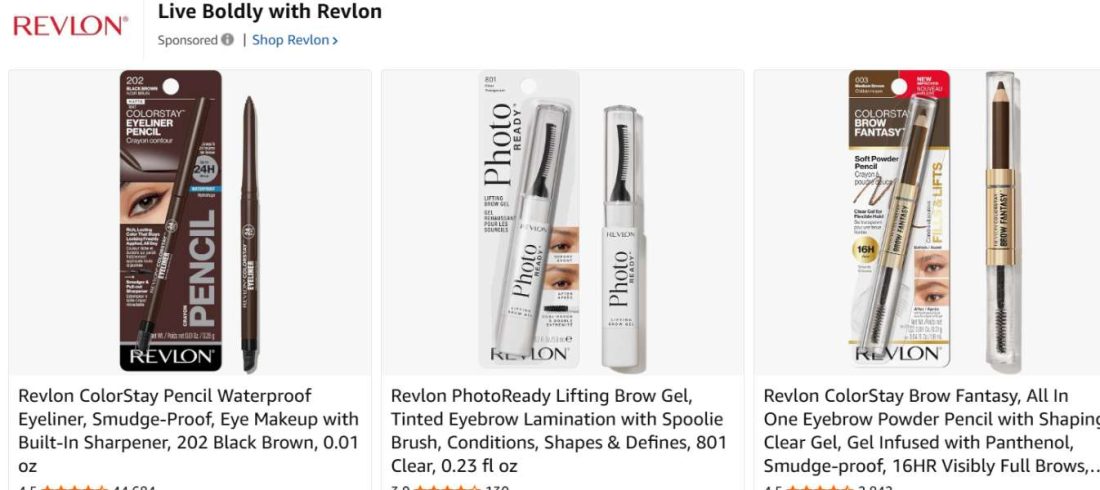
This changes how Sponsored Brands campaigns are built and maintained. With creatives managed centrally, the same asset can be reused across multiple campaigns without duplication. Updates to logos or refreshed visuals can be applied consistently, without rebuilding every campaign from scratch. It also makes creative testing cleaner, since variations can be swapped at the asset level while targeting and structure remain unchanged.
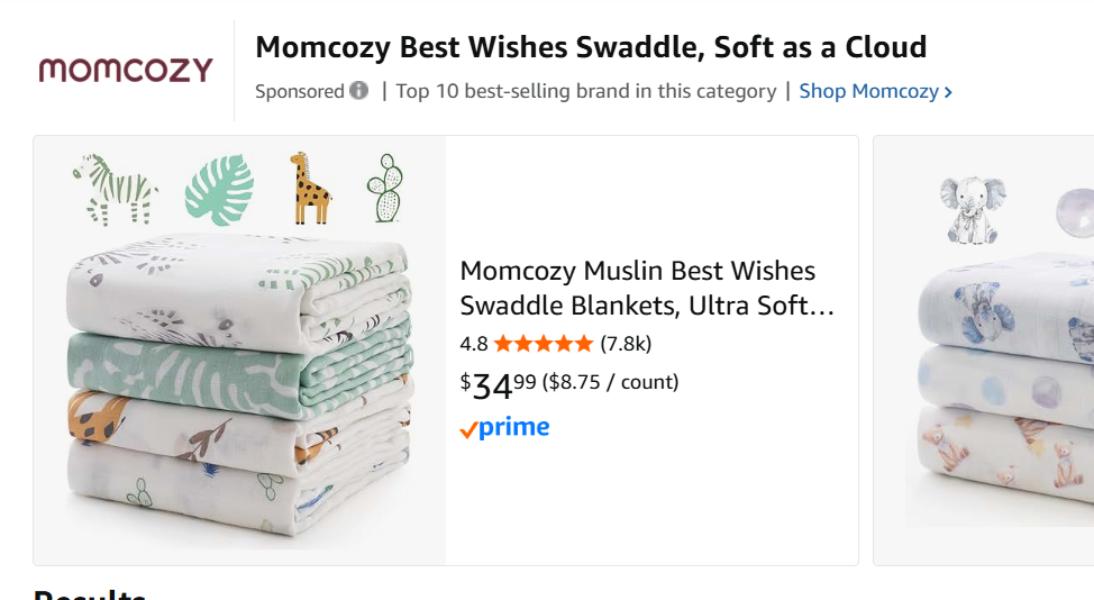
For brands running multiple Sponsored Brands formats at the same time, creative assets help keep visuals aligned across placements so the brand looks intentional rather than fragmented. When the banner ad matches the store hero and the video creative uses the same visual language, the shopper experience feels cohesive instead of disconnected.
Sponsored Display
In Sponsored Display, Creative Assets supports both static and dynamic creatives while keeping everything anchored to a single library. Images and videos used across audience, contextual, and retargeting campaigns are pulled from the same place, which helps prevent creative sprawl as display activity scales.

Look at brands like TREBLAB and Nothing, where video-led visuals appear directly within “Similar brands” placements on product detail pages. The same product-focused creative style used in search placements can carry into display units, reinforcing brand presence beyond the initial click. In home appliances, brands advertising cordless vacuum cleaners and Dyson-compatible accessories follow a similar pattern, using product-led video creatives to stay visible within competitive PDP environments.
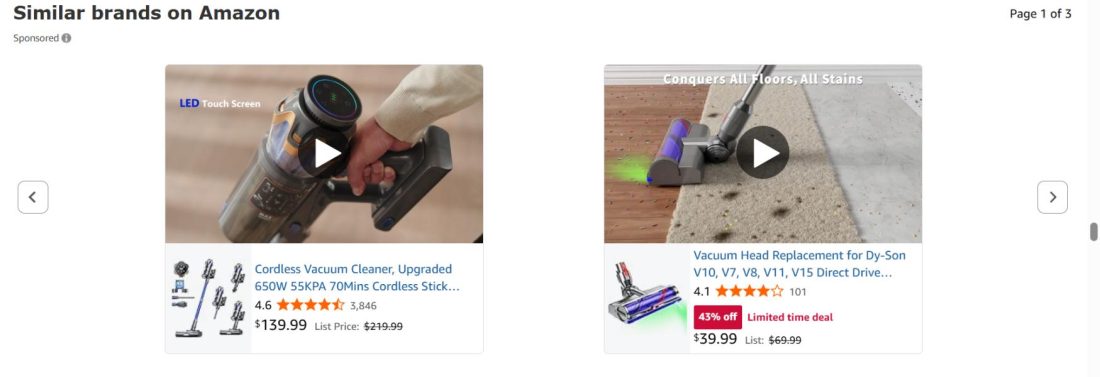
Because Sponsored Display often runs alongside Sponsored Brands, this shared asset pool becomes important for alignment. The same visuals and messaging can follow users from discovery through retargeting, so the brand feels consistent rather than fragmented.
When creatives need a refresh due to seasonality, compliance changes, or performance fatigue, the update happens once and can be reused across eligible display placements. This reduces rebuild time, avoids outdated creatives resurfacing, and allows teams to iterate faster across the Amazon advertising platform without breaking visual consistency.
Brand Stores
In Brand Stores, Amazon Creative Assets acts as the visual backbone of the storefront. Images and videos used across hero banners, navigation modules, and category tiles are pulled from a central library, reducing duplication and keeping branding consistent as the store evolves.

You can see this clearly with brands like Adidas, where the hero visuals, navigation structure, and campaign imagery align with what appears in sponsored brand placements. Similarly, Samsung maintains a clean, product-forward visual language across its store pages, reinforcing the same brand tone seen in paid ads.
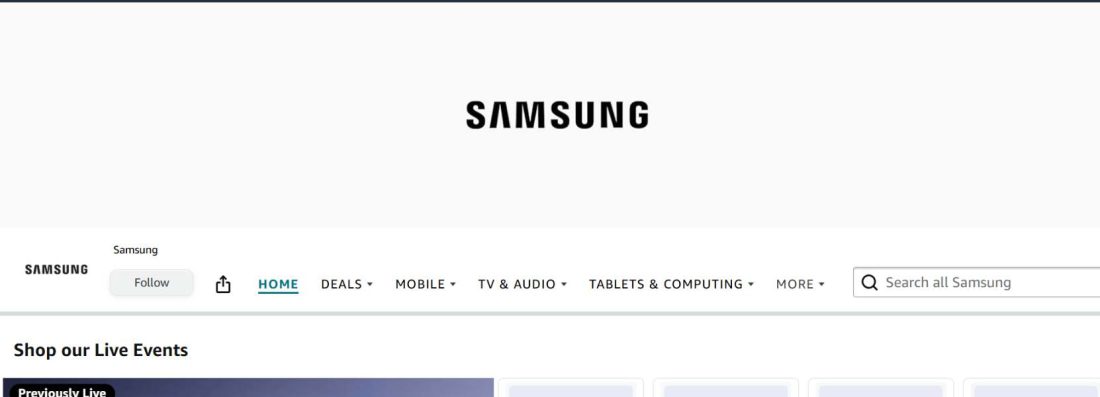
This matters because stores are never static. Pages get added, layouts change, and promotions rotate. When creatives live in a shared library, updates can be applied centrally instead of reuploading assets across multiple modules. Teams can reuse visuals across stores and sponsored placements, ensuring what shoppers see in ads matches what they land on. That alignment prevents the store experience from drifting as more contributors get involved.
Amazon Posts
For Amazon Posts, Creative Assets streamlines high-frequency publishing by centralizing the visuals brands rely on. Since Posts require ongoing updates and consistent storytelling, pulling images from a shared asset library reduces manual effort and keeps content aligned with broader campaign themes.
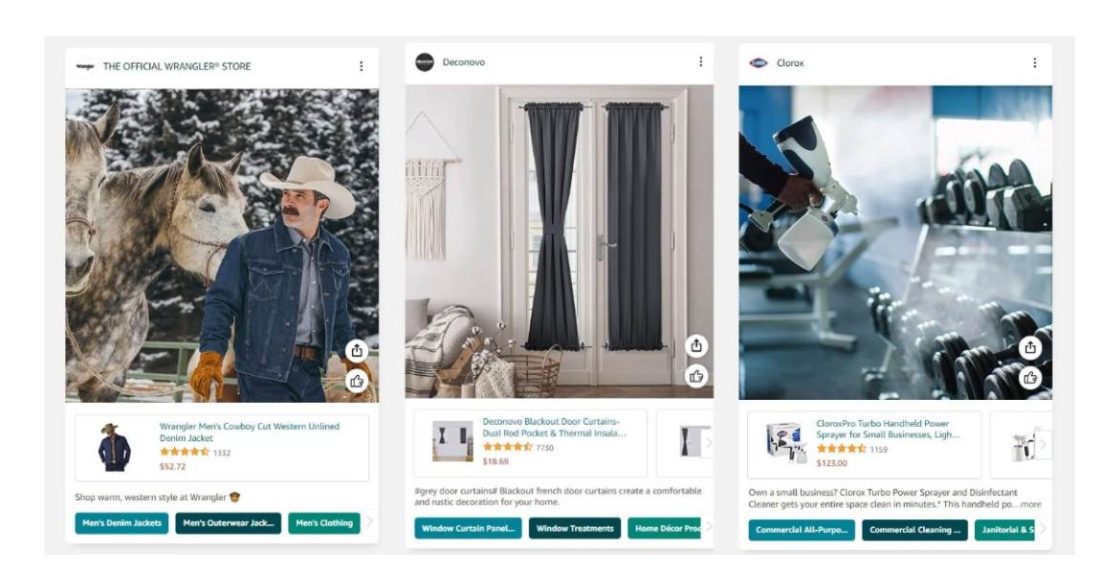
Notice how brands like LEGO carry bold, product-in-action visuals across posts and sponsored placements, reinforcing a recognizable brand tone wherever shoppers engage. Adidas extends performance-focused lifestyle imagery from ads into posts, maintaining narrative continuity across placements. Similarly, The Honest Company keeps consistent color palettes and lifestyle photography across Posts, brand stores, and sponsored formats.
When creative assets are managed centrally, posts do not operate in isolation. The same campaign-approved visuals can be reused across sponsored ads and store pages, ensuring recognition builds through repetition rather than fragmentation. Instead of feeling like standalone social content, posts become part of a unified creative system that supports the entire advertising funnel.
A+ Content
In A+ Content, Creative Assets is less about campaign execution and more about long-term brand consistency. The images and videos on product detail pages tend to stay live for extended periods, which makes reuse, alignment, and version control far more important over time.
For example, look at brands like L’Oréal, where lipstick listings often follow a consistent visual structure, from shade displays to texture swatches and benefit callouts. Similarly, Revlon maintains uniform product storytelling across its kajal and eye makeup pages, using repeatable feature breakdowns and clean comparison modules to reinforce clarity and brand identity.

Pulling A+ creatives from a centralized asset library reduces the risk of outdated visuals lingering across listings. When packaging changes, shade ranges expand, or imagery needs refreshing, updates can be applied systematically instead of editing each product page individually. This becomes especially valuable for brands managing multiple SKUs or collaborating across content teams.
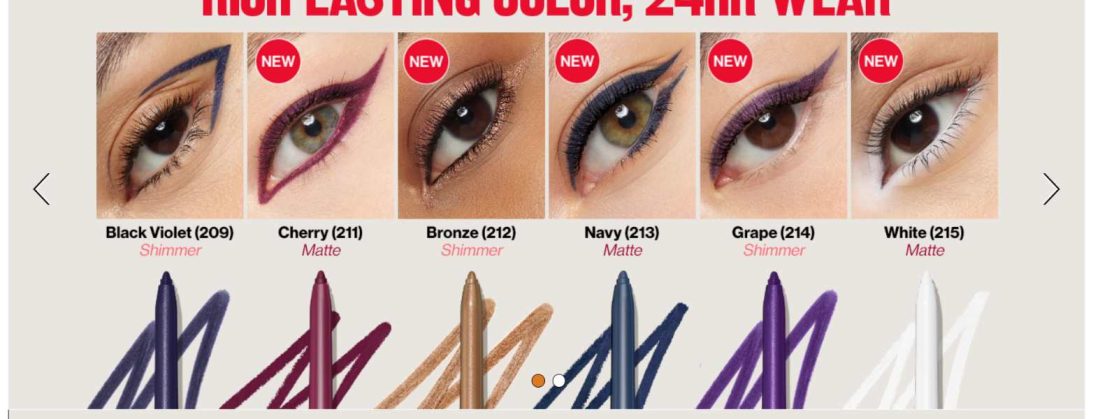
It also strengthens the overall brand experience. When A+ modules reflect the same visual language seen in ads and stores, shoppers move from click to conversion without friction. The result feels cohesive rather than pieced together, reinforcing trust at every stage of the journey.
How Component-Based Creatives Make Testing and Updating Ads Significantly Faster?
Component-based creatives change how ads are built and maintained. Instead of treating each ad as a fixed unit, creatives are broken into individual parts like images, videos, logos, and headlines that can be swapped independently.
What that means in practice is speed. If you want to test a new visual, you do not need to duplicate campaigns or rebuild ads. You change one component and leave everything else untouched. This makes tests easier to run and easier to interpret, because you are isolating one variable instead of changing multiple elements at once.
When a creative starts to fatigue or needs a refresh, you update the component once and reuse it wherever it is live. No pausing campaigns. No rebuilding structures. Over time, this turns creative testing from a heavy operational task into something that can keep pace with how quickly campaigns evolve.
Taking Creative Assets Further With the API and Multi-User Access
Once Creative Assets is set up and actually being used as a library, the natural next question is how it scales. This is where the API and multi-user access come in. Together, they take creative assets beyond everyday execution and make them workable for larger teams and more complex setups.
The API handles scale by automating how assets are uploaded, updated, and shared across accounts, while multi-user access keeps collaboration organized and controlled. Instead of slowing teams down, these features allow more people, more markets, and more brands to work from the same system without losing consistency or oversight.
Managing Creative Assets Programmatically via the API Across Multiple Locales or Brand Accounts
The Creative Assets API makes it possible to manage creative development without doing everything manually. Instead of uploading the same images or videos again and again for each locale or brand account, assets can be pushed programmatically. That means consistency is built in from the beginning, not fixed later.
Across multiple locales, the Amazon Seller API helps teams strike a balance between global control and local relevance. Core brand assets like logos or master visuals stay consistent across markets, while regional teams can layer in language-specific or compliance-driven variations where needed. This avoids unnecessary duplication and reduces the risk of regional accounts slowly drifting away from brand standards.
For brands running multiple brand accounts, the API effectively creates a shared source of truth. Assets can be synced across accounts, updates can roll out everywhere at once, and outdated creatives can be retired centrally.
This becomes especially important during rebrands, seasonal launches, or compliance updates, where timing matters and manual updates do not scale. In practice, API-driven asset management reduces operational effort, cuts down errors, and allows creative operations to grow alongside account complexity instead of holding it back.
How Multi-User Access Keeps Your Team Aligned on Brand Consistency
As soon as more than one person touches creatives, things can drift. Someone uploads a slightly different logo, another tweaks an image for speed, and before you know it, the brand looks different across campaigns. Multi-user access exists to stop that from happening.
By setting clear permissions, teams can decide who owns the brand and who executes on it. Approved creatives come from a shared library, and everyone builds from the same starting point. That means faster launches without everyone making their own creative decisions in isolation.
It also makes collaboration easier. When updates happen, everyone sees the same version at the same time. No chasing files, no guessing which asset is current. Over time, this keeps the brand consistent, not because people are careful, but because the system makes consistency the default.
How Does Creative Studio Connect to Your Asset Library Growth?
As creative assets become more central to how your team operates, the question shifts from managing creatives to producing them faster. This is where Creative Studio comes in.
Creative Studio is Amazon’s AI-powered creative environment, accessible directly from the Creative Tools menu in the Advertising Console. Unlike Creative Assets, which is a library and management system, Creative Studio is where new creatives are actually built.
The two work together. Assets generated in Creative Studio save automatically to your Creative Assets library, ready to be tagged, organized, and reused across formats without any additional steps.
This changes how creative production fits into campaign workflows. Instead of briefing external designers, waiting on files, and uploading them manually, teams can generate on-brand variations, resize assets for different placements, and produce video creatives from existing product imagery directly inside the platform.
Amazon’s first-party retail signals inform Creative Studio’s outputs, which means generated assets are built with an understanding of your brand’s existing style and tone rather than starting from scratch.
For teams managing multiple locales, product lines, or frequent seasonal refreshes, Creative Studio reduces the turnaround time between needing a new creative and having one ready to deploy.
Combined with the organizational structure of Creative Assets, it creates a closed loop where production, storage, and reuse all happen within the same system.
What Separates a High-Performing Creative Asset Strategy From an Average One?
You don’t see the difference in one campaign. You feel it three months later when launches stop being stressful. Not in dashboards or reports, but in how easy or painful everyday work feels. In average setups, teams spend time searching for assets, reuploading files, and fixing inconsistencies. In high-performing setups, things just move faster, with fewer decisions and fewer mistakes.
The gap comes down to how intentionally Creative Assets is used. The examples below show where average and high-performing approaches start to diverge in real workflows.
Campaign-first uploads vs reuse by design
Most teams don’t think about reuse when they upload creatives. They just want the campaign live. So files get named after the campaign, lightly tagged, and forgotten. Six weeks later, the same product is promoted again, and someone reuploads everything because it’s faster than digging through the library.
High-performing teams upload creatives with reuse in mind. Assets are organized by product and use case, tagged consistently, and reused across formats. When a new campaign starts, the creatives are already there and easy to find.
This usually shows up as reuploading the same creatives for new campaigns and wasting time searching for “the right version.”
Refreshing ads vs rebuilding them
Average strategies treat updates as rebuilds. A seasonal refresh means duplicating campaigns, swapping visuals, and hoping nothing gets missed.
High-performing strategies update at the asset level. One change in the library flows across every placement using that creative. No rebuilds, no gaps, no old visuals slipping through.
This comes up as duplicated campaigns, missed updates, and old visuals still running weeks later.
Searching for assets vs surfacing them
In average libraries, finding the right creative depends on who remembers where it lives. As the library grows, this becomes slower and more error-prone.
High-performing libraries rely on shared tagging conventions. Assets surface based on intent, not memory, which makes it easier for anyone on the team to move quickly and stay consistent.
Ends up meaning a lot of scrolling, guesswork, or asking teammates where a file lives.
Why Preparing Creative Assets Early Matters More Than Building Campaigns
In most teams, creatives get uploaded while campaigns are being built. And that’s usually when the chaos starts. Someone realizes a size is missing. A format isn’t approved. Legal hasn’t signed off. Suddenly, what should’ve been a launch day turns into a scramble.
High-performing teams don’t work like that. They move asset prep earlier in the process. Creatives are uploaded, approved, tagged, and ready to go before a single campaign is built. So when it’s time to launch, the focus is on execution, not chasing approvals across Amazon.
Because if you’ve done this long enough, you know how it shows up otherwise. Last-minute resizing. Bottlenecks. Timelines are slipping for no real reason except poor sequencing.
Amazon Creative Assets Examples
Below is a practical example of how Creative Assets is used in real workflows and what tends to go wrong when it isn’t used intentionally.
What Not to Do: A Hypothetical Story
Imagine a brand launching a new product. The team spins up a Sponsored Brands campaign and uploads a few images just to get things live. The files are named after the campaign, lightly tagged, and forgotten once the launch is over.
A month later, the product is added to Sponsored Display. Instead of reusing the same creatives, the team reuploads similar images because finding the originals feels harder than starting fresh. Now there are multiple versions of the same visual floating around the library.
A seasonal refresh comes up next. To swap visuals, campaigns are duplicated. Some ads get updated, others are missed, and a few old creatives keep running longer than intended. Meanwhile, Stores and A+ Content are using completely different images because no one is sure which version is approved.
By the time the brand scales spend, the problem isn’t performance. It’s friction. Launches take longer, testing feels heavy, and the brand looks inconsistent depending on where shoppers see it. None of this happens because the team is doing things wrong. It happens because creatives were treated as one-off campaign files instead of reusable assets from the start.
What This Looks Like When Done Right
Now take the same brand, but with a different approach. Before the first campaign even goes live, the team uploads a small set of product visuals into Creative Assets. The files are named clearly, tagged by product and use case, and approved once.
When Sponsored Brands launches, those assets are already there. A few weeks later, when Sponsored Display is added, the same visuals are reused instead of reuploaded. No hunting for files. No second-guessing which version is correct.
When it’s time for a seasonal refresh, the team updates the asset in the library instead of rebuilding campaigns. The change flows through everywhere that the asset is being used. Ads, stores, and A+ content all stay aligned without extra work.
As spending and campaigns scale, execution actually gets easier. Launches are faster, testing feels lighter, and the brand looks consistent no matter where shoppers encounter it. Not because the team is moving more slowly, but because the system is doing more of the work.
Case Study: Oogie’s Snacks
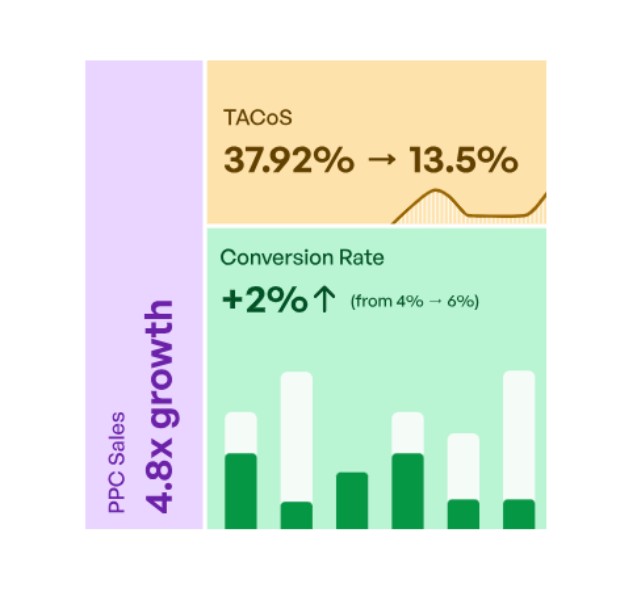
When Oogie’s Snacks came to us, nothing was technically broken. Ads were running, spend was steady, and monthly sales sat around $5K. But growth had stalled. Optimizing bids and budgets wasn’t changing outcomes, and adding more campaigns only made the account harder to manage.
The real issue was the creative structure. Assets were uploaded per campaign, visuals varied across formats, and there was no system for reuse. Testing felt slow, and even small updates required extra effort.
Instead of scaling spend, the focus shifted to scaling creatives properly. Oogie’s rebuilt fewer reusable assets designed to work across Sponsored Brands, Sponsored Display, and Store placements. Creatives were organized by product and use case, tagged clearly, and reused consistently.
That shift unlocked momentum. Sales grew from $5K to $24K, ad revenue increased 3X, and ACoS dropped from 40% to 30%. The improvement didn’t come from aggressive optimization but from treating creative assets as a system rather than one-off executions.
Interesting, right? Here is the full case study on Oogies Snacks.
Final Takeaway: Creative Assets is only as powerful as the strategy behind them
Uploading better creatives into the library doesn’t magically increase ROAS. If the campaigns are weak, they’ll still be weak. It just makes your existing habits louder. If the account is organized, things move faster. If it’s chaotic, the chaos scales too.
When creatives are uploaded reactively, tagged inconsistently, and managed at the campaign level, the feature becomes just another storage layer. When assets are planned for reuse, organized intentionally, and updated at the asset level, Creative Assets turns into a real execution advantage.
The brands that get the most value treat creative decisions as infrastructure, not last-minute inputs. They submit assets early, reuse them across formats, and maintain a library that supports speed, consistency, and testing as advertising scales.
At SellerApp, this is the kind of work we do every day to unlock better sales by helping brands move from reactive creative management to a system that actually scales. We have seen firsthand how getting this right changes the pace of growth.
Not just cleaner libraries, but faster launches, sharper testing, and ad spend that works harder because the creatives behind it are built to.
If every new product launch adds more manual work instead of less, something in the setup is off. If expanding your campaigns is creating more friction instead of momentum, that’s the gap holding you back, and if that is the gap you are willing to close, we are here for you.
Talk to the team at SellerApp, an Amazon PPC agency that builds expandable creative systems, not just campaigns.
FAQs
If you are running one or two campaigns, you probably will not notice much difference. The shift happens when your account gets busier. More formats. More refreshes. The same product is promoted in multiple places. That is when having one central library starts saving time. It is not a performance hack. It simply keeps things from getting messy as your activity increases.
Not automatically, and this is where confusion usually starts. An asset only updates in placements where it is actually referenced and eligible. It is not a global replace button. Before editing anything, it helps to check where that asset is currently being used. Otherwise, you risk changing something you did not mean to or expecting an update that does not happen.
Yes. In many cases, smaller teams benefit more. When you are working alone, reuploading the same image for Sponsored Brands, Stores, and A+ Content gets repetitive fast. A shared library removes that extra step. The real question is not team size. It is how often you reuse your creatives.
Usually, because the library is being treated like storage instead of a system. If naming is inconsistent, tags are random, or assets are uploaded for one campaign and forgotten, the chaos just moves into the library. The tool itself does not enforce structure. This is also why some growing brands eventually layer in external tracking, whether that is internal documentation or tools like SellerApp, to keep versioning and usage aligned across campaigns. The organization still needs to be intentional either way.
They do not directly increase performance. What they improve is execution discipline. You refresh on time. You test variations properly. You avoid running outdated visuals because no one realized they were still active. In larger accounts, some teams rely on workflow tools such as SellerApp to monitor campaign and creative performance more religiously. But even then, the gains come from cleaner processes, not from the asset library alone.