


Most Walmart sellers know the Walmart Brand Shop and Shelf features exist, but many set them up once and never really think about them again.
The problem is what happens after someone clicks your listing.
You spend time and money driving traffic to your product page. Ads, optimization, all of it just to get that click. But once shoppers land there, Walmart immediately shows them competing products.
That is why experienced sellers think beyond the listing itself.
Instead of letting shoppers wander around the marketplace, they try to pull them deeper into their own catalog. A well-built Walmart Brand Shop, combined with the right shelf structure, keeps shoppers exploring your products instead of drifting toward competitors.
In this article, we will break down how Walmart Brand Shop and Shelf work, look at a few real examples, and explain how sellers use them to turn more clicks into actual revenue.
Quick Guide:
- What Is a Walmart Brand Shop and Shelf, and Why Is It More Than Just a Pretty Page?
- How to Register and Get Verified Through the Walmart Brand Portal
- How to Drive Real Traffic to Your Walmart Brand Shop and Shelf
- The Biggest Mistakes Sellers Make With Their Walmart Brand Shop and Shelf
- Final Thoughts
What Is a Walmart Brand Shop and Shelf, and Why Is It More Than Just a Pretty Page?
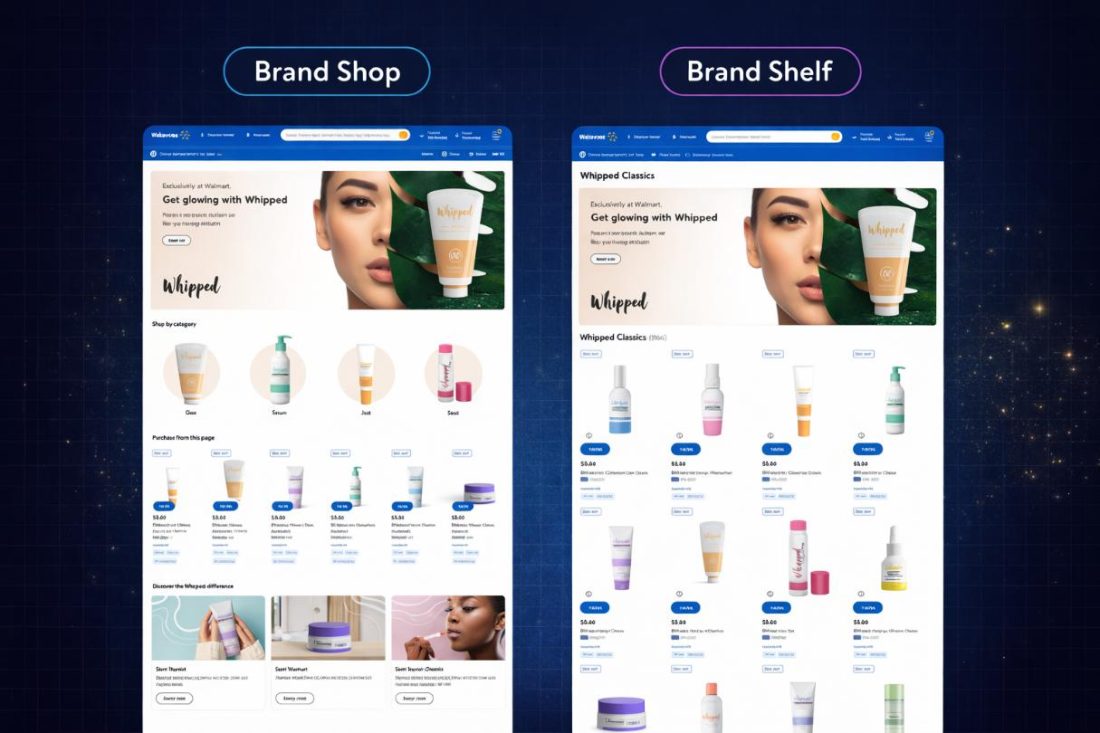
A Walmart Brand Shop is a branded storefront on Walmart Marketplace where sellers showcase their product catalog in a dedicated space. Instead of relying only on individual product listings, brands can present multiple products together in a single, organized environment.
A Walmart Shelf, on the other hand, is a product collection within the Brand Shop. Shelves group products into curated sections such as best sellers, seasonal collections, bundles, or product categories. These sections help guide how shoppers browse the catalog.
At first glance, a Walmart Brand Shop can look pretty simple. A banner, a logo, and a grid of products.
Because of that, many sellers assume it is mostly about presentation. But that is not really its main purpose.
The real value comes from how Brand Shops and shelves shape product discovery. Most marketplace shoppers do not arrive with a detailed plan. They search for one product, click a listing, and then start browsing.
A structured Brand Shop changes that behavior. Instead of encountering a random grid of products, shoppers can move through clearly organized shelves that make browsing easier.
For example, shelves can highlight best sellers, seasonal items, bundles, or specific product categories. When these sections are structured intentionally, they guide shoppers toward the products a brand wants them to discover first, often the items that perform best or drive higher margins.
In that sense, a Walmart Brand Shop and shelf are not just visual storefronts. It works as a discovery system that helps shoppers explore more of a brand’s catalog. Someone who arrives looking for one product might end up discovering several others within the same storefront. And on a marketplace full of competing listings, that ability to guide discovery becomes a significant advantage.
The Difference Between a Product Listing and Owning Brand Real Estate
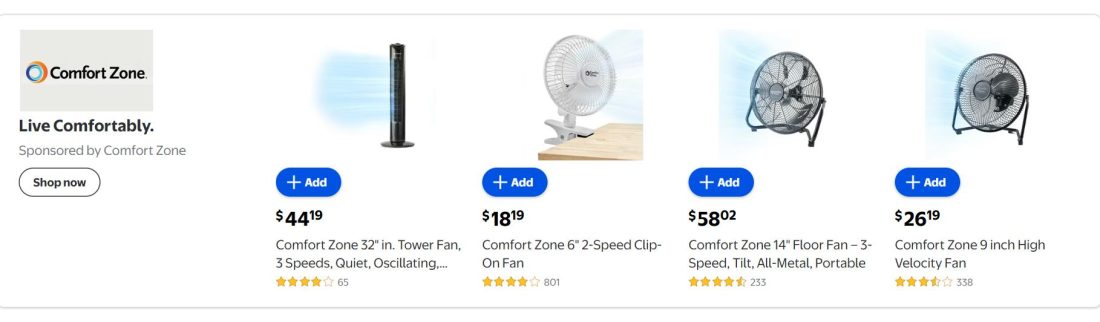
Most Walmart marketplace sellers start by optimizing individual product listings. They improve keywords, upgrade images, and adjust pricing to stay competitive.
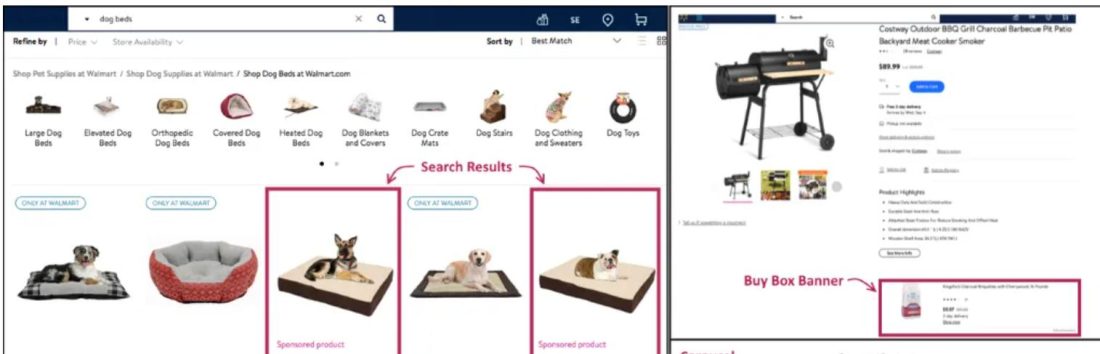
But a listing still sits inside Walmart’s marketplace environment, where competing products and sponsored placements appear alongside it.
A Walmart Brand Shop works differently. Instead of relying on one listing surrounded by alternatives, it creates a branded storefront where multiple products from the same catalog live together.
Within that storefront, shelves organize products into curated sections like best sellers, bundles, or categories. This structure encourages shoppers to explore more items from the same brand instead of drifting toward competing listings.
Why Shoppers Who Land on a Brand Shop Convert Differently Than Search Browsers
Shoppers who arrive through Walmart search behave differently from those who land on a Brand Shop. Search traffic usually compares multiple brands, while Brand Shop visitors explore products within a single brand environment.
This subtle shift matters more than it seems. When people are presented with too many choices, they tend to slow down and overthink the decision. Psychologists often call this decision fatigue. The more options shoppers compare, the harder it becomes to pick one.
Brand Shops reduce that friction. Inside a storefront, shoppers are no longer asking, “Which brand should I trust?” That question is already settled. Now the decision becomes simpler: Which product from this brand fits my needs best?
That smaller decision is easier to make.
As a result, shoppers often move faster. Instead of bouncing between competing listings, they browse shelves, explore collections, and compare products within the same catalog. The experience feels less like a competition and more like browsing inside a store.
For example, someone searching for running shoes might open several listings from different brands before deciding. But if that same shopper enters a brand storefront, they are more likely to browse different models, collections, or categories offered by that brand.
Once people start browsing like that, something interesting happens. They stay longer and discover more products. Instead of constantly comparing alternatives across brands, shoppers begin exploring complementary items within the same catalog. That naturally increases the chances of cross-selling and multi-product purchases.
In other words, a Brand Shop gently shifts the shopper from “Which brand should I choose?” to “Which products from this brand do I want?” And that small psychological shift can make a surprisingly big difference in how often shoppers convert.
How Walmart Brand Shop and Shelf Work Together as a Growth System
A Brand Shop Walmart becomes far more useful when it works together with shelves. The Brand Shop acts as the main storefront, while shelves organize products into clear collections that guide how shoppers explore the catalog.
Think of the Brand Shop Walmart as the entrance to a store and the shelves as the sections inside it. Without shelves, a Brand Shop would just be a long list of products. Shelves add structure by grouping items in ways that match how people naturally browse.
For example, a home décor brand might organize its Brand Shop like this:
- Best Sellers
- Wall Art and Frames
- Tabletop Decor
- Lighting and Ambience
- Seasonal Decor
When a shopper lands on the Brand Shop, these sections make navigation much easier. Someone who came looking for wall art might also notice decorative table pieces or a lighting collection that fits the same style.
Instead of buying just one item, the shopper starts picturing how multiple pieces could work together in the same space.
At that point, the Brand Shop stops being just a page with products on it. It starts working more like a discovery system for the whole catalog.
From a seller’s perspective, this creates a simple but powerful loop. Traffic enters the Brand Shop, shelves guide shoppers through different product groups, and customers naturally discover additional items. The result is better product visibility, stronger cross-selling opportunities, and a higher chance that someone buys more than one product.
Walmart Brand Shop Examples
Looking at a few Walmart brand shop examples helps clarify how brands structure their storefronts for discovery.
For instance, one Walmart brand shop example from a home décor brand might organize its storefront into shelves such as
- Best Sellers
- Wall Art and Frames
- Tabletop Decor
- Lighting and Ambience
- Seasonal Collections
This Walmart brand shop example mirrors how shoppers naturally browse. Someone who enters the storefront looking for wall art may also explore tabletop pieces or lighting that match the same style.
Other Walmart brand shop examples follow a similar pattern. Apparel brands often group products by collections or use cases such as everyday wear, seasonal styles, or trending items. Electronics brands may organize shelves around product categories like accessories, bundles, or new releases.
Across most Walmart brand shop examples, the goal is not just to display products but to guide shoppers through the catalog in a logical order that encourages deeper browsing.
How to Register and Get Verified Through the Walmart Brand Portal
Before you can create a Brand Shop Walmart , your brand needs to be registered through Walmart’s Brand Portal. This verification confirms that you own or represent the brand and allows you to access features like Walmart Brand Shop and Shelf storefront tools.
Step 1: Log in to Walmart Seller Center and apply for Brand Portal access.
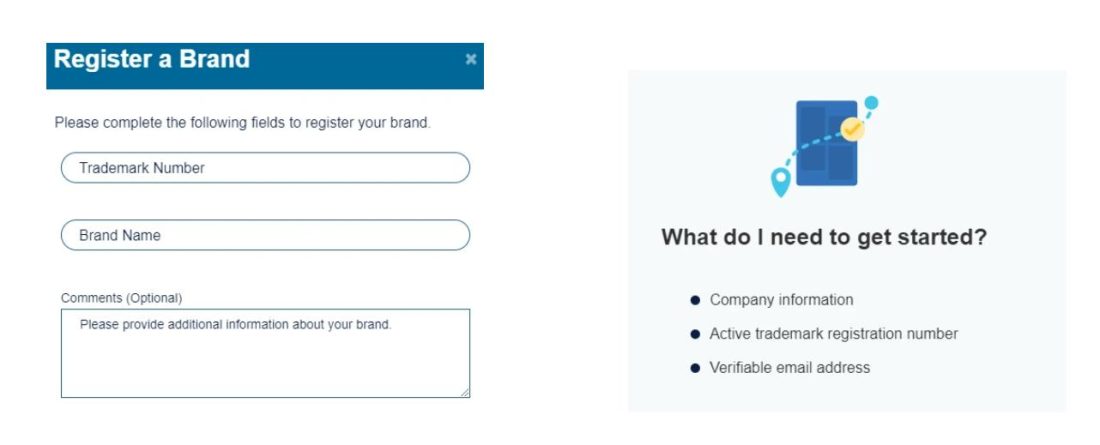
Step 2: Submit your brand details, including trademark information and brand ownership documents.
Step 3: Wait for Walmart to review and verify the brand before enabling Brand Shop features.
Step 4: Once approved, open the Shop Builder in Seller Center and start creating your storefront.
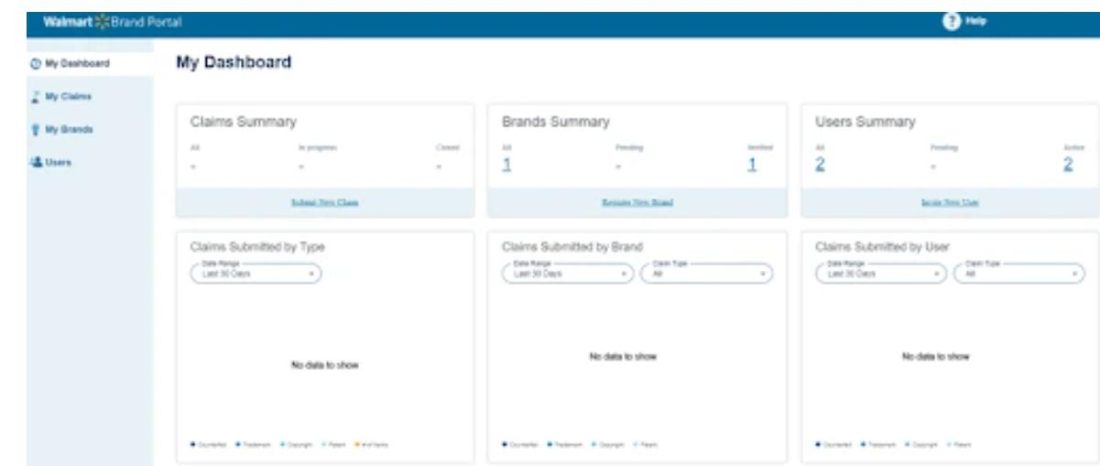
Step 5: Add your brand banner, logo, and basic brand information.
Step 6: Organize products into shelves such as best sellers, categories, or collections, and make sure your most important products appear first.
Step 7: Review and submit the Brand Shop for Walmart’s approval before publishing.
Step 8: Once approved, start directing traffic through ads, search, or external campaigns.
What Happens During the Review Process and How to Avoid Getting Rejected
After you build your Walmart Brand Shop and Shelf, it does not go live immediately. The storefront first goes through Walmart’s review process before shoppers can see it.
At this stage, Walmart checks whether your Brand Shop and shelf layout follow the platform’s guidelines and branding rules.
Most of the review is pretty straightforward. Walmart usually looks for things like correct brand assets, proper image sizes, and whether the page avoids misleading claims. They also check that the shelves are set up properly and that the products displayed actually link to the right listings.
If you look at different Brand Shop examples, most rejections are not because of complicated issues. It is usually something small. A banner image that does not meet size requirements, inconsistent branding, or a product link that is missing.
The easiest way to avoid delays is to give the page a quick review before submitting it. Make sure images are clean, products are placed in the right shelves, and branding looks consistent across the storefront. Small details like these usually help a Brand Shop pass review without much trouble.
How to Drive Real Traffic to Your Walmart Brand Shop and Shelf
Driving traffic to a Walmart Brand Shop and Shelf usually requires combining internal Walmart advertising with external traffic sources. The most effective sellers rely on a few key channels.
1. Sponsored Brand Ads
Sponsored Brand Ads are one of the most direct ways to send shoppers to a Brand Shop. These ads appear at the top of Walmart search results and can link directly to your storefront instead of a single product listing.
Because the ad showcases multiple products at once, it encourages shoppers to explore your catalog rather than comparing individual listings.
2. Internal Cross-Linking From Product Listings
Many sellers link their Brand Shop inside product descriptions or enhanced content. When shoppers land on a listing, they can click through to the storefront and browse the rest of the catalog.
This approach helps convert single-product traffic into broader catalog discovery.
3. External Traffic From Social and Email
Brands often send external traffic directly to their Brand Shop instead of a single product page. For example:
- Instagram product demos
- TikTok product reviews
- Email campaigns to existing customers
When shoppers arrive through these channels, they can explore multiple products inside the storefront.
4. Packaging Inserts and QR Codes
Some sellers include a QR code on packaging that links to their Brand Shop. After customers receive their order, they can scan the code and browse other products from the same brand.
This creates repeat discovery opportunities beyond Walmart searches.
How Brands Drive Traffic to Walmart Brand Shop and Shelf
The strategic advantage is not just traffic volume, but how that traffic behaves economically. These campaigns allow advertisers to send shoppers directly to a Brand Shop instead of a single product listing.
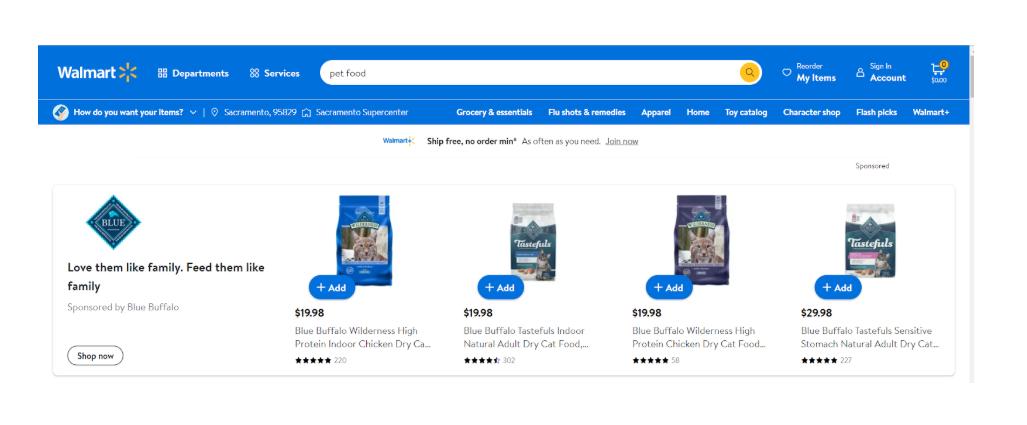
For mid-market and enterprise brands managing large assortments, this can significantly improve revenue per click and overall campaign efficiency. One paid click can generate discovery across several SKUs, increasing the likelihood of conversion and often raising average order value.
From a P&L perspective, this changes how advertising efficiency is measured. Instead of evaluating campaigns only by cost per click, brands can optimize around revenue per visit and catalog-level return on ad spend.
Using SellerApp to Discover High Intent Keywords and Optimize Walmart Ads
Running Sponsored Brand Ads to a Walmart Brand Shop and Shelf works best when campaigns are built around high-intent search terms.
According to SellerApp analysts, high-intent Walmart keywords often become more specific as shoppers move closer to making a purchase decision. Identifying these search patterns allows sellers to target queries that bring more qualified traffic into Brand Shop campaigns.
The challenge for many sellers is identifying which keywords actually signal purchase intent rather than general browsing.
This is where data-driven keyword analysis becomes important.
Platforms like SellerApp help sellers uncover search patterns on Walmart Marketplace and identify keywords that are more likely to convert.
With SellerApp, sellers can:
- Discover high-intent keywords relevant to their catalog
- Track keyword rankings and search visibility
- Identify underperforming search terms wasting ad spend
- Optimize campaigns based on performance data
For example, a campaign targeting a broad keyword such as running shoes may attract large search volume but also heavy competition. Data insights may reveal more specific queries, such as lightweight running shoes or long-distance running shoes, which often signal stronger purchase intent.
When these high-intent keywords are used in Sponsored Brand campaigns that send traffic into a Brand Shop, the result is more qualified visitors entering the storefront and exploring the catalog.
How to Measure and Optimize Your Walmart Brand Shop and Shelf Performance
Driving traffic to a Walmart Brand Shop and Shelf is only part of the strategy. To understand whether the storefront is actually contributing to growth, sellers need to track how shoppers interact with the catalog and how that behavior translates into revenue.
A practical way to approach this is through a simple optimization cycle.
Step 1: Track Brand Shop Traffic
Start by measuring how many visitors reach the Brand Shop and where that traffic is coming from.
Look at sources such as:
- Sponsored Brand Ads
- Walmart search traffic
- External channels like social or email campaigns
Understanding traffic sources helps identify which channels are actually driving discovery.
Step 2: Measure Engagement Inside the Storefront
Once shoppers enter the Brand Shop, evaluate how they interact with the shelves and product collections.
Key engagement signals include the following:
- The time spent in the Brand Shop
- Number of products viewed per visit
- Movement between shelves and categories
If shoppers are exploring multiple shelves, the storefront is successfully guiding discovery.
Step 3: Evaluate Catalog-Level Conversion
Unlike a single listing, a Brand Shop influences the performance of multiple SKUs.
Instead of evaluating success at the product level, look at
- The overall conversion rate of Brand Shop visitors
- Revenue generated per visit
- number of products purchased per session
These metrics reveal whether the storefront is increasing catalog-level sales.
Step 4: Optimize Shelf Structure
If engagement or conversions are low, revisit how products are organized.
High-performing Brand Shops often:
- Place the best-selling products on the first shelf
- Highlight bundles or complementary items
- Group products by category or use case
The goal is to make it easier for shoppers to discover related items as they browse.
Step 5: Test and Refine Regularly
Brand Shops should evolve as product performance changes.
Regularly test:
- Different shelf arrangements
- Seasonal product collections
- Featured products in the top section
Small adjustments in how products are displayed can significantly influence how shoppers move through the catalog.
How to Calculate the Revenue Contribution of Your Brand Shop
Because a Brand Shop supports multiple products, its impact on revenue rarely appears in one neat metric. Instead of looking at a single SKU’s conversion rate, it helps to estimate how the storefront changes the value of each visitor.
One practical way to do that is by comparing average order value (AOV) between different traffic paths.
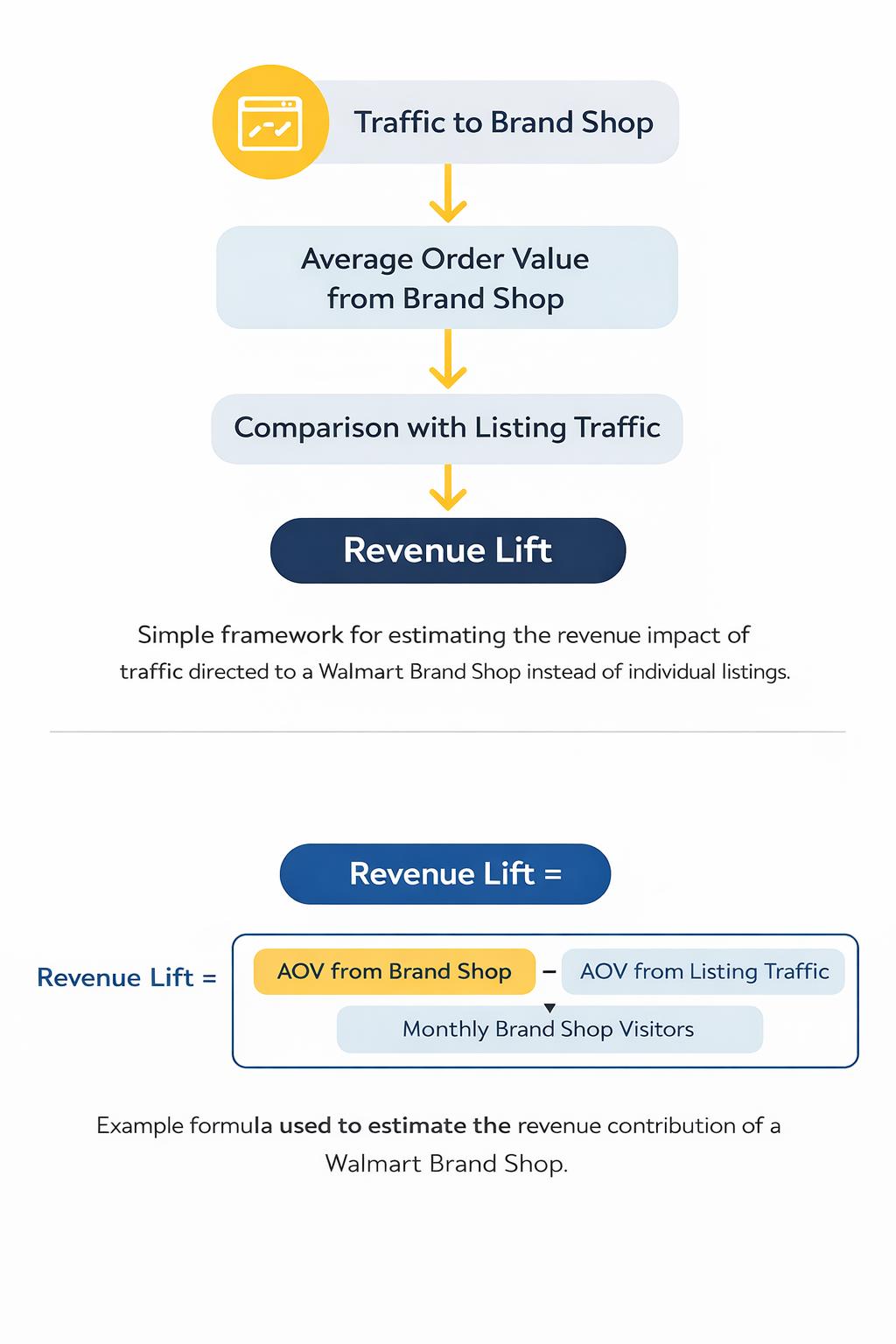
A simple framework looks like this:
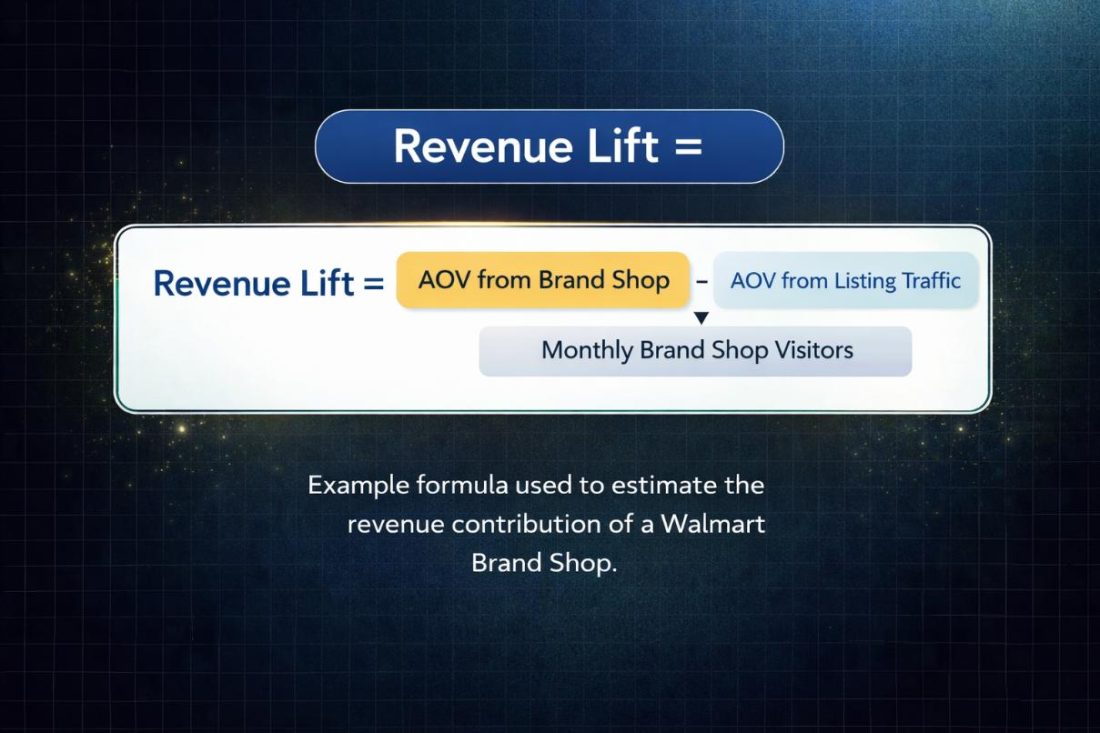
Estimated Brand Shop Revenue Lift =
(Average Order Value from Brand Shop traffic − Average Order Value from listing traffic) × Monthly Brand Shop visitors
This formula helps estimate how much additional revenue the storefront generates compared with sending the same traffic to individual listings.
Let’s look at a simple example.
Imagine your typical listing traffic produces an average order value of $28. After directing Sponsored Brand Ads and other traffic into the Brand Shop, you notice the average order value rises to $34 because shoppers discover additional products.
The difference is $6 per order.
Now, assume the Brand Shop receives 4,000 visitors per month.
Your estimated revenue lift would look like this:
($34 − $28) × 4,000 visitors = $24,000 in potential additional monthly revenue
Of course, this is a simplified estimate. Not every visitor will convert, and different traffic sources behave differently. But the calculation helps sellers see the broader picture.
Instead of evaluating whether one product converts, you start asking a more useful question:
Does traffic generate more revenue when it enters the Brand Shop?
If the answer is yes, the storefront is doing exactly what it should do. It is turning the same traffic into more product discovery, larger baskets, and stronger overall catalog performance.
And honestly, that is the real goal of a Brand Shop. Not just selling one item, but making every visitor a little more valuable.
When to Refresh Your Page and When a Full Rebuild Makes More Financial Sense
Optimizing a Walmart Brand Shop and Shelf does not always mean tearing everything down and starting from scratch. In many cases, a few small adjustments can make a noticeable difference in how shoppers move through the storefront.
Think of it more like rearranging a store shelf than rebuilding the entire store.
Sometimes a simple refresh is enough. Sellers might update the hero banner, move their best-selling products to the top shelves, or replace collections that are not getting much attention.
These small tweaks can improve product discovery, especially if the Brand Shop is already seeing steady traffic but some sections are underperforming.
A full rebuild usually makes sense when the storefront no longer matches the brand’s catalog or strategy.
For example, if a brand started with five products and now sells twenty, the original layout might feel messy or hard to navigate. At that point, reorganizing the Brand Shop around clearer categories, routines, or bundles can make the browsing experience much smoother.
The decision often comes down to performance signals. If shoppers are reaching the Brand Shop but only clicking on one or two products before leaving, the structure might need a rethink.
But if visitors are already exploring multiple shelves, a few updates here and there might be all that’s needed.
Simply, do not rebuild the house if you just need to move the furniture.
Checking storefront engagement periodically helps sellers decide whether the Brand Shop needs a quick refresh or a larger structural update. Most of the time, the answer is somewhere in the middle.
A few smart changes can quietly improve how shoppers discover the rest of the catalog.
The Biggest Mistakes Sellers Make With Their Walmart Brand Shop and Shelf
Many sellers build a Walmart Brand Shop and Shelf once and assume the storefront will automatically improve product discovery. In reality, the impact depends heavily on how the shop is structured and maintained.
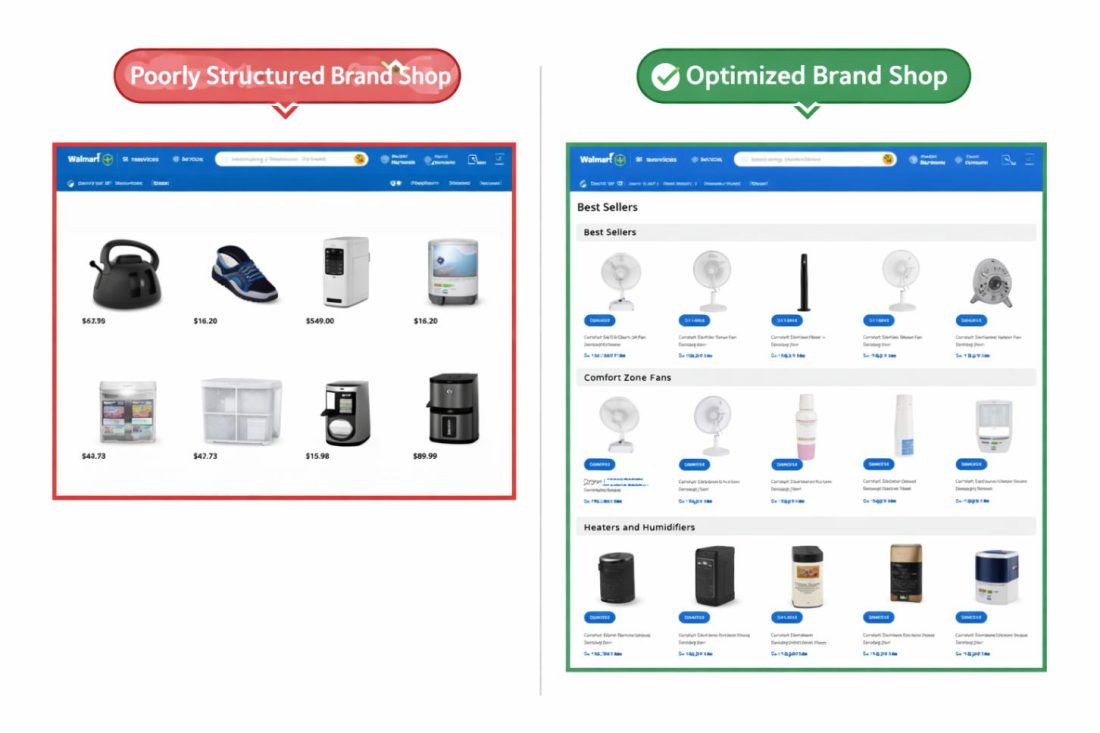
Here are some common mistakes that limit the effectiveness of Brand Shops.
- Treating the Brand Shop Like a Design Project
Some sellers focus heavily on banners, logos, and branding elements while overlooking how products are organized.
A Brand Shop should function as a discovery system, not just a visual storefront. Shelves need to guide shoppers toward specific product categories or collections.
When sections feel random or poorly organized, visitors struggle to find what they want and often leave quickly.
- Not Prioritizing High-Performing Products
The first shelves shoppers see should highlight your strongest products.
Best sellers, popular bundles, or top-performing categories should appear at the top of the storefront.
If less relevant products appear first, shoppers may never reach the items most likely to convert.
- Failing to Update the Storefront Regularly
Many brands create a Brand Shop once and leave it unchanged for months.
However, product performance, seasonality, and promotions change frequently. Regularly updating shelves with new collections, seasonal products, or promotions keeps the storefront relevant and encourages repeat discovery.
Final Thoughts: Turning Your Walmart Brand Shop and Shelf Into a Long-Term Growth Asset
A Walmart Brand Shop and Shelf work best when they are treated as part of a broader marketplace strategy rather than just a visual storefront.
By organizing products into structured shelves, driving traffic from both ads and external channels, and continuously optimizing the shopper journey through the catalog, brands can turn their storefront into a powerful discovery engine.
For mid-market and enterprise sellers managing large assortments, the real opportunity lies in treating the Brand Shop as a catalog-level growth driver, not just a design feature.
This is where SellerApp’s managed Walmart advertising and optimization services can help. Our team works with brands to design effective Brand Shop structures, optimize shelf layouts, and drive qualified traffic that improves overall marketplace performance
And if you want to manage all of this without juggling multiple tools, an all-in-one Walmart intelligence platform can make the process much easier. Solutions like SellerApp’s Walmart Intelligent Suite help brands discover high-intent keywords, optimize Walmart advertising campaigns, monitor keyword rankings, and track marketplace performance from a single dashboard.
Because once your Brand Shop starts attracting traffic, the real opportunity is learning how to turn that traffic into deeper product discovery and stronger catalog growth.
Brands looking for deeper marketplace growth can also explore SellerApp’s managed marketplace services to scale Walmart advertising, catalog optimization, and storefront performance.
FAQs
Yes. Walmart requires brand verification through the Brand Portal before you can create a Walmart Brand Shop and Shelf, and that process includes submitting trademark information to confirm brand ownership. This helps ensure that only legitimate brand owners can build storefronts on the platform.
If your trademark is still pending, you can still apply. In many cases, Walmart allows sellers to proceed with brand verification while the trademark application is in progress, as long as the necessary documentation is provided.
Yes. Your Brand Shop and Walmart Shelf come with a dedicated URL that you can share outside the Walmart marketplace. This allows you to send traffic from channels like Instagram, TikTok, email campaigns, or Google Ads directly to your storefront.
Instead of landing on a single product page, visitors arrive at your brand experience where they can browse multiple products, collections, and shelves. This makes the Brand Shop useful not just for Walmart traffic but for your broader marketing efforts as well.
There is no strict rule, but most effective Walmart brand shop and Walmart shelf use between four and seven shelves. This gives shoppers enough variety to explore without making the storefront feel cluttered or overwhelming.
A common setup includes a shelf for best sellers, a few shelves for product categories or use cases, and one for bundles, new arrivals, or seasonal items.
At a minimum, review your Brand Shop and Walmart Shelf once every quarter to make sure the shelves and featured products still reflect your current catalog. Updating it when you launch new products or run promotions helps keep the storefront relevant.
Even small changes, like rotating featured items or adjusting shelves based on performance, can improve how shoppers interact with your brand page.
Not directly in the same way as listing keywords affects search rankings. However, a well-structured Brand Shop and Shelf can improve engagement signals such as longer browsing sessions and multi-product exploration.
Over time, these signals can support better visibility in recommendation modules and related product placements across the Walmart platform.