

FNSKU stands for Fulfillment Network Stock Keeping Unit. It is a unique barcode that Amazon assigns to every product listing in your seller account for tracking inventory through their FBA warehouses.
The key thing to understand is that FNSKU identifies both the product AND the seller. Two different sellers can sell the exact same physical item with the same manufacturer barcode, but each seller gets their own unique FNSKU for that product. This allows Amazon to trace every unit back to the specific seller who sent it.
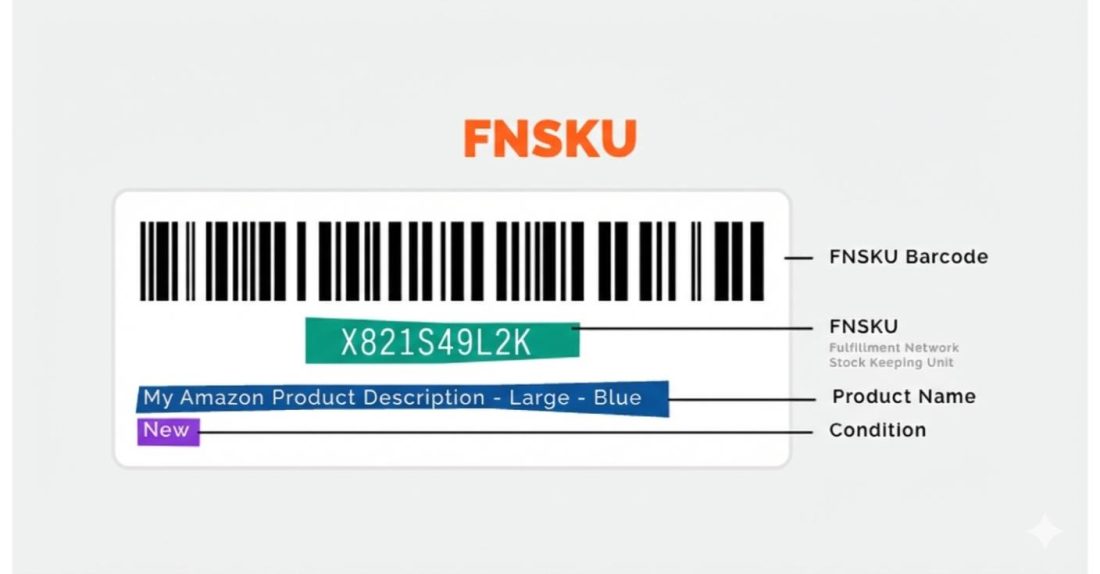
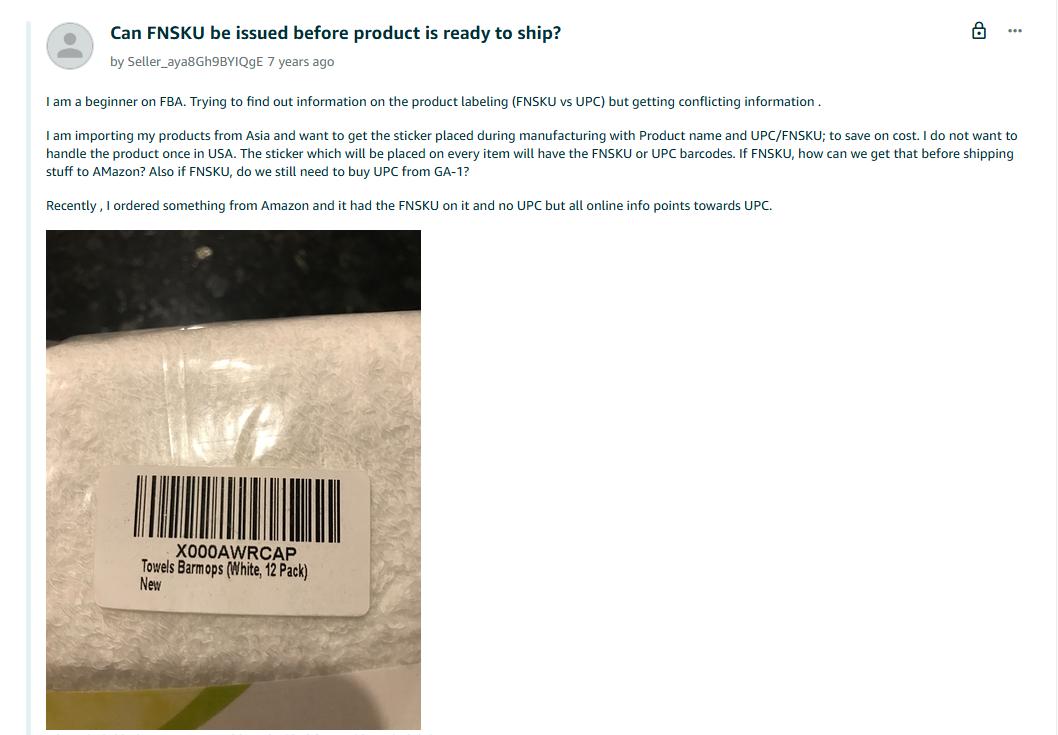
An FNSKU barcode always starts with X00 followed by alphanumeric characters. When Amazon warehouse staff scan this barcode, they instantly know what the product is, which seller owns it, and where it belongs in their fulfillment system.
Quick Guide:
- Why FNSKU Matters for Your Business
- The March 2026 Changes You Need to Know
- FNSKU vs UPC vs ASIN: Understanding the Differences
- How to Get FNSKU Labels from Amazon
- How FNSKU Affects Other Parts of Your Business
- FNSKU Label Technical Requirements
- The March 2026 Changes in Detail
- Should I print my own labels?
- Common Problems That Trigger Fees and Delays
- DIY Labeling vs Third-Party Prep Services
- Best Practices for Preventing Problems
- Action Steps Before March 2026
- Are there any other benefits to FNSKU?
- Do you want expert help? Hit us Up!
Why FNSKU Matters for Your Business
Without FNSKU labels, Amazon historically mixed inventory from multiple sellers selling identical products. You send in authentic goods. Another seller sends in counterfeits with the same UPC. Amazon puts them in the same bin. A customer orders from you, Amazon grabs the closest unit, and suddenly, you are getting one-star reviews for counterfeit products you never touched.
Unlike SKU, FNSKU labels solve this by keeping your inventory separate from everyone else. When customers order from you, they receive units that you actually sent to Amazon, with your quality standards.
The impact extends beyond counterfeits. Damaged products, expired consumables, items stored improperly by other sellers. All of these quality issues spread across sellers through commingled inventory. You maintain perfect quality control and still deal with complaints about products you never actually sold. FNSKU labels create accountability by ensuring your reputation depends only on your own inventory.
There is also a customer trust dimension that sellers often overlook. Repeat customers who had great experiences expect consistency. When commingled inventory delivers inconsistent quality, it damages relationships that took time and money to build. Proper labeling ensures that the quality customers associate with your brand actually comes from your products.
The March 2026 Changes You Need to Know
Amazon is ending commingled inventory practices on March 31, 2026. This creates two very different situations depending on your seller type.
Brand owners enrolled in Amazon Brand Registry with Brand Representative status will no longer need FNSKU labels on products with manufacturer barcodes. Virtual tracking replaces physical stickers, giving you operational flexibility across sales channels.
Resellers not enrolled as brand representatives face mandatory FNSKU labeling on every single unit sent to FBA, even if products already have manufacturer barcodes. The stickerless commingling option disappears entirely on March 31, 2026.
This distinction affects your operational costs, workflow complexity, and potentially which products remain profitable in your catalog. Understanding which category you fall into shapes everything from product selection to fulfillment strategy.
FNSKU vs UPC vs ASIN: Understanding the Differences
These three identifiers serve completely different purposes in the Amazon ecosystem, and confusing them leads to expensive mistakes. Getting this wrong means wasted money on unnecessary labeling or rejected shipments from missing labels.
UPC (Universal Product Code) is the manufacturer barcode printed on retail products everywhere. The same UPC works at Target, Walmart, your local grocery store, and Amazon. It identifies the product itself, not who is selling it. A 12-pack of Coke has the same UPC whether purchased in Miami or Seattle. Manufacturers buy UPC codes from GS1, print them on packaging, and use them across all retail channels worldwide.
ASIN (Amazon Standard Identification Number) is Amazon’s catalog identifier for product listings. Every listing gets a unique ASIN starting with B0. Multiple sellers can offer products on the same ASIN, which is the foundation of Amazon’s marketplace model. When you search for a product and land on a listing page, that page has one ASIN, but there might be dozens of sellers offering that exact product at various prices.
FNSKU combines product identification with seller identification. Same ASIN, same physical product, but different FNSKU for each seller. This is what enables inventory traceability. When a customer reports receiving a counterfeit or damaged item, Amazon can look at the FNSKU and know precisely which seller’s inventory fulfilled that order.
Think of it this way. The ASIN is the street address of an apartment building. The UPC is the apartment number. The FNSKU is the apartment number plus the name on the mailbox showing who lives there. Amazon needs all three pieces to route orders correctly through their massive fulfillment network.
How This Affects Product Selection and Sourcing
Understanding these distinctions directly impacts which products make sense for your business model.
If you sell commodity products with heavy competition and you are not a brand owner, the mandatory FNSKU requirement coming in March 2026 adds cost to every unit. For products with thin margins, this can flip unit economics from profitable to underwater.
A product with $2 margin and 5,000 monthly sales looks very different when you add $0.25 to $0.40 per unit in labeling costs. That is $1,250 to $2,000 monthly coming straight out of profit, not revenue. Some products absorb this easily. Others cannot survive it. Running these numbers now, before March, gives you time to adjust sourcing decisions and phase out products that no longer work.
Higher-value items with healthier margins become relatively more attractive. A $50 product with $15 margin barely notices $0.30 in labeling overhead. The math still works. Bundles that combine multiple lower-margin items into single higher-margin offerings also become more compelling. The labeling cost applies per unit, not per component, making bundles more efficient.
How to Get FNSKU Labels from Amazon
Amazon generates FNSKU codes automatically when you create FBA listings. You do not apply for them or purchase them separately. The codes appear in your inventory management system ready to use. Here is exactly how to access and print them.
Setting Your Barcode Preference
First, configure your account to use Amazon barcodes for inventory tracking. This is a one-time setting that applies to your entire seller account.
Navigate to Settings in Seller Central. Select Fulfillment by Amazon from the dropdown menu. Click on FBA Product Barcode Preference. Choose Amazon Barcode from the options and save your changes.
This tells Amazon you want unique identifiers for your inventory rather than relying on manufacturer barcodes for tracking purposes. Once configured, every FBA listing you create automatically gets its own FNSKU without additional action.
Finding Your FNSKU Codes
Your FNSKU codes live in the Manage FBA Inventory section of Seller Central. Navigate there and you will see a list of all your FBA products.
By default, the FNSKU column might not be visible in your inventory view. Click the settings icon near the top right of your inventory table. It looks like a small gear. In the column preferences that appear, check the FNSKU option. Apply the changes, and now you can see the FNSKU for every FBA product in your catalog.
The format is always X00 followed by alphanumeric characters. If you see a barcode starting with any other prefix, that is not an FNSKU. The X00 format is unique to Amazon’s fulfillment network identification system.
Printing Labels
Find the product you need labels for in Manage FBA Inventory. On the right side of that product row, look for the Edit button dropdown. Click the dropdown arrow and select Print Item Labels from the menu.
Amazon presents a popup asking how many labels you want to print. Enter the quantity based on how many units you need to label. Click Print Item Labels, and the system generates a PDF with properly formatted labels.
The generated PDF includes everything required: the barcode itself, ASIN, product name, and condition all appear on each label exactly as Amazon specifies. This PDF is exactly what you send to manufacturers, prep centers, or use for in-house labeling. The format meets all Amazon specifications without any guesswork about sizing, spacing, or layout.
How FNSKU Affects Other Parts of Your Business
FNSKU labeling is not an isolated compliance task. It connects to inventory planning, returns processing, account health metrics, and your overall Amazon strategy in ways that most sellers do not realize until problems surface.
Inventory Planning and Forecasting
When your inventory has proper FNSKU labels, Amazon’s tracking becomes precise. You can see exactly how many of YOUR units are at each fulfillment center, how fast they are selling, and when you need to replenish. Without proper labeling, this data gets muddied by commingled inventory from other sellers, making demand forecasting unreliable.
The practical impact shows up in two ways. First, you might run out of stock unexpectedly because Amazon pulled from shared bins that included other sellers’ inventory. Your inventory reports showed units available, but they belonged to someone else. Second, you might over-order because reports showed low stock when your actual units were simply located at distant warehouses while nearby commingled stock fulfilled orders.
After March 2026, this problem largely disappears for brand owners using virtual tracking. For resellers with mandatory FNSKU requirements, inventory visibility actually improves because every unit traces back clearly to your account. The data becomes trustworthy for planning purposes.
Returns Processing
Customer returns create complications that FNSKU labels help resolve. When a customer returns a product, Amazon needs to determine whether the item is sellable, damaged, or needs to be removed from inventory. FNSKU labels ensure returned products get attributed to the correct seller.
Without clear labeling, returns can get mixed up in the system. You might receive return charges for products you never actually sold because commingled inventory made seller attribution unclear. Conversely, damaged returns from your actual inventory might get attributed to other sellers, creating inventory discrepancies that take weeks to resolve through support tickets.
Proper FNSKU labeling means returns processing works as intended. Your returns get credited to your account. Damage assessments reflect your actual products. The whole system functions more predictably.
Account Health and Performance Metrics
Amazon tracks seller performance across multiple metrics that affect your account standing and Buy Box eligibility. Order defect rate, late shipment rate, valid tracking rate, and customer feedback all factor into your overall health score. FNSKU labeling problems directly impact several of these metrics.
Mislabeled inventory leads to wrong products shipped, which triggers customer complaints, A-to-Z claims, and negative feedback. Missing labels cause receiving delays that can cascade into late shipments if you were counting on that inventory for pending orders. Unscannable barcodes create processing delays that affect inventory availability.
The cumulative effect of labeling problems compounds over time. One bad shipment might not threaten your account. But recurring issues create patterns that Amazon’s algorithms notice. Maintaining clean FNSKU practices protects your account health score from unnecessary damage.
There is also a less obvious account health connection. Sellers with consistent labeling practices tend to maintain better overall operations. The discipline required to get FNSKU right usually carries over into other areas like shipment planning, inventory management, and customer service. Account health becomes a downstream indicator of operational quality.
Multi-Channel Fulfillment Considerations
If you sell through channels beyond Amazon, FNSKU labels create additional planning considerations. Products with FNSKU stickers are essentially dedicated to the Amazon channel because other retailers and fulfillment options do not recognize these barcodes.
For brand owners after March 2026, this constraint disappears. Virtual tracking means your products use manufacturer barcodes that work everywhere. You can shift inventory between Amazon, your own website, wholesale accounts, and retail partners without relabeling.
For resellers who must use FNSKU labels, inventory becomes channel-specific. Products labeled for Amazon stay with Amazon. If you also sell through eBay, your own website, or wholesale channels, you need separate inventory pools with different labeling. This affects purchasing decisions, warehouse organization, and cash flow planning.
Supplier and Manufacturing Relationships
Your FNSKU requirements shape conversations with suppliers and manufacturers. If you need FNSKU labels printed directly on packaging, that requires coordination, lead time, and potentially setup costs. Suppliers unfamiliar with Amazon requirements need education about specifications.
Some suppliers handle FNSKU labeling as a value-added service. Others charge extra. Some refuse entirely because it complicates their production processes. Understanding your labeling needs helps you evaluate supplier relationships and negotiate appropriate terms.
For products you source from multiple suppliers, FNSKU consistency becomes critical. The same FNSKU must appear on every unit regardless of which supplier produced it. Variations in label quality, placement, or specifications between suppliers can create fulfillment problems even when the products themselves are identical.
FNSKU Label Technical Requirements
Amazon has specific requirements for labels that determine whether your shipment gets accepted smoothly or flagged as defective. These specifications seem picky until your shipment gets rejected and inventory sits in receiving limbo while you scramble to fix problems. Understanding requirements upfront prevents costly delays.
Size and Format Specifications
FNSKU labels must measure between 1×2 inches and 2×3 inches. Common formats include 1×3 inches, 2×2 inches, and the standard 2×1 inch size that most sellers use. The actual barcode and text need adequate room with required white space around all edges for reliable scanning.
Labels must be printed in black ink on white, non-reflective paper with removable adhesive. The non-reflective requirement matters more than sellers expect. Glossy labels might look professional, but they create glare that interferes with barcode scanners. Amazon fulfillment centers flag products as unscannable when labels use shiny stock. Stick with matte finish paper specifically designed for barcode printing.
White space requirements are equally critical. You need 0.25 inches of clear space on the sides of the barcode and related text. Top and bottom require 0.125 inches of white space. Additionally, maintain 0.25 inches between label content and the edges of the label itself on sides, and 0.125 inches top and bottom. These margins ensure scanners can read the barcode reliably even if label placement is slightly imperfect.
Every FNSKU label must include four elements: the barcode itself, the ASIN or FNSKU number in human-readable text, the product name, and the item condition. When you print labels from Seller Central, Amazon auto-generates labels with all required elements properly formatted. If you create custom labels or have suppliers print directly on packaging, verify every element is present and correctly positioned.
Placement Rules That Prevent Rejections
Where you stick the label matters as much as the label specifications. Incorrect placement causes scanning failures that delay inventory from becoming available for sale.
Place FNSKU labels on flat surfaces only. Never apply labels on curves, corners, or edges where the barcode might bend or wrap. Barcode scanners cannot read barcodes that are not completely flat. Even slight curvature causes scanning failures that trigger defect flags.
Keep at least 0.25 inches between the edge of your label and the edge of the packaging. This buffer prevents damage during handling and gives scanners clear sightlines to the barcode without interference from packaging edges.
Critical rule most sellers overlook: Cover all other visible barcodes on the product packaging except serial numbers or Transparency authentication codes. If warehouse staff accidentally scan the wrong barcode, your inventory gets misrouted or flagged as mismatched. The goal is making your FNSKU the only scannable product identifier visible on the package.
For products requiring prep materials like poly bags or bubble wrap, apply the FNSKU label after prep is complete. The barcode must remain scannable through any protective packaging. If your poly bag obscures or distorts the barcode, warehouse scanners cannot read it and products get flagged.
Case Pack Requirements
Every individual unit inside a case pack needs its own FNSKU label. This trips up sellers constantly. The outer case barcode is completely irrelevant for fulfillment purposes.
Amazon warehouse staff open cases, scan each unit individually during receiving, and flag anything without proper labeling. The case-level barcode serves shipping purposes, not inventory tracking. Labeling only the outer case means every unit inside arrives without proper identification.
Case pack labeling errors cause some of the most expensive processing delays. Amazon has to unpack everything, label each unit individually, and repack. That is time your inventory is not available for sale, plus fees if Amazon handles the correction through unplanned prep services. Remove or cover any barcodes on the outer case itself to prevent scanning confusion.
The financial impact of case pack errors compounds in ways sellers do not expect. Beyond the direct prep fees, consider the opportunity cost. If a shipment with 500 units gets delayed two weeks for relabeling, and those products sell 10 units daily at $20 profit per unit, that is $2,800 in lost profit on top of whatever Amazon charges for the correction. Running the numbers on these scenarios makes the case for getting labeling right the first time.
Sam sees case pack errors spike during Q4 when sellers rush to get inventory into fulfillment centers before holiday deadlines. The combination of higher volume, tighter timelines, and seasonal staff at prep centers creates perfect conditions for labeling mistakes. Building extra quality control steps into Q4 workflows pays for itself many times over.
The March 2026 Changes in Detail
Understanding exactly what changes on March 31, 2026 determines how much this affects your operations and whether you need to adjust your business model. Most guides either skip this entirely or summarize it incorrectly. Here is what is actually happening.
What Is Actually Changing
Amazon is eliminating commingled inventory across their entire fulfillment network. For years, commingling let Amazon fulfill orders using the closest matching inventory regardless of which seller sent it. If you and another seller both sent identical products to the same fulfillment center, Amazon might pull from either seller’s stock to fulfill any order. Faster delivery, but serious authenticity problems when bad products from one seller got sent to customers who ordered from a different seller.
The new system requires clear inventory separation. Every unit traces back to a specific seller. No more shared bins based on matching manufacturer barcodes. When a customer reports an issue, Amazon can identify exactly which seller is responsible.
Brand Owner Benefits
Brand owners enrolled in Brand Registry with Brand Representative role get significant operational advantages starting March 31, 2026. Products with manufacturer barcodes like UPC, EAN, or ISBN no longer need FNSKU stickers. Amazon tracks your inventory virtually through their system.
This means you can ship identical inventory to Amazon, your own warehouse, wholesale partners, and retail stores without separate labeling workflows. No more dedicating specific production runs to FBA. No more coordinating with manufacturers about Amazon-specific label placement. Your manufacturer barcode works everywhere.
Sam from our customer success team at SellerApp worked with a kitchen gadgets brand preparing for this transition. They calculated roughly $3,000 monthly savings in prep labor and label costs once virtual tracking kicks in.
“We have been pre-labeling everything destined for Amazon for three years. Our prep team spends about 20 hours per week just on FNSKU stickers. Eliminating that step changes our entire fulfillment operation. That time and money can go toward actually growing the business.”
The flexibility extends beyond cost savings. Brand owners can maintain unified inventory pools across channels. If a retail partner places an unexpectedly large order, you can pull from the same inventory pool that was headed to Amazon. If Amazon sales spike, redirect wholesale inventory. The operational agility this creates is substantial for multi-channel businesses.
The one important exception: products without manufacturer barcodes still require FNSKU labels even for brand owners. If you create products with no existing UPC, Amazon barcodes remain mandatory for FBA tracking.
Reseller Requirements
Resellers face mandatory FNSKU labeling on every unit starting March 31, 2026. This applies even when products have perfectly good manufacturer barcodes printed right there on the packaging. No exceptions. No workarounds. No grandfather clauses.
The stickerless commingling option that many resellers relied on to avoid labeling costs? That option dies on March 31, 2026. Every single unit you send to FBA must have an FNSKU label regardless of what other barcodes exist on the product.
Amazon wants clear traceability for sellers who do not control their supply chain from manufacturing through delivery. When customers report counterfeits or quality issues, FNSKU labels let Amazon identify exactly which seller is responsible for that specific unit. Brand owners verify authenticity through manufacturing control. Resellers source from various channels where authenticity verification requires stricter tracking mechanisms.
Sam recently worked with a wholesale seller who was shocked by the math when they ran the numbers. “They were doing about $80,000 monthly in revenue across 15 different products. When we added up labeling costs at $0.30 per unit times their volume, it came to nearly $4,500 monthly. Three of their products were already barely profitable. Those three had to go. But the silver lining was that it forced them to focus on their best performers, and overall profitability actually improved within two months.”
The financial impact compounds at volume. Amazon discontinued their FBA Prep and Labeling service on January 1, 2026, so sellers now handle labeling themselves or pay third-party prep services. Either way, labeling becomes a real line item in unit economics that cannot be ignored.
Strategic Implications for Your Business Model
The playing field is tilting toward brand owners in ways that matter for competitive dynamics. Brand owner per-unit costs decrease while reseller costs increase. For commodity products where brands and resellers compete directly on the same ASIN, this creates structural margin advantages for brand owners.
Sam has been having direct conversations with SellerApp reseller clients about adapting to this shift. “The resellers who will thrive after March are the ones already focused on quality over quantity. If your business model depends on razor-thin margins and high-volume commodity products, the mandatory labeling requirement adds friction that compounds across every unit. The math changes, and not in your favor.”
The strategic response for resellers is not abandoning the business model. Amazon remains enormous with plenty of profitable opportunity. The response is evaluating your catalog product by product. Higher-margin items absorb labeling costs easily. Low-margin commodity products may no longer work. Bundles that combine products into higher-margin offerings become more attractive. Running these calculations now gives you time to adjust sourcing and inventory decisions before March creates urgency.
Should I print my own labels?
Honestly, it depends on scale. Starting off, you can actually buy these labels on Amazon from other third party Sellers or source them from appropriate manufacturers.
However, when you have a shockingly massive catalog, it’s best if you set up your own thing. In fact, some small businesses do this to ensure consistency.
l need equipment choice determines whether labeling runs smoothly or becomes a constant source of failed shipments, reprints, and delays. Amazon has specific recommendations that align with their fulfillment center scanning equipment. Following these recommendations prevents headaches.
Thermal Printers
Amazon recommends thermal printers, and their own fulfillment centers use Zebra GX430t models with direct thermal settings. Thermal technology creates durable barcodes that will not smudge or fade over the 24-month scanning life Amazon requires.
A decent thermal printer costs $150 to $300 depending on features and print speed. Label rolls are inexpensive, running just a few cents per label. Per-unit cost becomes minimal once equipment is amortized across thousands of labels. For sellers printing more than a few hundred labels monthly, the investment typically pays for itself within two to three months through saved time and eliminated labeling failures.
Thermal printers also handle volume much faster than alternatives. Labeling thousands of units takes an hour with laser printing but fifteen minutes with thermal. When you are preparing large shipments on deadline, that speed difference matters significantly.
Laser Printers
Laser printers work acceptably for FNSKU labeling if you already have one and do not want to invest in dedicated equipment. They are slower for high volume but perfectly functional for sellers processing hundreds rather than thousands of units.
The critical specification: verify your laser printer meets 300 dots per inch minimum resolution. Lower resolution creates barcodes that scanners struggle to read reliably. Most modern laser printers exceed this threshold, but check your model specifications to be certain. A failed print job wastes expensive label stock and creates inventory you cannot ship.
When using laser printers, verify that printer scaling is set to None or 100%. Automatic scaling can resize labels slightly, making barcodes unscannable or causing labels to misalign with your label sheets. This wastes label stock and creates defective labels that look fine visually but fail when scanned.
Inkjet Printers
Never use inkjet printers for FNSKU labels. This is not a suggestion or preference. It is a prohibition based on how inkjet technology works.
Inkjet ink smudges when exposed to moisture or handling. Labels printed with inkjet routinely fail Amazon’s 24-month scanning requirement. Shipments get rejected at receiving. Products sit in limbo while you scramble to fix problems.
A SellerApp client learned this expensively. They used an existing inkjet printer figuring labels are labels. First shipment went through fine. Second shipment sat in humid warehouse conditions for a week before processing at the fulfillment center. Nearly 40% of labels were unscannable by the time Amazon tried to receive them. “We thought we were saving money by not buying a thermal printer. Ended up costing three times as much in rejected inventory and rush re-labeling fees to a local prep center. Now I tell everyone: just buy the thermal printer from day one.”
Testing and Maintenance Protocol
Test printed labels with a barcode scanner before sending inventory to Amazon. Your smartphone works fine using free barcode reader apps. If your phone scans the label reliably, Amazon’s professional equipment will too.
Clean and replace printer heads according to manufacturer schedules. This maintenance task feels unnecessary until you discover problems. Labels that looked perfect when printed can become unscannable after months if printer maintenance gets neglected. Testing catches problems before Amazon does, which is always the better outcome.
Label Paper and Material Options
For laser printers, Seller Central supports multiple label sheet sizes that align with standard office label products. Common formats include 30 labels per page on US letter size measuring 1×2.625 inches, 21 labels per page on A4 at 63.5mm by 38.1mm, and 24 labels per page on A4 in various configurations. Additional A4 formats support 27, 40, and 44 labels per page depending on your specific needs.
Thermal printer users need thermal label rolls or fanfold labels in compatible sizes. Direct thermal labels do not require ribbon cartridges and work perfectly for FNSKU applications where long-term archival is not necessary. Thermal transfer labels require ribbon but offer longer shelf life if you pre-label large inventory quantities in advance.
Label adhesive strength matters more than most sellers expect. Removable adhesive is required by Amazon, but it needs enough stick to survive shipping and warehouse handling. Weak adhesive causes labels to peel off during transit, triggering missing barcode flags. Adhesive that is too strong damages packaging when removal becomes necessary and can leave residue that interferes with scanning.
Common Problems That Trigger Fees and Delays
Amazon tracks labeling problems in your Inbound Performance Dashboard and charges fees for errors requiring correction. Understanding common issues helps you avoid them before they affect account health metrics.
Missing Barcodes
Products arriving at fulfillment centers without proper FNSKU barcodes get marked defective immediately. Amazon applies labels and charges unplanned prep fees that eat into your margins.
The most frequent cause of missing barcode errors: case pack shipments where sellers label the outer case but forget individual units inside. Every single item inside a case pack needs its own FNSKU label. The outer case barcode is completely irrelevant for fulfillment purposes. Warehouse staff open cases, scan individual items one by one, and flag missing labels immediately during the receiving process.
Mislabeled Units
Mislabeling occurs when the FNSKU barcode does not match the physical product inside the packaging. This creates catastrophic problems throughout the fulfillment system. Customers order one thing, receive something completely different. Your account takes the hit for incorrect shipments even if mislabeling happened at a supplier or prep center.
This happens constantly with product variations. Shirts in multiple sizes and colors each have unique FNSKUs. Labels get mixed during prep. Medium shirts get large labels. Red gets tagged as blue. Amazon receives inventory that does not match barcode data, and every sale from that inventory creates a customer service problem.
Sam worked with a resistance band seller who had this blow up badly. Five resistance levels, each a different color band. The prep center mixed two colors on about 200 units. “Customers wanting light resistance for physical therapy were receiving heavy bands designed for experienced lifters. We had to recall everything, re-inspect, re-label, re-ship. The whole disaster cost nearly $3,000 including Amazon fees and shipping in both directions. Now we have separate labeled bins for each variation and verify every single unit before it ships.”
Prevention is straightforward: scan every label before applying. Verify product names match actual items. Separate variations physically during labeling. These simple steps eliminate most mislabeling before it becomes expensive.
Unscannable Barcodes
Unscannable labels trigger immediate defect flags and processing delays. Products sit in receiving until someone manually intervenes. Inventory stays unavailable for sale until the problem gets resolved, which can take days during busy periods.
Common causes of scanning failures: smudged labels from inkjet printers or dirty print heads. Labels placed on curves or corners where the barcode bends. Reflective surfaces creating glare that interferes with scanner lasers.
One seller discovered placement problems with cylindrical products. “We put labels on the curved part of the container because it was the biggest surface area. Made sense to us. Every single unit flagged as unscannable. Had to pay for re-labeling and lost about two weeks of sales velocity. Now we use a flat area on the bottom even though it is smaller.”
DIY Labeling vs Third-Party Prep Services
With Amazon’s FBA Prep and Labeling service discontinued as of January 1, 2026, you either label in-house or pay a prep center. The right choice depends on volume, complexity, and your operational setup. Neither approach is universally better.
When DIY Makes Sense
Small volume sellers shipping hundreds of units monthly can handle FNSKU labeling without significant operational burden. Thermal printer investment of $150 to $300, inexpensive label rolls, a few hours of work per shipment. Total cost runs $0.05 to $0.10 per unit including equipment amortization.
You also get quality control. You verify every product matches its label with your own eyes. You catch defects before shipping rather than discovering problems when Amazon rejects inventory. Quality issues get addressed immediately instead of creating expensive corrections downstream.
Private label sellers working directly with manufacturers can often arrange for FNSKU labels to be printed directly on packaging during production. Send your manufacturer the PDF from Seller Central. They incorporate the barcode into packaging design at the print stage. Products arrive FBA-ready without additional labeling work on your end.
When Prep Services Make Sense
High volume operations often find prep centers more economical than building in-house labeling capability. Services typically charge $0.20 to $0.40 per unit for FNSKU labeling, which can be cheaper than hiring employees, training them, managing quality, and handling the operational overhead yourself.
Amazon retail arbitrage and wholesale sellers benefit from prep services regardless of volume. Products arrive from various suppliers with different packaging formats, conditions, and prep requirements. Prep centers handle inspection, cleaning, poly-bagging, bubble wrapping, and labeling all in one location. You ship unsorted products to the prep center. They ship compliant inventory directly to Amazon fulfillment centers.
International sellers shipping from overseas manufacturers often route products through domestic prep centers before sending to FBA. This avoids customs complications with partially prepared shipments and ensures compliance with all Amazon requirements before inventory enters the fulfillment network.
Prep services also provide buffer storage during Q4 when FBA warehouse space gets constrained. Send and track inventory to your prep center early in the season. Have them create and ship FBA shipments on your schedule rather than whenever products arrive from suppliers. This smooths logistics during critical selling periods.
The Volume Calculation
At 200 units monthly, DIY almost certainly makes sense. The time investment is minimal and you maintain complete quality control. At 2,000 units monthly with multiple product variations, time savings from outsourcing likely exceed cost differences. The calculation shifts further toward prep services as complexity increases.
Run your specific numbers including labor value, not just direct costs. If your time is worth $50 per hour and you spend 10 hours monthly on labeling that a prep service could handle for $400, the prep service is actually cheaper even though the per-unit cost looks higher.
Consider also what you would do with the time freed up by outsourcing. If those 10 hours go toward product research, listing optimization, or supplier negotiations that generate more than $400 in value, outsourcing creates a positive return even before accounting for the mental bandwidth benefits of removing a task from your plate.
Hybrid Approaches
Some sellers use hybrid approaches that combine in-house labeling with prep services depending on the situation. Standard products that you source repeatedly might get labeled in-house where you have established workflows. New products, complex bundles, or large seasonal orders might go to prep centers where the additional cost is offset by reduced learning curve and faster turnaround.
Geographic considerations matter too. If you source products from overseas, routing through a domestic prep center before sending to FBA can simplify logistics even if you have labeling capability in-house. The prep center handles customs clearance follow-up, quality inspection, and FBA compliance in one location rather than you coordinating multiple steps across time zones.
One SellerApp client found an unexpected benefit from using prep services selectively. “We started sending our most variation-heavy products to a prep center while keeping simple single-SKU products in-house. Our error rate on the complex products dropped to basically zero because the prep center’s processes were more rigorous than what we were doing. The cost difference paid for itself in avoided Amazon fees within the first month.”
Best Practices for Preventing Problems
These recommendations come from sellers who have shipped millions of units and learned what works through expensive experience. None of this is theoretical advice.
Print Fresh Labels
Never reuse old labels from returned or damaged inventory. Amazon occasionally updates barcode formats without major announcements. Old labels might not scan correctly with newer fulfillment center equipment or updated software.
Print labels immediately before applying them to products. Do not print thousands of labels weeks in advance and store them for later use. Label adhesive degrades over time and can fail during shipment. Thermal labels fade with age and light exposure, reducing scan reliability. Fresh labels stick better and scan more reliably than labels that sat in storage.
Implement Quality Checkpoints
Scan every FNSKU label with a barcode scanner before applying it to products. This takes about three seconds per unit and catches mislabeling errors before they reach Amazon. Your smartphone camera works fine as a scanner using basic barcode reader apps.
Verify product names on labels match actual products. This seems obvious but gets overlooked constantly when handling similar variations at speed. Blue size medium gets blue medium labels. Red size large gets red large labels.
Photograph labeled products before boxing shipments. If Amazon claims mislabeling or missing labels, photos provide evidence of compliance at the time of shipment. This documentation has saved countless sellers from unplanned prep service fees when receiving errors occurred on Amazon’s end.
Organize by Variation
Products with multiple variations need separate labeling stations or clearly marked staging areas. Label all size small units completely before touching medium. Keep variations physically separated during the entire labeling process.
Sam emphasizes this constantly with SellerApp clients handling multiple variations. “The moment you have two variations on the same work surface with labels for both sitting there, mistakes will happen. It is just human nature. Keep them completely separated. Label one variation at a time. Finish it entirely before starting the next.”
Color-code or number label sheets when printing multiple FNSKUs. Sheet 1 is size small. Sheet 2 is size medium. Sheet 3 is size large. Visual organization reduces mental overhead and prevents grabbing the wrong label during high-volume sessions when attention wanders.
Monitor Performance Dashboard
Check your Inbound Performance Dashboard in Seller Central weekly at minimum. Amazon reports labeling problems here along with other shipment issues. Early detection lets you fix root causes before issues become systemic.
Look for patterns in reported problems. Same product getting mislabeled repeatedly suggests label sheet confusion in your workflow. Same shipment batch showing missing labels points to prep center quality control failures. Identify patterns and fix underlying processes rather than treating individual symptoms.
Action Steps Before March 2026
The March 31, 2026 deadline approaches regardless of your preparation level. Here is what to do now based on your specific situation.
For Brand Owners
Verify your Brand Registry enrollment status and confirm you have Brand Representative role assigned. This is the specific designation that qualifies you for virtual tracking. General Brand Registry enrollment alone is not sufficient.
Review your catalog for products without manufacturer barcodes that will still require FNSKU labels under the new system. These products need continued labeling processes even after March.
Update fulfillment workflows to leverage operational flexibility. Coordinate with manufacturers about removing Amazon-specific labeling steps from production. Calculate the operational savings coming your way and plan how to redeploy those resources toward growth.
For Resellers
Evaluate your entire catalog for profitability including realistic labeling costs per unit. Add $0.25 to $0.40 per unit to your cost basis and recalculate margins. Identify products that stay solidly profitable after this adjustment. Identify products that become marginal or unprofitable.
Adjust sourcing decisions accordingly. Phase out products that no longer work. Identify opportunities to shift toward higher-margin items that absorb labeling costs easily. Consider bundle strategies that improve per-unit economics.
Set up labeling operations or establish relationships with prep services. Get processes running smoothly before the deadline creates urgency and limits your options. Testing your workflow now catches problems when you have time to fix them.
For Everyone
Audit your overall FBA compliance posture. Clean up inbound performance metrics if they have slipped. Fix recurring problems before stricter enforcement standards take effect.
The March 2026 changes represent one step in Amazon’s ongoing push for seller accountability and inventory traceability. Building compliance into your operational DNA creates competitive advantage as standards keep rising and marginal competitors get pushed out.
Are there any other benefits to FNSKU?
Most sellers treat FNSKU labeling as a checkbox compliance task. Print labels, stick them on products, move on. But the March 2026 changes reveal how barcode strategy intersects with broader competitive positioning in ways that separate growing businesses from struggling ones.
Brand Building Implications
If you are building a brand rather than just selling products, FNSKU considerations affect your trajectory. Brand owners get operational advantages that compound over time. Every product benefits from streamlined fulfillment. Every shipment saves labeling time and cost. Multiplied across thousands of units over years, these advantages represent significant competitive moats.
The inverse applies to resellers competing against brand owners on the same products. Your cost structure is permanently higher. Your operational complexity is permanently greater. You need to find other sources of competitive advantage like superior product selection, better customer service, or niche market focus where brand owners are not competing directly.
For sellers considering the transition from reselling to private label, the March 2026 changes add urgency to that decision. Brand Registry enrollment takes time. Product development takes time. Manufacturing relationships take time. Starting now means being positioned for better unit economics by the time your private label products launch.
Market Selection Strategy
FNSKU requirements should factor into product research and market selection. Categories with heavy reseller competition face margin pressure as mandatory labeling costs get added. Categories dominated by brand owners have different competitive dynamics.
When evaluating new products to sell, model the full cost structure including labeling. A product that looks attractive at surface-level margin calculations might not work once you add prep costs. Conversely, slightly higher-priced products with better margins might become more attractive relative to low-cost alternatives.
Product size and weight also matter for labeling economics. Tiny products might have labeling costs that represent a significant percentage of the item value. Large products absorb labeling costs more easily as a percentage of total cost.
Operational Excellence as Differentiation
In a marketplace where many sellers compete on identical products, operational excellence becomes a differentiator. Sellers who nail compliance consistently, avoid inventory problems, maintain healthy account metrics, and ship efficiently build advantages that competitors cannot easily replicate.
FNSKU labeling is one component of operational excellence. Getting it right means your inventory reaches customers without delays, your account health stays strong, and your time goes toward growth activities rather than fixing problems. Getting it wrong means constant firefighting, margin erosion, and account health headaches.
The sellers who build systematic labeling processes, implement quality checkpoints, and monitor performance dashboards create competitive insulation. While competitors struggle with receiving delays and defect charges, operationally excellent sellers compound their advantages.
Think of it as a long-term investment in your business infrastructure. The time spent building proper labeling workflows pays dividends across every shipment, every product, every month. Sellers who cut corners on labeling save small amounts of time upfront but pay larger costs downstream in fees, delays, and account health problems.
Do you want expert help? Hit us Up!
If FNSKU requirements or FBA operations feel overwhelming, SellerApp provides guidance and tools designed for FBA sellers at every stage. Our platform helps manage inventory, optimize listings, track performance metrics, and navigate Amazon’s constant requirement changes.
Sam and the customer success team work with sellers from first product launches through seven-figure operations. The goal is always practical advice that moves your specific business forward, not generic information available anywhere.
The March 2026 changes represent significant operational shifts for the entire Amazon seller ecosystem. Sellers who understand implications and adapt accordingly will outperform competitors scrambling at the last minute. Your products deserve to reach customers efficiently without delays caused by labeling problems. Proper FNSKU management makes that happen.