


If you are thinking about how to sell digital downloads on Etsy, it may feel like stepping into a crowded farmer’s market where every seller is shouting the same thing. Templates here. Wall art there and planners everywhere.
Yet year after year, digital downloads remain one of Etsy’s most resilient, profitable, and low-maintenance business models. So, stop thinking of how to sell digital downloads on Etsy as just a side hustle.
For most sellers, digital products still offer a rare advantage in e-commerce. For example, there’s no shipping, no packaging, no fulfillment issues, instant delivery, and infinitely scalable inventory. Once you create the file, it can be sold hundreds or thousands of times with no additional work.
You’re not paying higher carrier rates, you’re not even dealing with returns, and you’re not losing sleep over Q4 logistics.
This guide provides a step-by-step breakdown of exactly how to sell digital downloads on Etsy. As you approach the end, you’ll have a comprehensive understanding of the complete system for building a high-performing Etsy digital download shop, tailored to the current marketplace reality.
Quick Guide:
3. Why is categorization important on Etsy?
4. Listing Optimization & Presentation for Etsy sellers
5. Using Ads on Etsy while you are still figuring how to sell digital downloads on Etsy
6. Scaling Digital Downloads Business on Etsy
7. Risks, Copyright & Compliance (4 Things You Absolutely Need to Watch Out For)
If you are wondering how to sell digital downloads on Etsy, here are three steps that you should not skip:
While you are thinking about how to sell digital downloads on Etsy aside, it is important that you understand that designing a digital product sounds simple until you sit down to make one and realize every tiny decision, Canvas size, formatting, bleed, and export quality, determines whether the customer can print it without frustration. Sellers prefer Canva because it’s quick; however, most of them use Adobe Illustrator for its premium features.
They build a master file first, then duplicate and adjust for each variant. The workflow is like this: you set the correct dimensions, lock in margins, pick a type hierarchy that won’t fall apart when resized, and make sure every graphic has enough contrast to look clean on both screens and home printers.
Before the file ever reaches Etsy, the seller runs it through a basic test print, checks for pixelation, checks how it behaves when scaled, and exports it in the exact formats buyers expect: PDF for print, PNG for crisp graphics, JPG for lightweight files, and ZIP folders for bundles.
As you move into more advanced formats with editable templates on Canva or static designs in Illustrator, the real challenge isn’t creativity but structure. Editable templates need locked layers so customers can’t accidentally drag your entire layout out of place. Fonts must either be native to Canva or provided with clear licensing terms. Print-ready settings matter even more.
A wedding invitation template, for example, needs 300 DPI resolution, safe zones, correct bleed, and a layout that won’t shift when exported. If you’re working in Illustrator or Affinity Designer, you have even more control: clean vector paths, color profiles that won’t dull in print, and layered files that can be repurposed for other products later.
The top sellers build their templates the same way professional creatives build brand kits: clean layers, reusable components, and consistent spacing that make their catalog look unified.
Once the first product is solid, the next step is scale, and this is where most creators either break through or stall. Instead of building new designs from scratch, experienced Etsy sellers take a single core product, say, a budgeting sheet, and turn it into a full-fledged product. They create a minimalist version, a bold version, a pastel version, a printable black-ink-friendly version, and a Canva-editable version.
They rerender it for A4, letter size, half-letter, and mobile-friendly dimensions. Every variation becomes a separate SKU or gets bundled into a premium pack. The strategy is that if one design session turns into ten or twenty listings, each catches a different type of buyer. And because all of these versions share the same underlying layout, they’re quicker to update and easier to maintain long-term.
This is also how you quietly build authority inside a niche. Your store grows deeper instead of wider, and Etsy’s algorithm picks up on the pattern, pushing more of your listings upward because they behave consistently.
We have listed down four easy steps that can help any seller who is thinking about how to sell digital downloads on Etsy:
Step 1: Deciding on the title
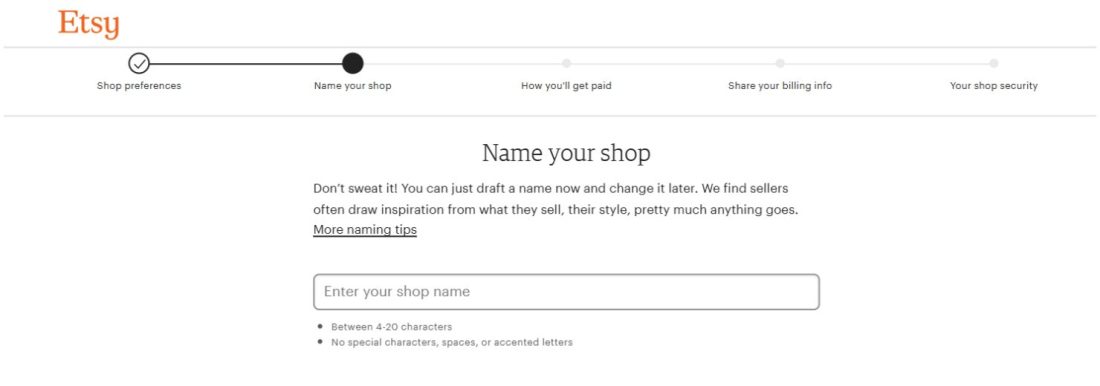
If you think that the first step only includes picking a name, adding a logo, and uploading a banner. It’s time to rethink, as the truth is, this is the moment buyers decide whether your shop feels like a real business or a side hustle someone abandoned last summer.
Start by choosing a shop name that doesn’t sound like a random username you came up with at 2 a.m.
Then pick a niche that hints at what you sell without boxing you in.
Once the name is set, create your banner and logo in the same sitting so they share the same tone. A banner that reflects your product family planners, templates, and wall art immediately makes the shop feel intentional. Using a good logo maker is essential here, because it helps you create a professional, high-resolution logo that aligns with your brand colors, fonts, and niche—building instant trust with shoppers and improving overall brand recognition. And keep your bio short. A couple of honest lines about what you make and why it helps people lands better than any lengthy paragraph.
Step 2: Design your Etsy storefront
After the visual identity is settled, pull up your storefront and ask yourself whether it looks like a place someone would actually enjoy browsing. Featured items should represent your best work, not the first thing you created. Buyers scroll quickly, and if they don’t feel the reason for purchase in the first few seconds, they leave.
Add a short “About” text that doesn’t sound gimmicky. Mention something specific about why you love designing templates, how your files help small business owners, or what problem your products solve. That one tiny detail makes a shop feel like it’s run by a real person, rather than an anonymous uploader.
Once the front page feels stable, start organizing your shop sections. This part influences sales more than most new sellers realize. Instead of dumping everything into one long list, break the store into clean categories: planners in one space, templates in another, and seasonal items grouped together.
Think of it like arranging shelves in a library. When someone clicks into your budgeting sheet, they should naturally stumble into matching trackers or planners that feel like they belong in the same universe. This type of structure keeps people browsing longer, and longer browsing almost always leads to more purchases.
Step 3: Finalize and test your files before uploading
Before you upload anything, ensure your files are ready, as someone will judge your competence based on their first download. Name your files in a way that makes sense to the buyer. Something like “Minimalist-Budget-Planner_2025_Print.pdf” reads far better than “planner-final-NEW-FIXED.pdf,” which screams chaos behind the scenes.
For larger downloads, gather all the files into a ZIP file with labeled folders. Add a simple one-page instruction sheet that explains what’s inside, how to open it, and how to use each version. You’d be surprised how many buyers have never opened a ZIP file before; a clear instruction page makes you look prepared instead of reactive.
When the files are ready, run a few tests. Open everything on your phone, your laptop, and, if you have one, on a family member’s device just to make sure nothing breaks. Print one page on your home printer to double-check margins, colors, and clarity. A planner that looks perfect on screen can fall apart in real-life print if the contrast is too light or the prices are too high.
Step 4: let your product speak for itself
Once everything works, upload your listing and create the thumbnail mockups. This part is more important than the product itself. A clean, well-lit mockup clearly communicates what buyers can expect and establishes the tone for the entire shop.
Keep the style consistent so the entire storefront feels like one cohesive brand, not ten different personalities competing for attention. In your listing description, keep the first two lines clear and helpful; they’re the only lines buyers see before clicking “more.”
Specify the file types included, their sizes, and what the buyer can customize. A short note on how to use the file is enough.
As your shop starts filling up, prepare a few canned responses for the questions you’ll get repeatedly: someone can’t open a file, the print size appears incorrect, or the Canva link displays “access denied.” Saving these replies in advance saves hours of answering the same thing.
Add an FAQ section, too. That alone reduces the number of support messages by a third.
So, if you are still figuring out how to sell digital downloads on Etsy but plan to dump all your products into the same category, pause right there. In this section, you will understand how the algorithm works for Etsy and why categorization is important for sellers
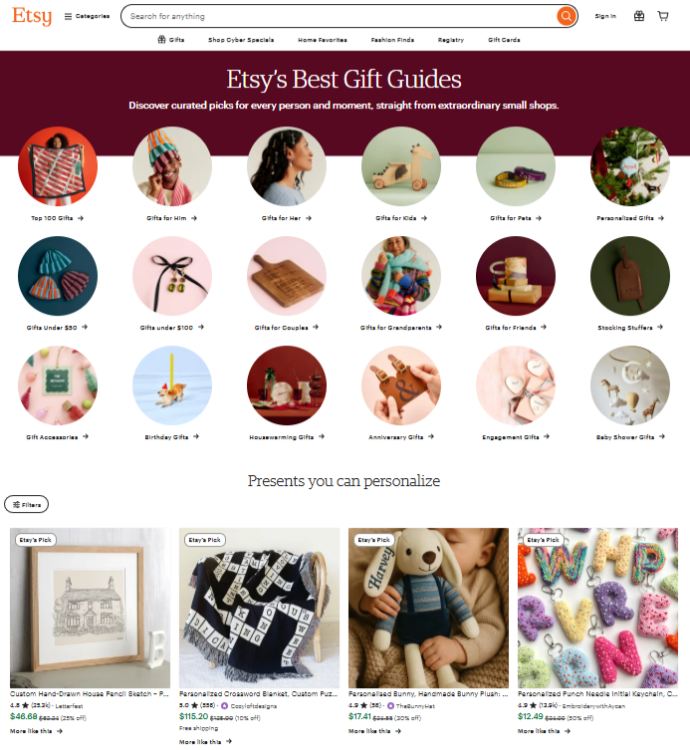
At first glance, Etsy’s digital categories feel obvious. Planners sit with planners. SVGs live with SVGs. Templates get grouped together and left alone. But buyers don’t move through these categories based on how things look. They move based on when they need something and how quickly it fixes a problem they already feel.
Take editable templates, especially Canva-based ones. These don’t sell because they’re beautiful. They sell because they remove effort. Around tax season, graduation months, wedding peaks, or small business launches, buyers aren’t browsing for inspiration; they’re trying to get something done fast. When you sell in this category, timing and clarity matter more than design complexity. If your listing doesn’t immediately communicate “you can customize this in minutes,” you lose the sale.
Printables work differently. They reward sellers who think in seasons, not individual products. The shops that do well here aren’t constantly reinventing their style. They’re watching the calendar. School planners start moving before summer ends. Budget trackers spike right after New Year’s. Holiday labels sell best when they appear earlier than feels comfortable. Miss the window, and even a great product can sit untouched.
So what do you actually do with this information? You stop choosing categories based on what you can make and start choosing them based on what you can maintain. If a category requires frequent updates, seasonal refreshes, or timed releases, ask yourself whether you’re willing to operate that way. If not, the category will quietly work against you, no matter how polished the product is.
When category choices are made this way, your shop starts to feel intentional. Products sit next to others that make sense together. Buyers move naturally from one listing to the next. And instead of chasing every trend, you build a catalog that works with buyer behavior rather than fighting it.
The marketplace itself drives these trends. Etsy’s algorithm tends to reward listings that get early engagement, so categories with built-in search intent, like invitations and social-media packs, pick up traction quickly when they’re launched with strong thumbnail clarity and tight keyword mapping.
One Etsy seller shared that when they first launched new listings, views and visits were high on the first day but then dropped later, even though the item still appeared near the top of search results when they checked from their own logged-in account.
This happens because Etsy gives new listings a short initial visibility boost to help the system gather real engagement data (clicks, favorites, carts, purchases). Once that temporary boost fades, visibility depends on whether real buyers interacted with the listing beyond the initial exposure, and Etsy’s algorithm uses that data to decide how much further to show the listing to new shoppers in search results.
This aligns with Etsy’s own description of how search ranking works, which includes new listings getting an early temporary surge so Etsy can monitor how shoppers actually interact with them. Listings that earn positive behavioral signals, such as clicks and favorites, can then improve their organic search placement because Etsy interprets that engagement as proof of relevance and buyer interest.
Sellers who then refine titles, improve thumbnails, or adjust keywords often see renewed engagement, because those changes help attract clicks and favorites, exactly the behavioral signals Etsy rewards.
Meanwhile, layered art files and mockup bundles often succeed because they attract professional buyers, designers, small business owners, and resellers who behave differently from casual consumers.
They save items, come back repeatedly, buy in multiples, and leave more detailed reviews, which quietly strengthen listing quality scores over time.
Seven-figure sellers in adjacent marketplaces like Amazon KDP, Canva Marketplace, and Shopify asset stores follow a similar logic when choosing categories.
They don’t chase what’s trending. They scan for formats that drive repeat purchases, support modular creation (so one template becomes ten), and withstand algorithm fluctuations.
They also build catalog depth in the categories they choose because saturation becomes irrelevant when you own an entire niche with consistency and speed. The same method works on Etsy.
Pick a category where you can release often, gather early engagement, and attract buyers who return because your files save them time, stress, or money.
One of the best illustrations of this principle on Etsy comes from top digital product shops that have turned modularity and catalog depth into real sales numbers. Take a look at DigitalCurio and MyPorchPrints, two of the highest‑selling digital download stores on Etsy. Both shops didn’t just list one type of file and hope for repeat buys.
DigitalCurio has thousands of digital products, mostly commercial‑use clipart and graphics, so a customer who comes for one pack often finds 10 others that meet the same creative need. With over 800,000 total sales, this shop proves that when you build a large, interconnected catalog of assets within a single niche, saturation becomes irrelevant, and Etsy’s search ecosystem starts sending consistent traffic across many listings rather than just one.
On Etsy, people don’t buy products; they buy clarity and confidence. Since shoppers can’t see or touch what you’re selling, your listing has to answer their questions before they even know they have them.
A strong title helps the right buyer find you, images show them exactly what they’re getting, and your description reassures them they’re making the right choice. Listing optimization isn’t about tricks or algorithms; it’s about making your product easy to understand, easy to trust, and easy to say yes to.
When everything works together, your listing does the selling for you, even when you’re not online
We have noticed a pattern that most sellers assume listing images only need to look nice. But experienced Etsy sellers know better. Images directly affect conversion, sometimes dramatically. When a buyer scrolls through dozens of similar templates, listings that use consistent lifestyle mockups are the ones that stop the scroll.
When every thumbnail in your shop shares the same color tones, clean margins, and perspective, the storefront feels cohesive. Etsy’s algorithm tends to reward shops that hold buyers’ attention longer. Higher engagement often leads to more internal traffic loops, something longtime sellers frequently notice in their analytics after refreshing designs.
Strong mockups do three things at once:
Once visuals do their job, titles and descriptions take over. Etsy rewards clarity more than keyword cramming, as evidenced by sellers’ test variations.
There’s a consistent pattern:
Descriptions behave the same way. Buyers skim, but with intent. Listings that open with a clear outcome usually perform better than those that jump straight into specifications.
For Example, “This template helps small business owners track expenses without spreadsheets…” performs better than “Includes 12 pages, PDF format, printable…”
As niches get more competitive, keyword strategy shifts from volume to precision. Etsy’s search favors listings that closely match buyer intent, which is why long-tail keywords almost always convert better.
If someone searches “editable invoice template small business PDF,” they’re not browsing. They’re buying.
Sellers who lean into this language often see fewer total views, but a higher percentage of those views turn into purchases. This pattern holds across planners, invitations, SVGs, wall art, and more.
Tags follow the same logic as keywords. Repetitive or overly broad tags dilute relevance. Etsy search doesn’t reward volume; it rewards accuracy.
In saturated categories, tags that describe
perform better than generic terms like “digital download.”
For example, “minimalist printable” and “neutral aesthetic template” often outperform “planner PDF” or “instant download.”
Small listing details build trust, and trust drives conversion.
What helps:
These elements reduce back-and-forth messages and remove friction. Friction is one of the most common reasons buyers abandon otherwise easy purchases.
Digital downloads don’t have material costs, but buyers still react to pricing signals.
Observed patterns:
The strongest-performing listings usually sit in the middle of the category range—high enough to signal quality, but not so high that buyers hesitate or comparison-shop excessively.
Seasonality affects performance more than most sellers realize.
Common patterns:
These shifts affect keyword search volume. Updating tags and language to match seasonal buyer phrasing can significantly improve discoverability.
Etsy ads amplify whatever already exists. When a listing is optimized with clear images, strong titles, and relevant tags, PPC volatility decreases. Ads become cheaper and more predictable because Etsy doesn’t have to guess who the buyer is.
Sellers who run ads on poorly optimized listings often see:
Most people talk about Etsy Ads like they’re a simple “visibility booster,” but anyone who has actually tried scaling a digital download shop knows it isn’t that straightforward. Digital products behave differently under ads because margins are high, competition is uneven, and buyer intent can swing wildly from week to week.
If you are starting out, ads don’t feel optional. They become the one reliable way to push a new listing into the stream of shoppers who already know what they want and don’t sit around scrolling for hours.
The real challenge is deciding which products deserve to be advertised in the first place. Sellers who spread ads across their entire catalog usually burn money without learning anything. Once you’ve posted a few dozen listings, you start seeing patterns. Downloads with a very specific purpose usually convert better than the broad “general use” designs that appeal to everyone and no one.
Items in the five-to-nine-dollar range tend to handle paid traffic more gracefully because U.S. buyers treat that price as an impulse tier. Once you move past that threshold, the listing needs a clear emotional hook or a very practical reason to justify the cost; otherwise, your ad spend will disappear without providing the traction you expected.
The safest path is to advertise only the items that already show some early signs of life. A couple of favorites, a few saves, or an organic sale is enough to tell you that buyers understand what you’re selling.
When you promote a listing that already resonates, your cost per click steadies quickly, and the conversions arrive in a more predictable rhythm. Ads cannot rescue a listing that falls short of expectations. They only accelerate the ones that already have a pulse.
Budgeting for ads requires more discipline than Etsy’s recommendation box suggests. The platform will happily nudge you toward higher daily budgets, but those numbers rarely match the realities of a small shop. A more grounded approach is to start low and observe how quickly Etsy spends it.
If your entire budget disappears before lunch, you are probably in a high-pressure niche or your listing is hitting overly broad search terms. If the spend barely moves, the category might be quieter than you thought, or your listing images are not convincing enough to earn clicks.
The comfortable middle is where the daily spend moves steadily, clicks arrive at a predictable pace, and the traffic feels intentional rather than random.
Scaling ads is less dramatic than most new sellers hope for. You do not double budgets overnight. You increase slowly only after you see steady conversions, not after a single lucky day. Etsy traffic shifts by weekday, payday cycles, and small seasonal moments that the algorithm picks up before you do.
Download categories tied to calendars, holidays, weddings, or school seasons often show these tight demand windows. Ads can stretch those windows slightly, giving you three or four extra days of strong traffic on either side, but they will not create demand that isn’t already there.
Ads shift from being expensive experiments to steady growth tools when they sit on top of strong organic optimization. A listing with clean visuals, believable mockups, and a description that doesn’t confuse the buyer makes every paid click cheaper.
When those two forces work together, ads stop feeling like a gamble and start behaving like a predictable accelerant. You are not using ads to force a weak idea into the market. You are simply speeding up a result that would have come naturally, only much slower.
Once a shop starts earning steady sales, most U.S. sellers hit the same point of doubt: how do you turn this from a small side hustle into something that actually grows month after month? Scaling a digital downloads business isn’t about churning out hundreds of files or opening every design tool you can find.
The shift happens when you stop treating Etsy as the final destination and start treating it like the first channel in a larger system.
The first step usually involves expanding the kinds of products you offer. Most sellers begin with printables or simple planners because they’re easy to produce, but growth comes when you move into templates, layered artwork, themed bundles, and the kinds of licensing packages that appeal to small business owners or creators.
U.S. buyers respond well to products that help them save time, such as resume templates, business kit templates, editable invitations, and content packs for social media, because they see direct value that they can reuse repeatedly. When your catalog covers multiple use cases for the same buyer group, your shop feels less like a collection of files and more like a brand that understands a particular customer’s day-to-day needs.
Keeping your shop fresh becomes a quiet but essential part of scaling. Digital planners, calendars, and seasonal kits tend to sell less well in March than they do in December. U.S. sellers who grow past the beginner stage typically establish an update cycle, featuring new yearly planners, refreshed color themes, or holiday-specific releases that keep the catalog fresh.
Buyers naturally gravitate toward listings that look recently updated because it signals that you are still active and your files won’t be outdated the moment they download them. These small refreshes don’t take long, but they keep the shop’s momentum alive.
At some point, every growing seller wonders whether Etsy should be their only home. The honest answer is that it usually shouldn’t. Etsy is an amazing discovery engine, but it limits the level of control you have over pricing, branding, or how often you can communicate with buyers. When sellers feel capped on Etsy, they branch out to platforms like Gumroad, Shopify, Payhip, or even niche marketplaces that align with their product style.
This doesn’t replace Etsy. It stabilizes your income so all your revenue isn’t tied to one algorithm or one marketplace’s mood swings. When you treat Etsy as a traffic source instead of your entire business, you naturally start building a brand rather than just a storefront.
Scaling also becomes easier once you find a structure in your workflow. New sellers often burn out because each listing feels like a start-from-scratch process. Sellers who grow into four-figure and five-figure months usually build small internal systems: a batch-design routine, a folder structure that keeps assets from disappearing across devices, a mockup library that lets you produce listing images quickly, and a set of listing templates that save you from rewriting the same details fifty times.
Simple tools are helpful, but a mindset shift is even more effective. The smoother your creation process becomes, the more attention you can devote to product quality and strategy, rather than administrative tasks.
Most digital sellers reach a point where creativity clashes with legal reality. A font you loved turns out to be for personal use only. A graphic you downloaded months ago came with licensing rules you never fully checked.
These are not rare accidents. They become part of everyday shop life once your listings gain traction. The foundation of a stable Etsy business is simple: every font, graphic, mockup, and template must come with commercial rights you can verify later.
Saving licenses, receipts, and the original source links gives you protection if Etsy ever asks where an asset came from.
Copyright violations often begin innocently. A trending TikTok phrase looks fun to add to a planner. A cute character resembles something from a popular movie, and you assume changing a few colors makes it “different enough.” It doesn’t. Trademarked lines, sports references, recognizable icons, celebrity quotes, and brand-adjacent designs all trigger Etsy’s enforcement systems.
You may not get flagged immediately, but when it does happen, it tends to occur in clusters. A single trademarked phrase can lead to multiple takedowns because automated bots can spot it across categories you didn’t even realize you were in. One mistake can put your entire shop under extra scrutiny for months.
As your listings gain visibility, copies begin to appear. Sometimes it’s another Etsy seller recreating your design stroke for stroke. Other times, it’s your preview images floating around Pinterest with someone else’s watermark on top.
It’s frustrating, but it’s part of the digital landscape. The most resilient sellers protect themselves early. Watermarked previews, lower-resolution display images, small ownership notices within PDFs, and clear licensing text in the downloaded files help slow down theft and provide grounds to report offenders. You’re not trying to create an impenetrable wall, just enough friction to discourage low-effort copying.
Once your shop reaches a consistent level of sales, Etsy reports your earnings to the IRS. There’s no way around it. Many sellers treat the first few months as a hobby, then get blindsided when their 1099-K arrives. Digital downloads are still considered business income, which means tracking expenses is crucial.
Your design tools, mockup subscriptions, commercial licenses, and even part of your workspace may be deductible. Staying organized early prevents the scramble most sellers experience in their first full tax year. The shops that treat themselves like businesses from day one have a much easier path when growth actually arrives.
Compliance isn’t about fear or overthinking. It’s about giving yourself room to grow without worrying that your next upload will put the entire shop at risk. When you respect licensing rules, avoid trademark issues, protect your original work, and keep your financials clean, you build something much stronger than a collection of digital files. You build a brand that can expand without constantly watching its back.
If you are still wondering how to sell digital downloads on Etsy, then let’s break the ice: digital sellers eventually learn that Etsy rewards the people who treat it less like a quick win and more like a slow craft. Uploading files is the easy part. What separates a store that fizzles out from one that keeps compounding month after month is the quiet discipline behind the scenes: paying attention to what buyers actually search for, tightening your design process so it doesn’t swallow your evenings, and understanding that compliance is.
The digital marketplace behaves a little like a tide. Some days it pulls you forward with unexpected traffic spikes; other days it recedes for reasons you can’t fully explain. However, if your shop is well-established with strong systems, clean licensing, consistent branding, and a catalog tailored to customer needs, then you are set.
One of the quiet frustrations Etsy sellers face is the guessing game: guessing what shoppers search for, guessing which listings deserve ads, and trying to figure out why a product takes off one week and stalls the next. SellerApp fills that gap with the kind of clarity sellers don’t realize they’re missing.
With SellerApp, instead of relying on instinct, you begin to see buyer behavior in patterns. You understand which keywords attract high-intent shoppers instead of passive browsers. You can spot listings that are quietly becoming long-term winners and lean into them before your competitors notice. And if you eventually branch into Amazon or other marketplaces, SellerApp becomes the bridge.