
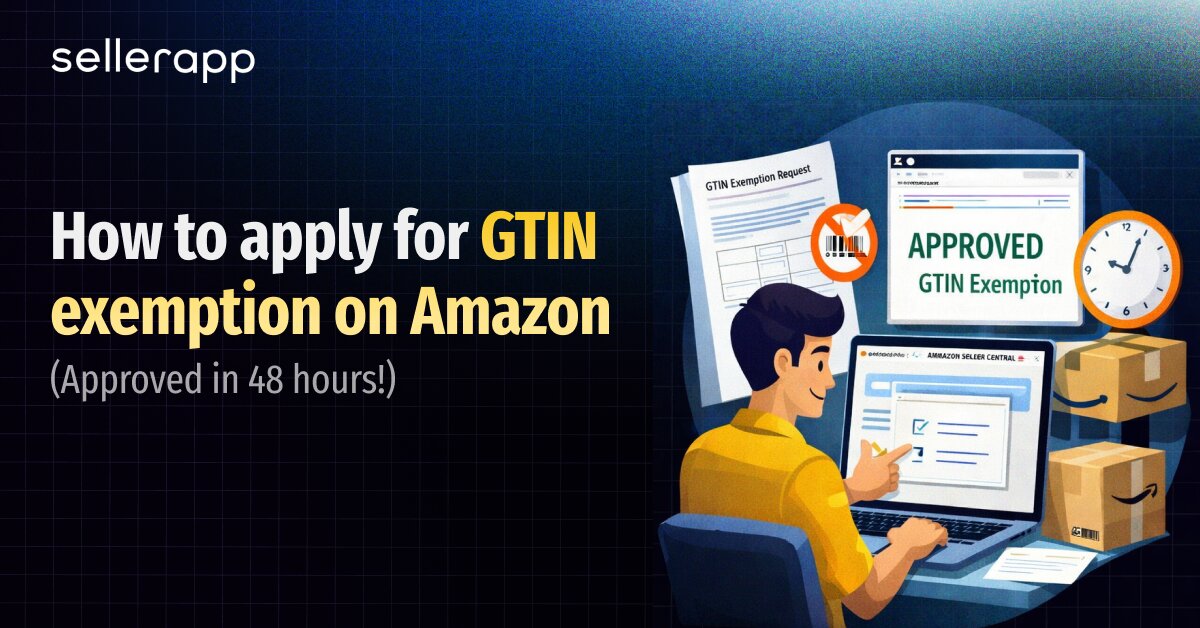
The GTIN exemption on Amazon lets you list products without buying expensive UPC barcodes, but most sellers don’t know it exists. Let’s take a step back and assume that you’ve done everything right for your brand.
Your private label product samples arrived last week, and they’re better than you imagined. The photos came back from your photographer looking crisp and professional. Your supplier invoice is paid in full. You’ve even settled on the perfect product title after three days of keyword research. Brilliant stuff, and you’re excited.
Now, you log into Seller Central, ready to finally launch this thing. Click “Add a Product.” Start filling out the listing form. Everything’s going smoothly until you hit that one field:
“GTIN required.”
You stare at it. What the hell is a GTIN? You Google it. Oh, it’s a UPC barcode. Fine, how much can that cost? You click over to GS1.org. $250 for a pack of barcodes. Plus a $50 annual renewal fee. But did you know that you don’t always need to buy those barcodes?
GTIN exemption on Amazon lets you list products without spending a dime on UPCs. It’s an official Amazon program designed specifically for sellers, especially private-label brands, handmade creators, people building custom bundles, and anyone selling products without manufacturer barcodes.
This article will help you understand what a GTIN exemption on Amazon is and if it truly fits your business.
Quick Guide:
Before we jump straight into exemptions, did you know that a GTIN (Global Trade Item Number) is the barcode number that identifies your product globally?
UPCs in the US and EAN codes in Europe are the same thing. Amazon uses GTINs to organize its massive catalog, prevent duplicate listings, and track inventory across millions of products.
So without it, Amazon’s system basically says, “I don’t know what this product is, so you can’t sell it.”
That’s where the GTIN exemption on Amazon comes in.
It’s an approval that lets you create listings using only your brand name and product category, so you don’t need a barcode.
Amazon built this specifically for sellers who’d otherwise be locked out, such as private-label brands launching new products, handmade artisans, people bundling multiple items, and anyone selling products without manufacturer barcodes.
Think of it as Amazon saying, “Okay, we trust you’re not trying to game the system. You can list without a GTIN, but you need to prove your product qualifies.”
But this is only a short-term strategy. If you’re building a real brand that’ll expand beyond Amazon, Walmart, your own Shopify store, and retail distribution, you’ll eventually need GS1 barcodes anyway. GTIN exemption only works on Amazon. The moment you try listing on another marketplace, you’re back to square one.
But for testing a product concept, launching handmade items in small batches, or getting to market fast without dropping $250 upfront, a GTIN exemption on Amazon is exactly what you need.
The question here is whether your product actually qualifies, because Amazon rejects plenty of applications from sellers who think they’re eligible but aren’t even close.
Amazon approves GTIN exemptions for sellers who can’t obtain manufacturer barcodes, such as private label sellers like Peak Performance Nutrition.
1. The private label seller
These sellers create products under their own brand (your supplements, phone cases, whatever, as long as it’s your brand and has no existing GS1 barcode).
2. Handmade creators
Then come the handmade creators making jewelry, pottery, or artisanal goods in small batches.
3. Parts and Accessories sellers
They are offering automotive components or mobile accessories that never came in retail packaging.
4. Bundle builders
These sellers are creating custom gift sets from multiple products. and sellers of truly generic/unbranded products (though listing as “Generic” shows “By Generic” under your title, which kills any brand-building effort).
The common thread here is you own the brand, or the product genuinely doesn’t have a manufacturer barcode, or you’re combining items into something new.
Here is which sellers get rejected for the GTIN exemption on Amazon
Anyone reselling established brands (Nike, Apple, Samsung) must use the manufacturer’s barcode, period.
Products from brands on Amazon’s GTIN-required list (major brands that already provide GS1 barcodes) and products already in Amazon’s catalog with existing GTINs (you can’t create a duplicate listing to dodge using the barcode; add your offer to the existing ASIN instead).
If you don’t own the brand or you’re trying to bypass an existing barcode system, Amazon will reject you every time. Exemption is for new products that genuinely lack barcodes, not a workaround for sellers who don’t want to spend money.
If you have been with us so far, then you must be thinking, “How do I request a GTIN exemption from Amazon?” Here is a clear breakdown of that.
Before you think about how to apply for a GTIN exemption on Amazon, you need to be aware that most rejections happen because sellers rush the application without proper prep.
Amazon’s requirements seem simple until you realize how picky they are about execution. If there is one digital mockup instead of a real photo and one capitalization error in your brand name, you’re back to square one, waiting another 48 hours for a rejection email.
This is something you need to absolutely know. Amazon rejects digital mockups instantly. It doesn’t matter how professional your 3D renders look or how realistic that Photoshop mockup is. If it’s not a physical product photographed with an actual camera, there are high chances that you’re getting rejected.
To avoid this, you can order your sample, take real photos, and save yourself the hassle.
Here is what you can do. Take 2-9 images showing all sides of your product and packaging. Amazon wants to see that what they’re approving actually exists. Front, back, sides, top, and bottom, if relevant, plus packaging shots.
You don’t need photos of every color or size variant. If you’re selling yoga mats in blue, black, purple, pink, and gray, a single set of photos will suffice for the exemption application.
Once approved, you’ll create variation listings where customers can select their color, but for the exemption itself, Amazon just needs to see one example that proves your product is real and matches your brand.
The critical rule here is no GS1-issued barcodes are visible anywhere. If Amazon sees a UPC or EAN on your product or packaging in the photos, Amazon will instantly reject it. The whole point of the exemption is that your product doesn’t have these barcodes. If one’s visible in your photos, Amazon assumes you’re trying to game the system or don’t actually qualify. So either cover it, crop it out, or reshoot without it.
The brand name in your exemption request must match exactly what’s on your product and exactly what you’ll enter in the listing form later. Not “close enough.” Not “basically the same.” Character-for-character identical.
Amazon’s system is case-sensitive. “MyBrand” ≠ “mybrand” ≠ “My Brand.” The spelling matters the most here. The wrong punctuation can lead to rejection. If your product says “Smith & Co.” but you type “Smith and Co.” in the application, Amazon will reject your request. If your packaging shows “FITPRO” but you enter “FitPro” in the form, it is rejected.
Check your product packaging right now. Write down the brand name exactly as it appears. Check capitals, lowercase, spaces, ampersands, periods, everything. That’s what goes in your application. If possible, you can copy and paste to avoid typos.
Here’s where sellers screw up without realizing it. Your brand must already exist in Amazon’s system before you apply for the GTIN exemption on Amazon. If it’s a brand you created for this private-label product and Amazon’s never heard of it, your exemption application will fail.
Submit a brand approval request first. Go to Amazon Seller Central, search for “Add a new brand,” and get your brand name added to Amazon’s database.
This usually happens automatically when you create your first listing if you have Brand Registry, but if you’re doing an exemption application, you need the brand approved before the exemption application.
Ideally, your brand should be registered in the Amazon Brand Registry, as it provides trademark protection, gives you access to A+ content, and makes the process smoother.
But if you’re not eligible for Amazon Brand Registry yet, you can get an exception by contacting Selling Partner Support and mentioning error code 5665. Amazon will manually add your brand to the system so you can proceed with the exemption application.
You can request a GTIN exemption in two ways on Amazon. The new methods let you do it while creating your listing. The traditional method is to submit a separate application first, then create the listing after approval.
Here are the two methods:
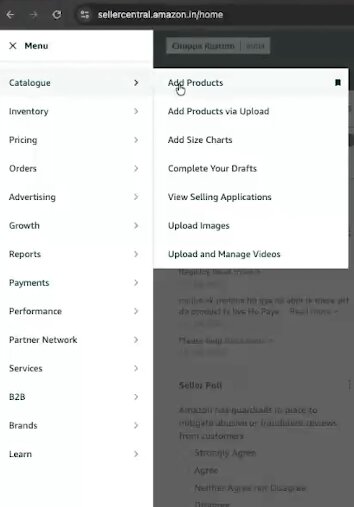
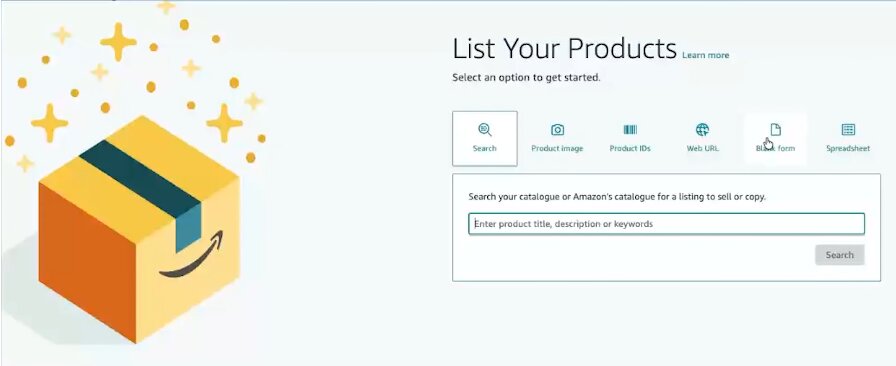
5. Select your product category
6. When you hit the Product ID field, check “I don’t have a Product ID.”
7. Amazon prompts you to request an exemption, upload photos, and submit
This method is faster if you’re ready to list immediately. Once approved, you continue filling out the same listing form without starting over.
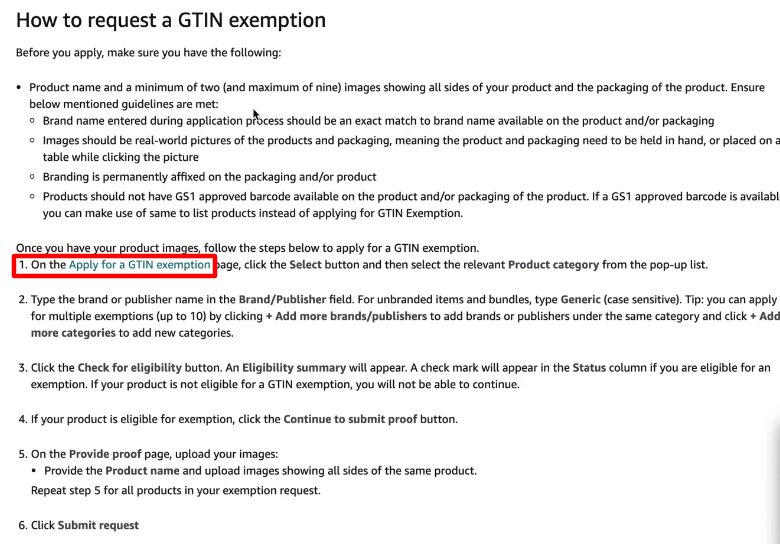
3. Select your product category from the dropdown.
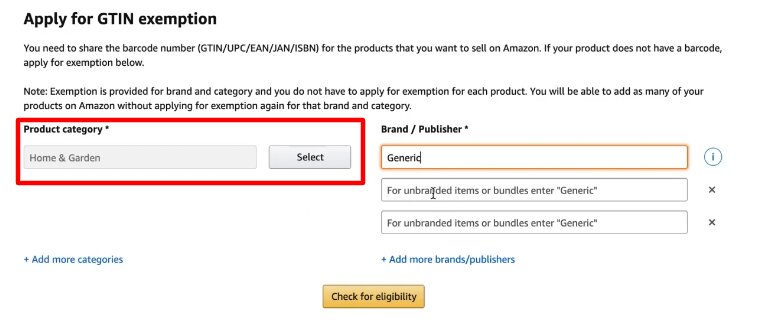
4. Enter your brand/publisher name exactly as it appears on product (or “Generic” for unbranded)
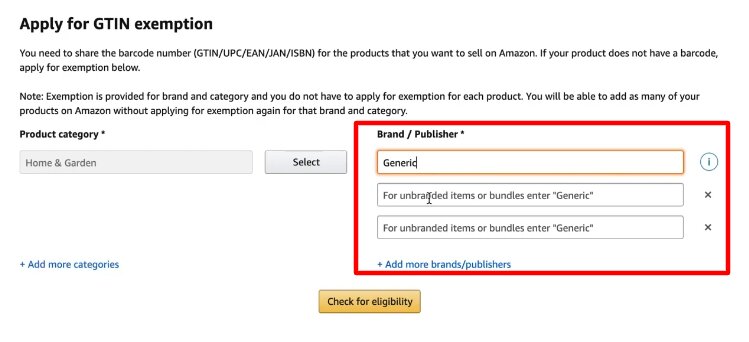
5. Click “+ Add more brands/publishers” if applying for multiple (up to 10 at once)
6. Click “Check for eligibility.”
7. Upload 2-9 product photos (real photos, no mockups, no visible barcodes)
8. Click “Submit request.”
This method works better if you’re applying for multiple brands at once or want approval confirmed before investing time in listing details.
After you submit your GTIN exemption on Amazon by following the process we mentioned before, Amazon will review it within 48-72 hours, while some applications get approved in just a few hours. You’ll receive an email with approval or rejection.
If approved, wait 30 minutes before creating your listing. Amazon’s system needs time to register the exemption across all databases. If you try listing immediately, you might still see “GTIN required” errors.
After 30 minutes, create your listing normally. Enter your brand name exactly as it appears in the approval email, select the same category, and the system will recognize your exemption; no product ID is required.
GTIN exemption on Amazon isn’t as complicated as it seems. Simply put, you qualify if you own the brand or sell genuinely unbranded products. You don’t qualify if you’re reselling someone else’s stuff. The application takes 10 minutes if you have real product photos and your brand name spelled correctly. Amazon approves within 48 hours.
Most sellers waste weeks researching this, while their inventory sits in a warehouse, costing them money. If you’re testing a product and need to launch cheaply, use an exemption. If you’re building a real brand or planning to sell anywhere beyond Amazon, spend the $30 on a GS1 barcode. If you’re not sure, start with the exemption and upgrade later when sales prove the product works.
The worst decision is no decision. As mentioned previously, take 2-9 photos of your actual product, ensure your brand is approved in Amazon’s system, submit your exemption application using the exact brand name on your product, wait 48 hours, and create your listing. Or you can go to GS1.org, spend $30, and have a barcode in your email within an hour that works everywhere forever.
Either way, the longer you wait to perfect your understanding of GTIN exemption on Amazon, the longer your competitors are building momentum. Apply today. Launch tomorrow. Optimize while you sell.