Amazon FBA Calculator

See the real profit behind any Amazon ASIN, yours or a competitor’s

Find out whether Fulfillment by Amazon (FBA) or Fulfillment by Merchant (FBM) is more profitable for you with SellerApp’s Amazon profit calculator.

Check your product

Marketplace
Enter your ASIN to see an estimated FBA vs. FBM comparison.
Free, no signup neededFBA and FBM compared side by side18 Amazon marketplaces

Sample result

Insulated steel water bottle, 32 oz

Sample product
FBA net profit per unitHigher profit
$10.3941.6% margin
FBM net profit per unit
$9.4437.8% margin
Marketplace
Amazon US (amazon.com)
Selling price
$24.99

Sample product, not your results.

See the full breakdown

FBA earns $0.95 more per unit in this example, or $285 at 300 units per month.

Assumes $5.20 product cost, $5.50 FBM shipping to buyer, $1.00 packing and labour, and 300 units a month.

Calculate Amazon FBA feesEvery Amazon selling fee for any product.

Compare fulfilment modesFBA and FBM side by side.

Analyze product profitabilityKnow your margin before you commit.

Sample result

FBA vs FBM profit

The verdict
FBA earns you $0.95 more per unit

That is $285 a month at 300 units.

$7,497
$7,497
$4,380
$4,665
$3,117
$2,832
RevenueCostNet profit
FBAFBMMonthly, at 300 units
Fulfillment by Amazon (FBA)Higher profit
Shipping chargeIncluded
Sales price$24.99

Cost per unit

$14.60

Net profit

$10.39

Net margin

41.6%

Fulfillment by Merchant (FBM)
Sales price$24.99

Cost per unit

$15.55

Net profit

$9.44

Net margin

37.8%

Free profit report

Get the full report for your own product

Enter your ASIN above. We build the report from your own product and costs: lowest price, most you can spend on ads, and a year of profit.

Check your productFree. Built from your product, not the sample.
Free profit report

What your numbers mean for your product

Profit per unit is only the start. Your free report shows the lowest price you can sell at, how much you can spend on ads, and what you’ll earn over 12 months.

Get the full report for your product

The report is built from your own product and costs, not the sample. Enter your ASIN and add your costs above, and it will be ready here.

Check your product
Breakeven price
—
Highest ACoS you can afford
—
12-month net profit
—
Peak-season storage
—
Free tools

Check more about this product

Your profit depends on demand, ad costs and how well the listing converts. These free tools pick up where the calculator stops.

See all 10 free tools
Amazon Sales Estimator

How many units will it sell?

Check real monthly demand for any ASIN before you order stock.

Uses your ASINEstimate sales
Amazon ACoS Calculator

Find your breakeven ACoS

Set PPC targets that keep every ad-driven sale profitable.

Uses your calculationPlan my ad targets
Listing Quality Checker

Is the listing ready to convert?

If your Amazon listing isn’t getting good conversions, this free listing analysis might have the answers.

Uses your ASINCheck listing quality
SellerApp Chrome extension, free

FBA vs FBM profit on every Amazon page

Stop copying numbers into calculators. Open any product on Amazon and the extension shows profit, fees and estimated sales right on the page.

  • Instant profit check. FBA and FBM profit for the product you’re viewing.
  • Sales and demand. Estimated monthly sales and best-seller rank.
  • Every marketplace. Works on Amazon sites across the globe.
Add to Chrome, it’s free
FBA Calculator for Amazon logoFBA Calculator for Amazonby SellerApp on the Chrome Web Store3.5 out of 5
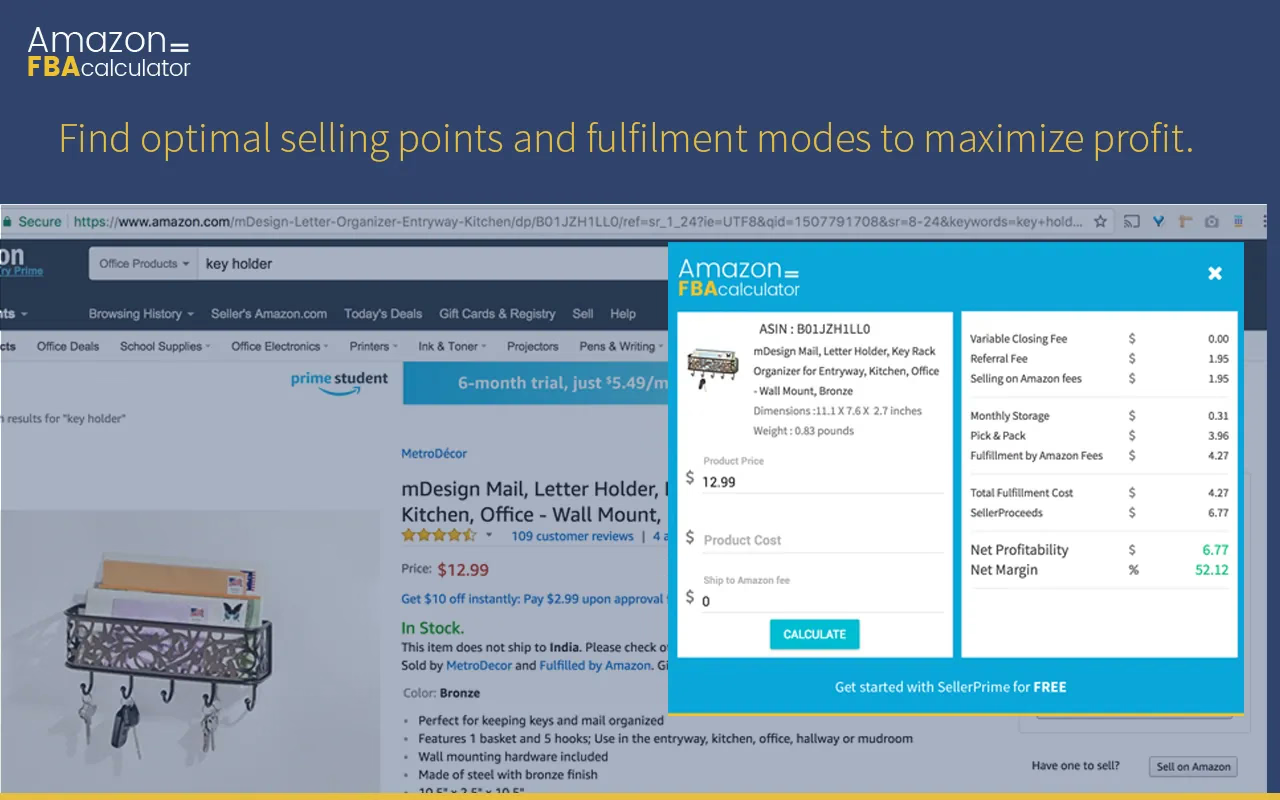
The FBA Calculator for Amazon Chrome extension open on an Amazon product page, showing the product’s ASIN, price, FBA fees, net profit and net margin
The extension opens on any Amazon product page with fees, profit and margin.
Quick guide

How to use the Amazon FBA calculator

SellerApp’s FBA profit calculator works like Amazon’s FBA revenue calculator, but focuses on profitability.

  1. Enter item details

    Enter the product’s ASIN into the calculator. The ASIN is the 10-character ID Amazon gives every product.

    SellerApp tip: add your category and product cost for the most accurate profit.

  2. Review profit estimates

    See net profit and margin for FBA and FBM, so you can judge whether the product is worth selling through FBA.

    SellerApp tip: unlock the full report to see every fee behind the numbers.

  3. Adjust the variables

    Try different prices and cost estimates to see how they change your profit. Useful for planning pricing and marketing.

    SellerApp tip: the Chrome extension runs this check on any Amazon product page.

The basics

What is an Amazon FBA calculator?

Understanding your costs and potential returns is crucial for Amazon FBA success.

The SellerApp FBA calculator helps Amazon sellers estimate profitability by analysing initial investment, FBA fees, sales projections and other variables such as marketing. It gives you monthly sales volumes, total profit and sales trends, for both pre-launch evaluation and ongoing cost management.

That means better-informed decisions, smoother operations, and a profitable, competitive business.

Costs to account for when selling on Amazon

  • Landed costYour true cost per unit once stock reaches Amazon: COGS, freight charges, customs duties and prep combined.
  • Cost of goods sold (COGS)What you pay your supplier per unit
  • Freight chargesSea, air or courier shipping to the FBA warehouse
  • Customs duties and import taxesCharged when stock clears customs
  • Prep and labeling (FNSKU)Bagging, bundling and barcode labels
  • Referral and closing feesAmazon’s commission on each sale
  • FBA fulfillment feePick, pack and ship, per unit
  • Monthly storage feesHigher from October to December
  • PPC ad spendSponsored Products and other Amazon ads
FBA or FBM

Should I choose FBA or FBM?

Your fulfillment method shapes your margins and growth. Here’s how FBA and FBM compare.

Fulfillment by Amazon (FBA)

Convenience and reach

Advantages

  • Fast shipping and customer service through Amazon’s logistics network
  • Prime eligibility and an edge for the Buy Box
  • More time to strengthen other areas of your business

Watch out for

  • Inventory limits tied to a performance score, so scaling can be slower
  • Fulfilment, handling and storage fees that eat into margins if not calculated

Best for: Smaller, high-demand products where fast sales velocity pays off.

Fulfillment by Merchant (FBM)

Control and flexibility

Advantages

  • Full control over storage, packaging and shipping
  • Suits oversized or heavy items that carry steep FBA fees
  • A direct relationship with your customers

Watch out for

  • FBA offers often have the edge, so you may need lower prices to win the Buy Box
  • You handle storage, packing, shipping and customer service yourself

Best for: Niche, oversized or heavy items, or sellers with their own fulfilment strengths.

Global coverage

Supported Amazon marketplaces

SellerApp’s free Amazon FBA calculator supports 18 marketplaces. Choose yours from the drop-down in the calculator.

Frequently asked

Amazon FBA calculator FAQs

How do I calculate Amazon FBA fees?

Add the referral fee (a category percentage of the sale price), any closing fee, the FBA fulfilment fee for your product’s size and weight, and storage. Enter your ASIN above and the calculator does this for you.

Does this calculator work outside the US?

Yes. Pick any of 18 supported Amazon marketplaces. Prices and units switch to that marketplace, and VAT or GST is removed before profit is calculated.

What is the difference between FBA and FBM?

With FBA, Amazon stores, packs and ships your orders for a fee. With FBM, you store and ship orders yourself and pay Amazon only its selling fees.

Is FBM cheaper than FBA?

It depends on size, weight and your own shipping costs. The comparison above shows which earns more for your product.

What does the SellerApp Chrome extension do?

It shows FBA and FBM profit, fees and estimated sales on any Amazon product page, so you can check a product without leaving Amazon.

Is the FBA calculator free?

Yes. The comparison is free with no signup. Add your email to unlock the full report and get it as a PDF.

All pages